[Bug Report] UI items in Hardware Config / Register Control are truncated -- text not readable
This is happening on SigmaStudio 4.7 B 0 Rev 1831, but was also present on previous versions. Operating System is Windows11 23H2, but this bug was also present on other versions of Windows.
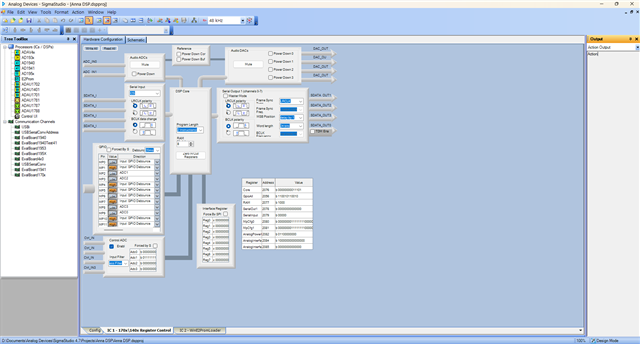
The UI Items in the Register Controls for a DSP chip under the Hardware Config section are finding themselves truncated and hard to read. It is currently impossible for me to read a large section of the Register Control window due to the truncated text.
Unfortunately, SigmaStudio does not seem to be scaling properly. I have tried opening SigmaStudio with the Visual Studio 2022 debugger attached, but found no debuggable targets. That is despite the fact that it's a .NET app and uses .NET GUI builder default icons in some places, hinting to at least some level of .NET usage.
With SigmaStudio not being OpenSource and SigmaStudio+ not supporting ADAU1401/1701 chips, I can't provide a possible fix or workaround for this issue.
I can't provide much further information from my side, from the looks of it.
Main (group) window:
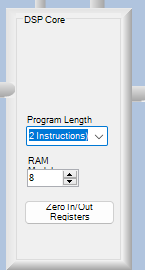
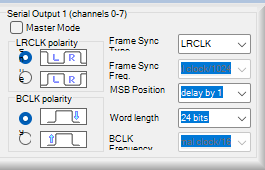
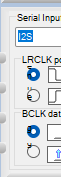
Close-up of issue type (not the only place it happens):
Suggestions:
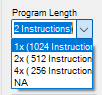
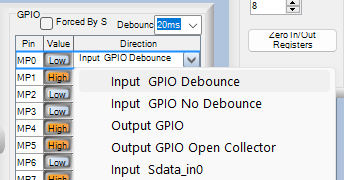
1. A drop-down menu like with the GPIO pins would enhance the drop down menus that are being clipped to the width of the parent level box:
2. DSP Core RAM xxxxxx (not readable) should not be clipped to an arbitrary width (the width of the DSP Core box would be more appropriate)
3. A minimum width for the Register Control window could be combined with scaling to fit the entire width/height of the available space. Scroll horizontally/vertically like the Schematic view if the available space is smaller than the minimum width/height. The Register Control window already scrolls vertically when the Capture Output widget is loaded, so I can't see a reason for it to not be possible in the width too.
4. If no other solutions are possible, consider at least adding hover-to-expand tooltips, so users wanting to know the full text can hover over it to receive a tooltip that expands to the full text.
Edit Notes
Add extra tip
[edited by: HumbleDeer at 7:03 PM (GMT -5) on 19 Jan 2024]
Audio Signal Processors
bug_report
Audio Products
software
sigmastudio
SigmaDSP Audio Processors
SigmaStudio 4.7 Build 0 Revision 1831
adau1701
Show More

Hello HumbleDeer,
This has been an ongoing issue for a while and was part of the decision to make wholesale changes with SigmaStudio+ as to how we handle graphics. I am not one of the programmers so I cannot speak to all the details you brought up but on my screen I do not have as many issues as you are seeing. Which leads me to believe it is a setting in Windows or it might be sue to the version of Windows. We are still using Windows 10 Pro in the company and have not moved over to Windows 11. Here is a screenshot of my screen:
I highlighted some of the differences between my screen and yours. This may come down to screen resolution and system font size settings? Even with my settings some things are still not right and have been that way for as long as I can remember. I recall many years ago having a conversation with one of the programmers who said there was not much that could be done. Your suggestion about the pull-down box is a really good one. I will pass your post on to the programming team.
I do have a somewhat unrelated question for you. How did you get the USBi to work using Windows 11? Are you using an ARM core machine or an X86 based machine? The reason why I am asking is that some users, including me, need to run SigmaStudio on an M1/M2 MAC using Parallels and Windows 11. The USB drivers for the USBi do not work and so far I have not found a work-around.
Dave T

Please log in to reply.