How to increase Delay time?
Hello Forum Users,
Delay time is often at a premium and being able to use it more efficiently is a good thing.
The question is how do I more efficiently use delay memory? The memory is 32 bits but 32bits is often not needed so can I use a smaller bit depth and pack in more channels of audio into the same amount of delay memory?
Dave T
Audio Signal Processors
adau1452
24bit
Audio Products
software
SigmaStudio Rev 4.7
delay time
SigmaDSP Audio Processors
delay
16b
Show More
Hello Forum users,
I have developed two programs to show how to pack in more channels of audio into the delay blocks to squeeze out more delay time from the available memory.
I will attach two programs. One uses the built in blocks in the library to pack and unpack 16 bit audio from the 32 bit word size in the core. The delay cells stores the entire 32 bit word into memory and since we often do not need that large of a dynamic range it would be great to be able to recapture these unused bits. So the 16 bit program will pack two channels of 16bit audio into one 32 bit word. That 32 bit word gets placed into the delay line and when it comes out the data is split out into two 16 bit words and converted back to the core 32 bit representation for further processing of the audio. The 96dB of 16bit audio is certainly good enough for many echo or reverb like effects. Care must be taken to not go above a 1.24 number in the core. Anything above this level will clip and the bottom nine bits will be truncated. Only the 1.15 of the 1.24 bits will be used.
The second program is a little more involved and also has some hierarchy blocks that might be handy for other programs. Remember that those blocks can be exported and imported into another project or just cut-and-pasted in.
This program will take the 1.24 number and truncate it to a 1.23 number. Just the LSB will be truncated but since the serial port inputs do not use the LSB there is not much lost here. Anything over the level of a 1.24 level in the core will be clipped.
Then the 1.23 number is shifted to the left by seven to become an 8.16 number in the core. This means the three upper bytes of the core's four bytes will hold the 24 bit value. At that point it is a left justified 1.23 number, just do not use it for mathematical operations. This makes the bottom byte available for use. Since a 24 bit number is three bytes, we need to setup three channels of delay. The first three channels will be the 24 bit value shifted to the left but the fourth channel will be divided up and stored in with the other three channels, one byte per channel.
In the end you pack four channels of delay into three channels worth of delay memory. You squeeze out a little more time but you are using 24 bit data! You can certainly take the output of one channel and send it back into another channel to chain together the channels to make a much longer delay. This example project is not using pre-made cells for packing. It is SigmaStudio version of bit-banging. I documented what is being done in the project. Let me know in the comments if you find this useful.
Here are the projects.
Enjoy!
Dave T
ADAU1452 Delay 16 bit words packed .dspproj
ADAU1452 Delay 24 bit words packed.dspproj
Hi Dave,
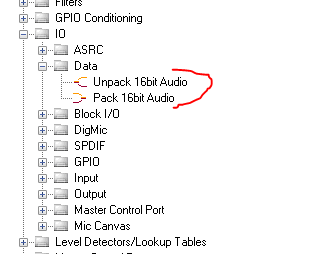
Excellent idea! Before you published your answer, I tried to do it with bit masks and shifts. Where in the Toolbox are the Pack and Unpack blocks?
Another method works by trading bandwidth for delay. Described in this thread, it runs on any DSP, even the -1701. In fact, it's the only way I know of to get a decent reverb out of the Sigma100 chips. We can get away with low BW for reverb, because the real thing is often rather muffled anyway.
Best regards,
Bob
Hello Bob,
Yes, we hide the location of these blocks. I would not want anyone to find them! LOL
Here is where they are located:
As I said in my post, we only have a block for the 16 bit packing and unpacking. The 24 bit one I bit-banged.
Dave T
Please log in to reply.