ADAU1761 Sound Output Issue Inquiry
When booting the Linux kernel, the operation of the ADAU1761 chip was confirmed with an oscilloscope. Checked items: i2s dout/din, i2c bclk/lrclk.
When implemented in bare metal, the sound comes out normally, but when trying to play audio using ALSA in Linux, there is no sound output.
Items checked:
i2s clk and dout signal output when running aplay
No output of MONOOUT / LHP, RHP signals
Issue 2 seems to be the problem, but I'm not sure why it's not coming out.
I am using the adau1761.c / adau17x1.c codec, what could be the problem?
When applying dapm, it was confirmed that everything is applied in ADAU1761_OUTPUT_MODE_HEADPHONE mode.
What should I review?
Edit Notes
The circuit configuration for the output from the codec is similar to that of the EVAL-ADAU1761.
[edited by: MOONG at 5:31 AM (GMT -5) on 8 Mar 2024]
Audio Signal Processors
Audio Products
hardware
adau1761 not work
SigmaDSP Audio Processors
adau1761
Show More
Hello MOOG,
I went into SigmaStudio and pulled out an ADAU1761 but you could pull out a 1361 as well. Then I dropped in the USBi interface and connected it.
I setup the communications protocol to be SPI so I would not have to have hardware to do this.
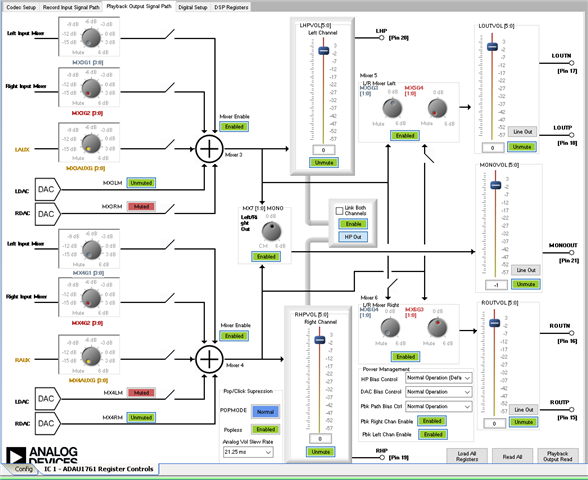
Then I set up the playback path with all the outputs on like this:
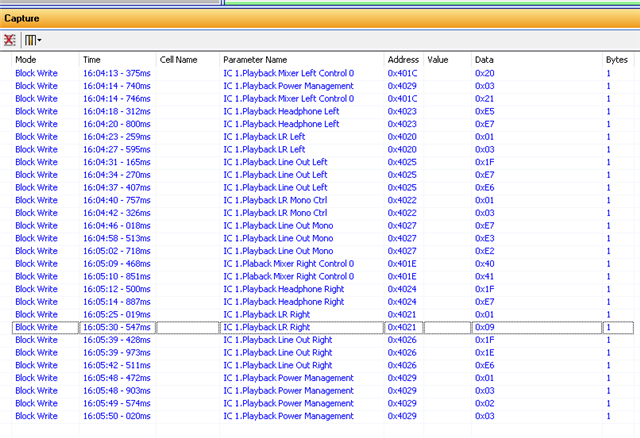
Then I clicked on all the controls to set them into the correct mode and I pulled up the Capture window and selected all the lines. You cannot do CTRL-A you have to click on the first one and then shift-click on the last one.
It looked like this:
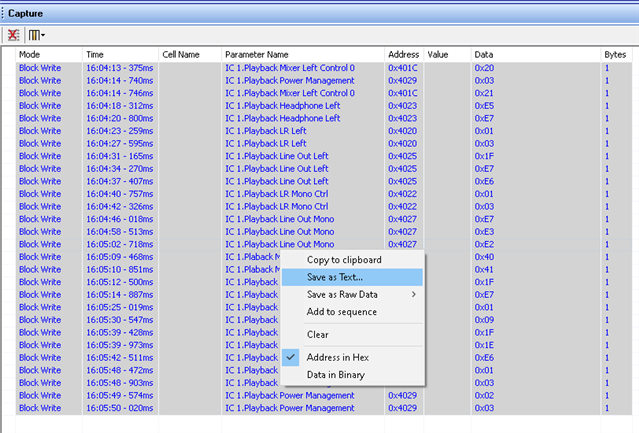
Then I hovered the mouse over the selected area and right clicked and selected "save as Text"
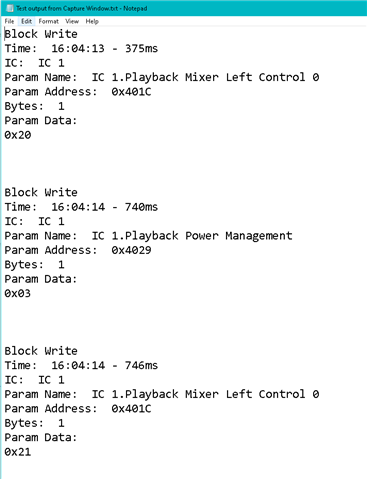
This is what the start of the file looks like:
This is the file I ended up with:
Fullscreen
Test output from Capture Window.txt
Download
Block Write
Time: 16:04:13 - 375ms
IC: IC 1
Param Name: IC 1.Playback Mixer Left Control 0
Param Address: 0x401C
Bytes: 1
Param Data:
0x20
Block Write
Time: 16:04:14 - 740ms
IC: IC 1
Param Name: IC 1.Playback Power Management
Param Address: 0x4029
Bytes: 1
Param Data:
0x03
Block Write
Time: 16:04:14 - 746ms
IC: IC 1
Param Name: IC 1.Playback Mixer Left Control 0
Param Address: 0x401C
Bytes: 1
Param Data:
0x21
Block Write
Time: 16:04:18 - 312ms
IC: IC 1
Param Name: IC 1.Playback Headphone Left
Param Address: 0x4023
Bytes: 1
Param Data:
0xE5
Block Write
Time: 16:04:20 - 800ms
IC: IC 1
Param Name: IC 1.Playback Headphone Left
Param Address: 0x4023
Bytes: 1
Param Data:
0xE7
Block Write
Time: 16:04:23 - 259ms
IC: IC 1
Param Name: IC 1.Playback LR Left
Param Address: 0x4020
Bytes: 1
Param Data:
0x01
Block Write
Time: 16:04:27 - 595ms
IC: IC 1
Param Name: IC 1.Playback LR Left
Param Address: 0x4020
Bytes: 1
Param Data:
0x03
Block Write
Time: 16:04:31 - 165ms
IC: IC 1
Param Name: IC 1.Playback Line Out Left
Param Address: 0x4025
Bytes: 1
Param Data:
0x1F
Block Write
Time: 16:04:34 - 270ms
IC: IC 1
Param Name: IC 1.Playback Line Out Left
Param Address: 0x4025
Bytes: 1
Param Data:
0xE7
Block Write
Time: 16:04:37 - 407ms
IC: IC 1
Param Name: IC 1.Playback Line Out Left
Param Address: 0x4025
Bytes: 1
Param Data:
0xE6
Block Write
Time: 16:04:40 - 757ms
IC: IC 1
Param Name: IC 1.Playback LR Mono Ctrl
Param Address: 0x4022
Bytes: 1
Param Data:
0x01
Block Write
Time: 16:04:42 - 326ms
IC: IC 1
Param Name: IC 1.Playback LR Mono Ctrl
Param Address: 0x4022
Bytes: 1
Param Data:
0x03
Block Write
Time: 16:04:46 - 018ms
IC: IC 1
Param Name: IC 1.Playback Line Out Mono
Param Address: 0x4027
Bytes: 1
Param Data:
0xE7
Block Write
Time: 16:04:58 - 513ms
IC: IC 1
Param Name: IC 1.Playback Line Out Mono
Param Address: 0x4027
Bytes: 1
Param Data:
0xE3
Block Write
Time: 16:05:02 - 718ms
IC: IC 1
Param Name: IC 1.Playback Line Out Mono
Param Address: 0x4027
Bytes: 1
Param Data:
0xE2
Block Write
Time: 16:05:09 - 468ms
IC: IC 1
Param Name: IC 1.Plaback Mixer Right Control 0
Param Address: 0x401E
Bytes: 1
Param Data:
0x40
Block Write
Time: 16:05:10 - 851ms
IC: IC 1
Param Name: IC 1.Plaback Mixer Right Control 0
Param Address: 0x401E
Bytes: 1
Param Data:
0x41
Block Write
Time: 16:05:12 - 500ms
IC: IC 1
Param Name: IC 1.Playback Headphone Right
Param Address: 0x4024
Bytes: 1
Param Data:
0x1F
Block Write
Time: 16:05:14 - 887ms
IC: IC 1
Param Name: IC 1.Playback Headphone Right
Param Address: 0x4024
Bytes: 1
Param Data:
0xE7
Block Write
Time: 16:05:25 - 019ms
IC: IC 1
Param Name: IC 1.Playback LR Right
Param Address: 0x4021
Bytes: 1
Param Data:
0x01
Block Write
Time: 16:05:30 - 547ms
IC: IC 1
Param Name: IC 1.Playback LR Right
Param Address: 0x4021
Bytes: 1
Param Data:
0x09
Block Write
Time: 16:05:39 - 428ms
IC: IC 1
Param Name: IC 1.Playback Line Out Right
Param Address: 0x4026
Bytes: 1
Param Data:
0x1F
Block Write
Time: 16:05:39 - 973ms
IC: IC 1
Param Name: IC 1.Playback Line Out Right
Param Address: 0x4026
Bytes: 1
Param Data:
0x1E
Block Write
Time: 16:05:42 - 511ms
IC: IC 1
Param Name: IC 1.Playback Line Out Right
Param Address: 0x4026
Bytes: 1
Param Data:
0xE6
Block Write
Time: 16:05:50 - 020ms
IC: IC 1
Param Name: IC 1.Playback Power Management
Param Address: 0x4029
Bytes: 1
Param Data:
0x03
So go through this file and then go through your code to see if you are enabling all the correct signal paths. You have to look at the defines and figure out which registers they are for. The define names should be similar to the control name so that would help.
Then make sure you are sending the correct register writes.
Dave T
Hello Dave,
I came across a piece of information stating that uploading a bin file to Linux only includes DSP information, and I only recently understood this. I've confirmed that it uploads correctly, but there's something I'm really curious about, and solving this seems like it would be the final step.
DAC ON/OFF
-> I used alsamixer to set options like Mixer 3/4 Enable or Mixer7 Enable, but the most critical part, unmuting the DAC, doesn't seem to work as MX3LM and MX4RM don't change to Unmute. Can you provide any guidance on this?
If I need to modify the code, which part should I look at? I'm really at a loss here.
The photo below shows the current codec state read by the Sigmastudio tool Playback Output read aftersetting it up with alsamixer.
Thank you !
Hello Moong,
I am also at a loss. I am not a Linux expert and have no platform here to do any Linux work. You had posted a couple of times in the Linuz space and the manager of that space simply moved it over to the Audio space or SigmaDSP space. I support the SigmaDSP and audio codec products so that is not exactly wrong but your issues is falling into the cracks between these two worlds.
Your approach of using the alsamixer options is what I was talking about from the start. To use sigmaStudio to develop what the registers need to be and then looking at the defines in the Linux driver to see which defines control those registers. I would look at all the defines and look at the register addresses you need to change. Somewhere there will be a place where the register address is defined. Many of the registers will have several bit fields so those will be defined with similar names. Then somewhere in the code all the bit fields will be "OR"'d together and written to the register using the name in the defines.
That is what you need to look for. You are doing well so far by finding the mixers. Make sure the volume controls are up. Regarding the mutes, do what I suggest and search the header files for the hex or the decimal address of the register. It could be listed as hex but it also could be listed as decimal.
Dave T
I tried to respond to your PM but your settings do not allow me to respond. So send me a friend request.
Please log in to reply.