Much noise when connecting an I2C programmer to a ADAU1701 board .... what would be a general reason?
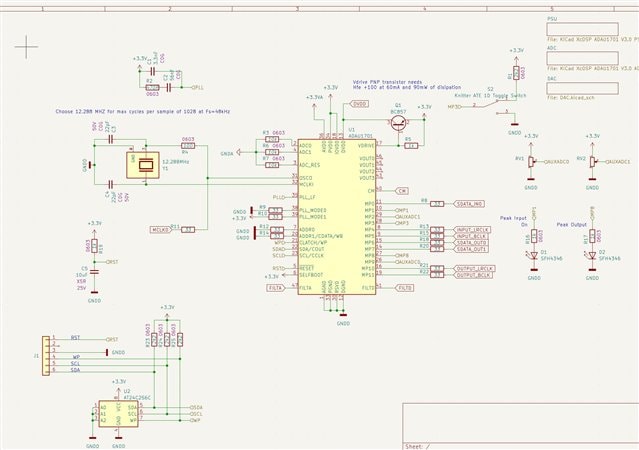
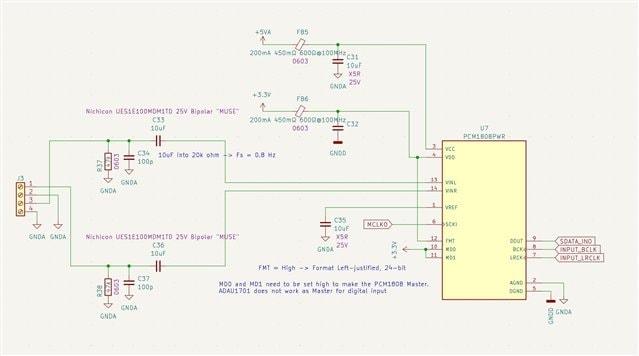
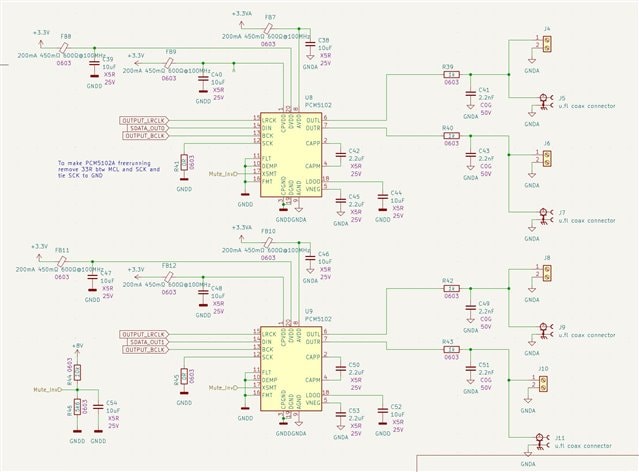
I have just made a new PCB with a ADAU1701, PCM1808 and 2 x PCM5102A
I'm using Wondom ICP5 I2C programmer connected to RST, WP, SCL SDA and GND.
When I connect the programmer to the board, I get quite a lot of noise on the analog outputs.
I have had a bit of that on previous implementations but not as much, and therefore not really as degrading as now.
I'm running the PCM1808 in master mode (no MCLK connection to ADAU1701.
Also the PCM5102As are running in free running mode (SCK tied to GND)
The last is different from before, where I clocked the PCM5102As by the ADAU1701 MCLK.
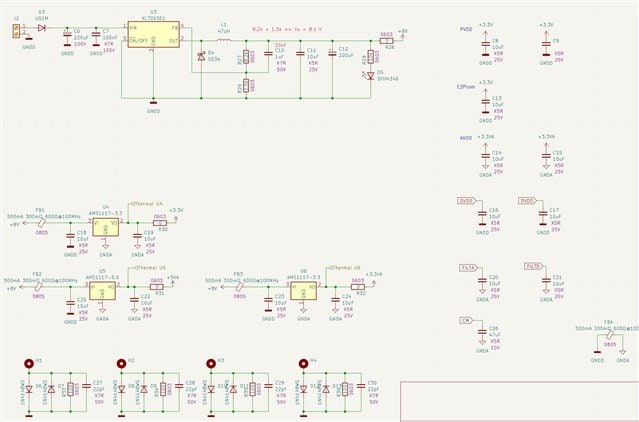
Have separate PSUs for 3V3 digital, 3V3 Analog and 5V analog (All AMS1117)
What would be the normal reason for this noise??
Thanks in advance, Mads
Thread Notes
Harishgowtham - Moved from Processors and DSP to SigmaDSP Processors & SigmaStudio Dev. Tool. Post date updated from Sunday, April 7, 2024 10:56 AM UTC to Thursday, April 11, 2024 5:00 AM UTC to reflect the move.
Harishgowtham - Moved from Processors and DSP to SigmaDSP Processors & SigmaStudio Dev. Tool. Post date updated from Thursday, April 11, 2024 5:00 AM UTC to Thursday, April 11, 2024 5:00 AM UTC to reflect the move.
Audio Signal Processors
hardware
I2C Programming
noise
SigmaDSP Audio Processors
adau1701
Show More
Hello MadaM,
Sorry I missed your post somehow? I just saw this now.
There are a number of problems here. The first is that it is not a good idea to tap off the MCLK from the MCLKO pin when using a crystal. The loading on the crystal can be sensitive and you may find that it does not always oscillate or the waveform is not very good. It is better to use a clock oscillator module and use buffers to drive the MCLK to the DSP and to other parts.
Having the PCM5102A free-running I am not sure about. But they are DACs so perhaps they can be run that way? I do not obviously know anything about that part.
The root of your problem is here: You are running the 1808 in master mode and sending those clocks to the DSP. The ADAU1701 MUST have its clocks be derived from the same master clock as the clocks coming into the serial port. I do know that it mutes the converters when the clocks on the serial port do not correctly divide into the master clock. I know you are not using the converters built into the DSP but it still will not be correctly clocked since you have different LRCLKs coming into the DSP.
There is one thing you wrote in the schematic as a note that is not exactly correct. You wrote that the ADAU1701 does not work as a master for the digital inputs. You are correct that the clocks for the digital inputs are only inputs and the clocks for the digital outputs can be master or a slave. What you need to do is to connect the output clock to the input clocks so both the serial input and output clocks are the same. Then set the serial output port to be a master and you now have clocks going out that are for both the serial input and serial output ports. This part was designed when serial audio standards were still rather new. The serial input and output clocks should have been tied internally and one only set of clocks going to pins that can be set as an input or an output but that was not how the part was designed. You always have to tie the input to the output clocks external to the DSP unless you do not plan on using one of them.
Now this is a little tricky with how you have the hardware designed. I will think about this and see what would be the easiest to try as a first suggestion.
I guess since you have the MCLKO off of the crystal and going to both the DSP and the 1801 I guess keep that as it is which is not the best but as long as the waveform looks good then keep it. This will make these two parts run at exactly the same rate.
Right now you have the 1801 clocks as a master going to the DSP. Keep it that way but jumper the input and output clocks together at the DSP and change the setting on the DSP registers so make the serial output port be a clock slave. So now all the converters and the DSP will all be running off of the same LRCLK and BCLK and all referenced to the same MCLK.
This should work as long as there are not any other surprises. There could be PCB issues.
I also suggest you do a couple of troubleshooting things with SigmaStudio.
Setup meters in your project that are right at the inputs from the ADCs. So you can see if the ADC audio is getting into the DSP core.
Then setup a test oscillator inside the DSP and route that out of the serial port. Now you can see if the output side is correctly working. Keep in mind that the oscillators in SigmaStudio ar at 0dBFS so it will be REALLY loud. I usually take the oscillator output and send it through a volume control set to like -30dBFS and then send it out of the serial port.
By doing these two things you are splitting up the problem in half.
You also could use the built in DACs as a test output to go to an oscilloscope so you can "see" signals from the core.
This is a start. Let me know how it goes.
Dave T
Hi Dave
Thanks a lot for the extensive answer ... as always brilliant support here ;)
What was probably not obvious from my description is that my design functionally works fine. There is sound in and sound you on all channels.
What I have been dealing with is some strange noise.
1. When I connected the Programmer (ICE5 from Wondom) there was a lot of hearable noise on the output. I solved this. It turned out to be a USB switch I used, where the programmer was connected to. When roving this and connecting the programmer directly to the PC with a long enough cable, the noise in programming mode almost disappeared.
2. I'm using the board right now just for as a subwoofer preamp, taking the LFE channel from my PC in and outputting only one channel to the power amp. I get some strange noise (see/hear the recording attached. The noise comes and goes and is not constant.
When I implement a control for volume going to the DACs, and turn it all down, the noise disappears, meaning it is not something to do with the DACs.
Maybe it comes from the PC .... do not really know yet.
Can it be something to do with the ADC or DSP?
In the previous version of the board I did as you describe with running the ADC in slave mode, where the input clocks on the DSP was tied to the output clocks of the DSP. This worked fine, but I thought it was better just to set the ADC in slave mode, which I would guess is the "normal" way to connect an external ADC to the ADAU1701?
I I was to implement a crystal oscillator, and not using the ADAU1701 internal oscillator, is there any one you would recommend (good performance, small, cheap)?
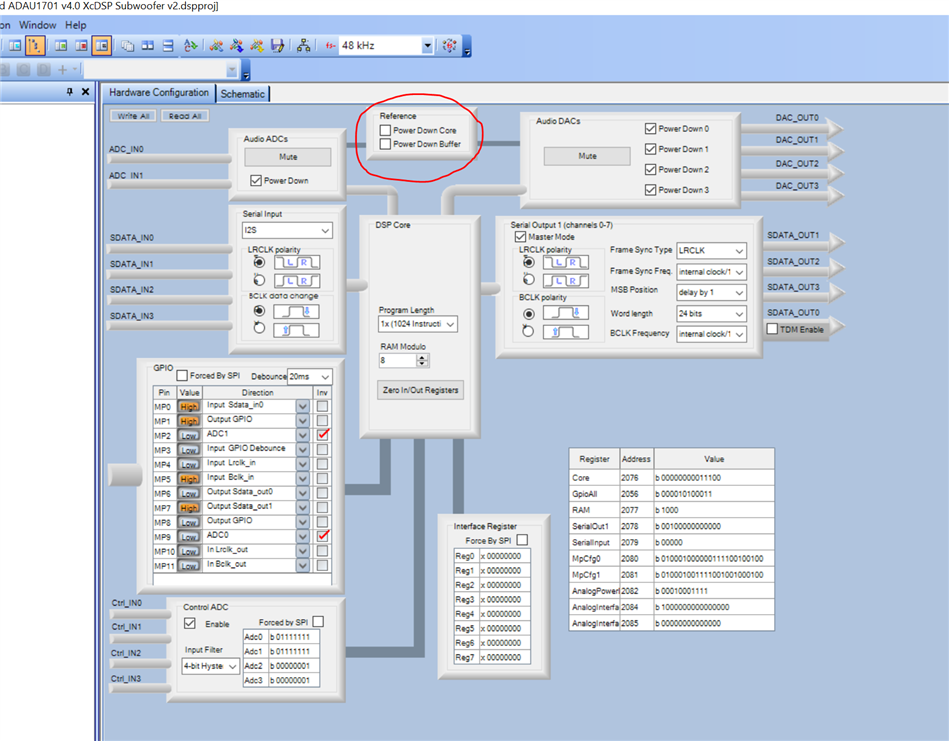
Trying the find source of the strange noise, I was playin a bit around in the SigmaStudio interface. In Hardware Configuration -> IC1-170x\140x Register Control, on the top of the page, there is two buttons for the Reference; Power Down Core, and Power Down Buffer.
As I'm not using either the ADCs or the DACs I would have guessed that I could have turned of all about the reference. Turning off the Buffer does nothing but turning off the Core turns off the sound. It is not obvious from any description I could find what these actually does or means.
Thanks and Kind regards Mads
Ny optagelse 2.m4a
Hello MadsM,
Thanks for making the sound file. It sounds just like idle tones to me. These are created by sigma-delta modulators when the signals are really low. I do not want to go into depth too much on this post. I have talked about it on other posts. It also can happen with IIR filters when the frequencies are low and bit-depth of the multiplications are of big numbers with very small coefficients. Basically you have to use double precision filters when the EQ frequency settings are below roughly 1/10th the sample frequency. I think you are running at 48kHz fs? If so then anything below 500Hz you should use a double precision filter. I suspect you are using single precision? The number of available instructions is rather small on this processor so I hope you do not run out of instructions. Only use double precision for the low frequency sections to save instructions. Since you mentioned the issue is with the LFE output I am guessing this is the issue.
By the way, I am not surprised about the USB noise issue you described. Grounding on USB interfaces if often horrible and it is done differently from one computer to the next and in your case the USB hub as well. That was good troubleshooting to try connecting it directly.
Dave T
Hi Dave
Thanks again for all the help ... if just all support in the world would be this way
Changing all to double precision seems to do the trick. Haven't hear about this before, and would never have guessed this.
It of course makes sense, with a calculation using feedback and having un proportionally and discrete "rounding" errors. Good I made the recording
Did you have a short explanation on why sound disappears if the reference core is turned off, and you are not using neither internal ADC nor internal DAC?
Thanks and kind regards Mads, Denmark
Hello Mads,
MadsM said:
Did you have a short explanation on why sound disappears if the reference core is turned off, and you are not using neither internal ADC nor internal DAC?
I think I might need a few more details. I do know that with this core if you ARE using the ADC and the DACs and you apply a clock to the serial port that is NOT synchronous with the incoming master clock, then it mutes the DACs. Even if you are not actually using the digital input signals. It is an early processor design. We changed that on the Sigma200/300/350 DSP cores.
But, you said you are not using the internal ADC and DACs and you remove the reference clock? You need to explain what core you mean? If you remove the MCLK input the DSP will no longer have internal clock pulses to operate.
Dave T
Hi Dave
It's in the HW config tap. Maybe core means the DSP core .... but the underlying blue line connecting ADC Reference and DAC would imply a connection to these.
Thanks and KR Mads
Hello KR Mads,
To be honest, these are settings I never use because I almost always see the converters being used.
If you watch the Capture window you will see the register settings that are being changed. This screenshot shows where I clicked to power down the buffer off and on and then powered the "core" off and on.
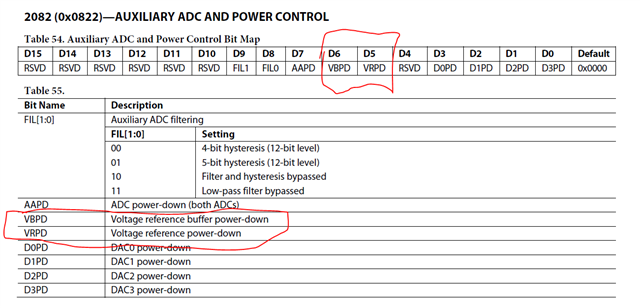
If you then look it up in the datasheet you find it is these registers:
The naming on the GUI is not clear at all.
It is the reference buffer and the actual voltage reference itself.
I am guessing it might effect the AUX ADCs as well? Are you using those in your project?
In my quick test I setup an oscillator in the core and had some meters in the project. I can turn the oscillator on and off and see the meters change. When I power these down the core still works. I can see the oscillator turn on and off. So it is clearly NOT powering down the core.
There must be something else happening to get the results you are seeing. So what I just did was loaded in a project that uses an AUX ADC and I have a readback to see the pot changing things in the project.
When I click on Power Down Core the AUX ADC stops working. So the AUXADC must use the voltage reference to work which makes sense. It is an SAR type of converter.
So you need to keep it on if you are using the AUXADC features.
Thanks,
Dave T
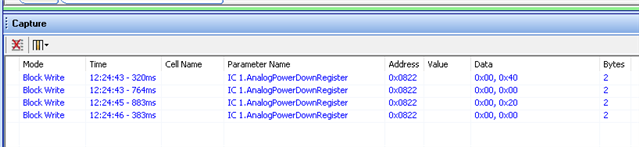
Ahh good way to see what it actually does, looking at the registers. Check.
No worries. Yes I'm using the AUX ADCs, one as volume control ... that's why it "looses" sound ....it is actually just turned all the way down.
Cool. Thanks
Hello MadsM,
Yes, I noticed that as well that it puts out a zero.
Have you seen my YouTube channel? I have a video in there about using the Capture/Params/Sequencer windows. It is a powerful tool.
Also this one about using SigmaStudio for troubleshooting is good to learn some tricks.
Thanks,
Dave T
Please log in to reply.