SigmaStudio+ ADAU1452 unable to write EEPROM?
Hello,
I've been trying for hours to get a board with an ADAU1452 and an EEPROM (SPI on the master of the ADAU1452) to run. My problem: With SigmaStudio 4.7 everything works perfectly. With SigmaStudio+ 2.2.0 I can't write to the EEPROM, no matter what I do. I have already tried everything possible in SigmaStudio+, Disable Reset PLL during Download, EEPROM to USBi, EEPROM to ADAU1452 (MasterControlportEnable)... I am using a USBi (pre V1.5). There is no error message, the ADAU is written correctly and works, but the EEPROM does not. Is this a known problem or am I missing something?
Best regards
Ralph
Audio Signal Processors
adau1452
software
eeprom write problem through DSP
sigmastudio
SigmaDSP Audio Processors
sigmastudio+ 2.2.0
Show More
Hello Ralph,
A few questions:
What hardware are you using?
Are you able to disable Selfboot while you attempt to program the EEPROM? (If you can then I suggest you do that when attempting to write to the EEPROM. )
Do you see the program being written via the Capture window?
Is the Write protect pin set correctly?
Dave T
Hello Dave,
thanks for the quick reply!
I am using an ADAU1452 DSP board from China.
Yes, I can and have turned off Selfboot.
Yes, I can see that the program is being written.
Yes, the Write protect pin of the EEPROM set correctly
I always get an EEPROM updated successfully, but the EEPROM has not been written.
As I said I have the problem only with SigmaSudio+ 2.2.0 not with SigmaSudio 4.7
Best regards
Ralph
Translated with DeepL.com (free version)
Hello RalleDSP,
It works fine for me here using the ADAU1452 evaluation board.
Send over your project. I would like to check some things.
Also, can you send me a link to the board you are using?
Dave T
Hello Dave,
here is the project and some information about the board.
Best regards
Ralph
export.ssprj
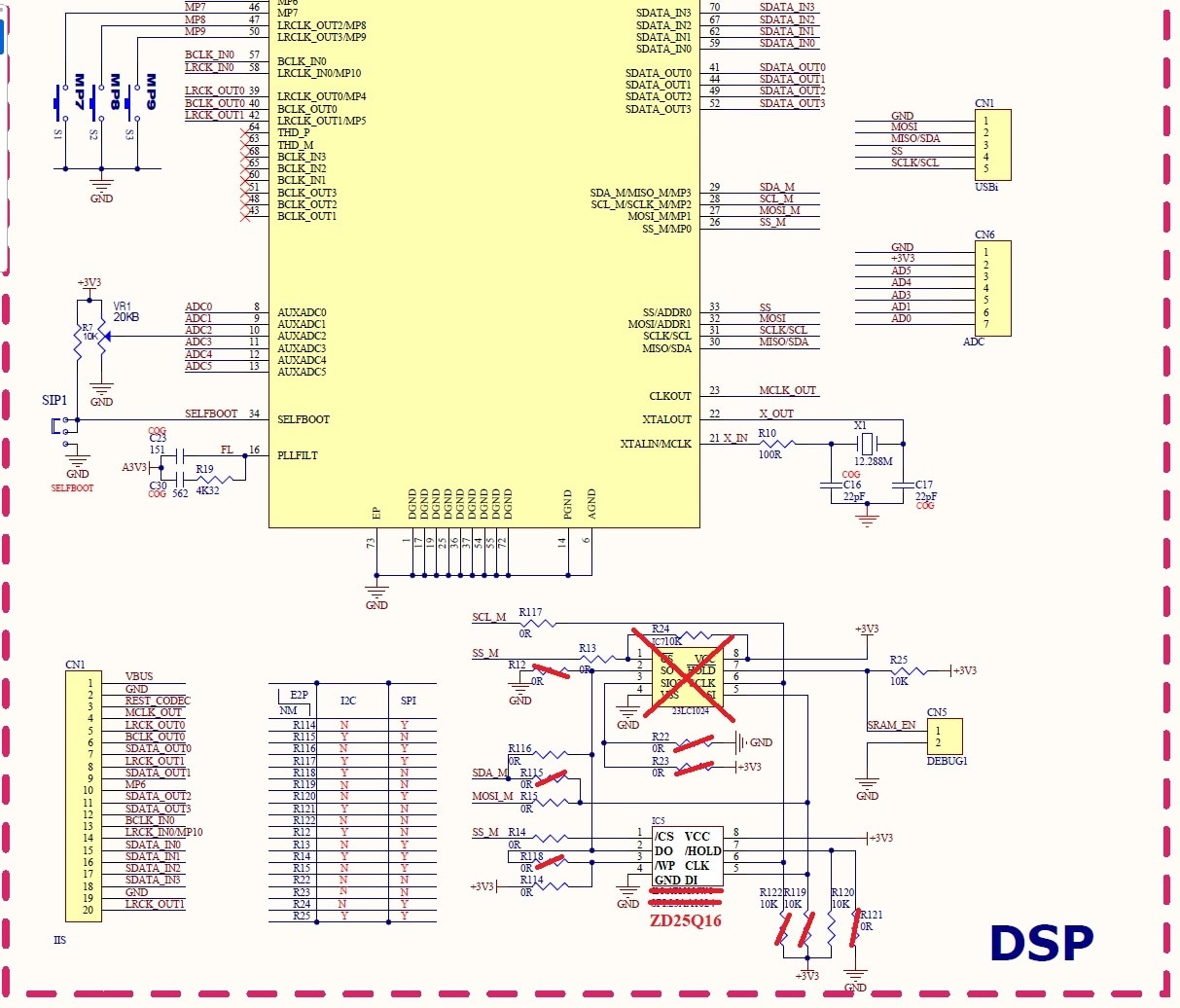
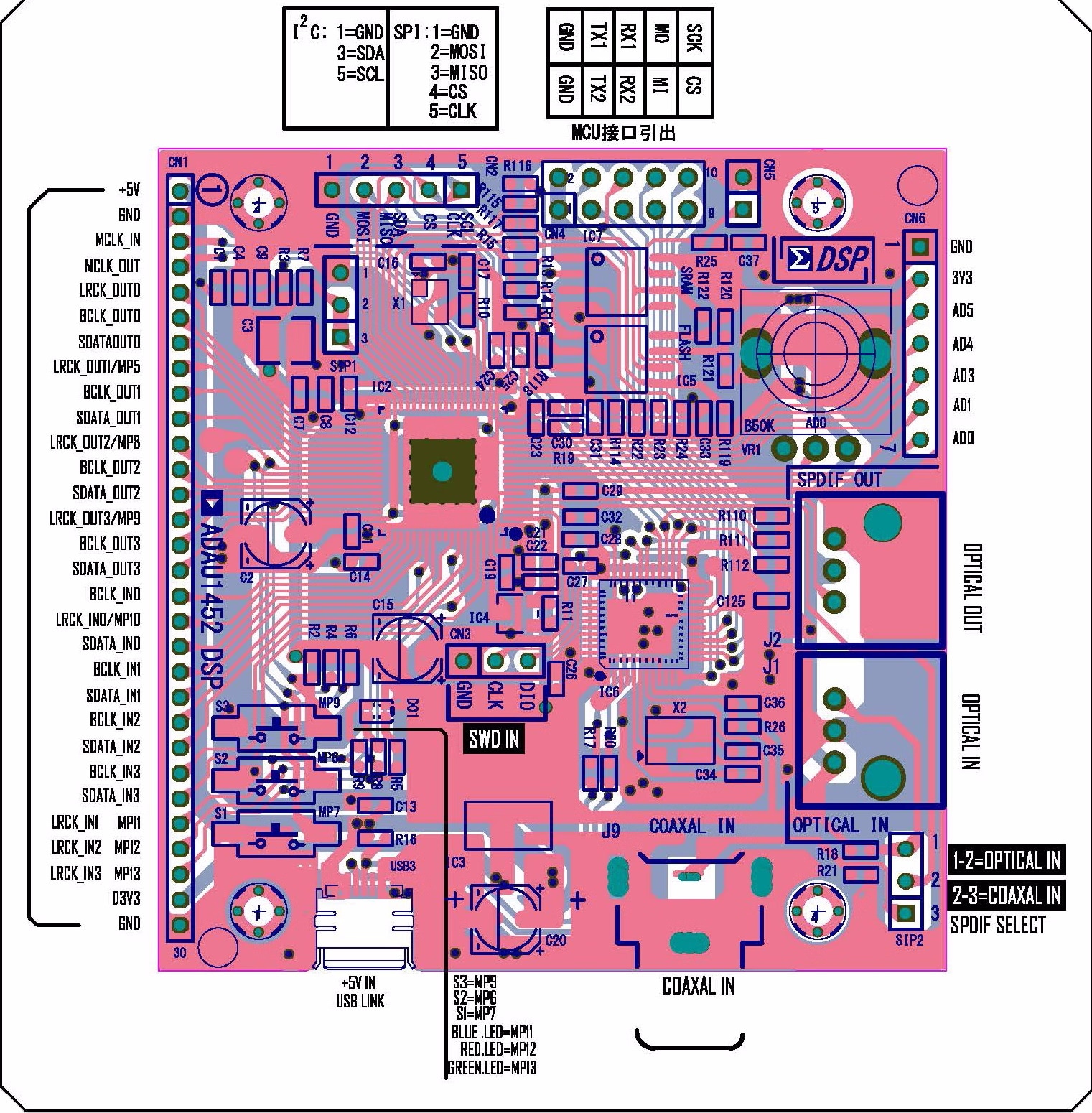
Hello RallyDSP,
Thanks for the info. I looked it all over and took a long time to find the datasheet for the Flash, it was not as easy as usual.
By the way, this is an interesting board. I do not think I have seen this one for sale anywhere?
I looked at your project and it seems that it is setup correctly. I wanted to check that you have the custom platform setup with the EEPROM in it and you do have it. It looks like it has the correct settings.
I do not see an issue with the hardware schematic either.
I think you need to read the Flash datasheet more carefully. It is quite complex and I do not have the time to spend on this today. I suspect it might be the addressing mode at power up. Read this older post where I had listed the requirements. It looks like it needs to be in the 16 bit addressing mode at first?
Can ADAU145x self-boot from an external SPI Flash (not EEPROM)? - Q&A - SigmaDSP Processors & SigmaStudio Dev. Tool - EngineerZone (analog.com)
Also, I would watch the capture window when verifying the EEPROM contents. Is the first byte an 0xAA? Is the data all zeros or does it look like that data is actually in the Flash? What I am trying to say is to see if the FLASH is being written to and just not able to be read properly or is nothing being written to it? This will help to focus in on what to do next to figure this out. Define the problem more carefully. Is it not writing or not reading?
What part came with this board? Did you change it out?
One more thought I forgot to mention when I first posted this response.
You are running the SPI clock at 10MHz. This is not too high usually but when things are not working it is often a good idea to get the design to walk before you run. Try to lower this to 1MHz and see if that makes a difference.
If it does then that puts us on a different path.
Dave T
Hello Dave T,
I've had a good look at the flash data sheet, it always has 24bit addressing. I don't think the problem is the flash. However, I have tried different flashes. Always the same problem. I have ordered an EEPROM. When it is delivered I will try that too.
With SigmaStudio4.7 the flash is written correctly. The ADAU starts with the correct program! What does not work with SS4.7 is “check last compilation through dsp” because I always get an error message that the first byte is not 0xAA but 0x00.
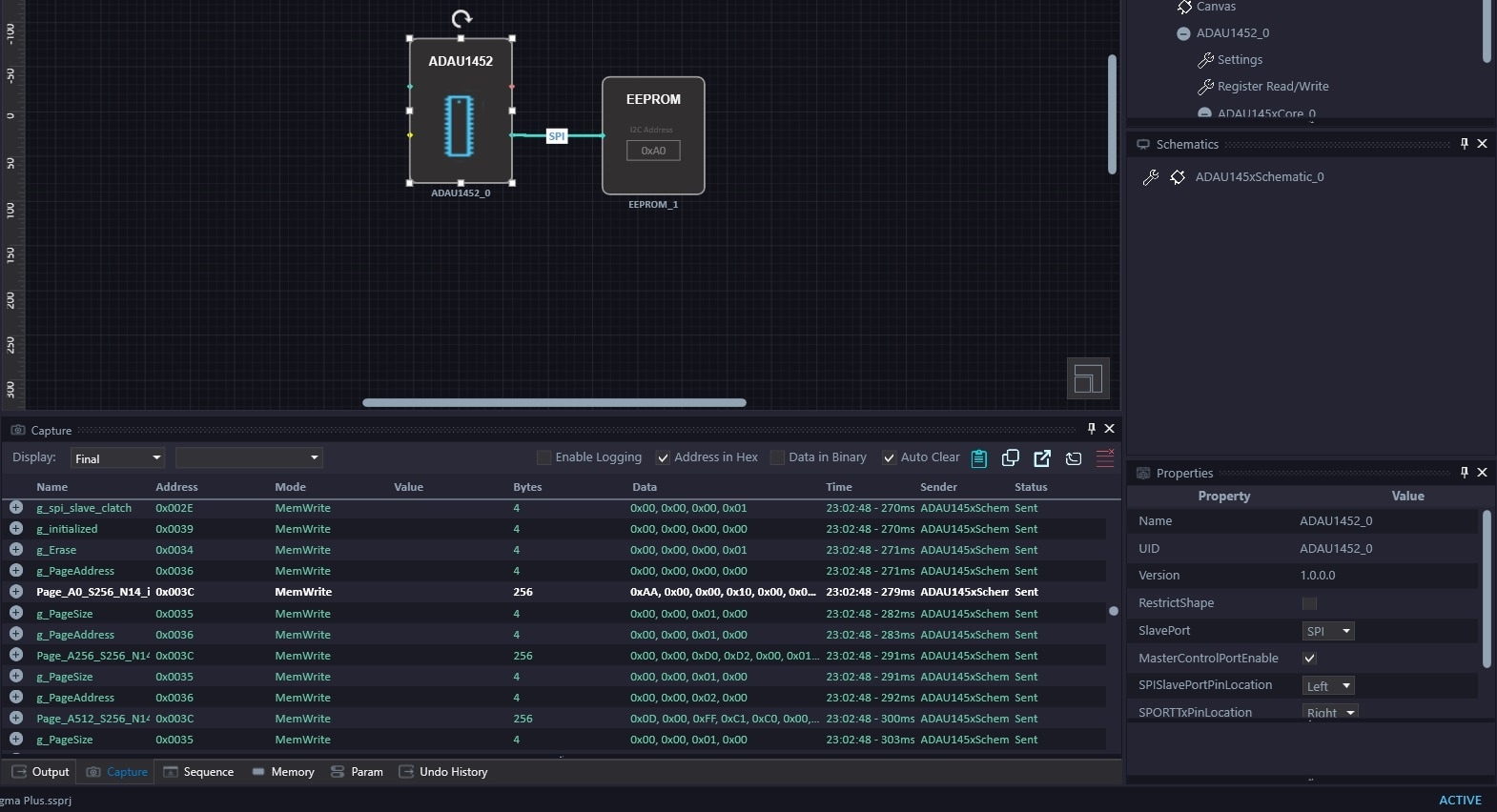
With SS+2.2.0 the flash is not or not correctly written. But SS+2.2.0 seems to send to the flash (see picture).
SPI at 1MHz makes no difference.
Best regards
Ralph
Hello Dave T,
I think I have found the problem.
If I set the SPI master clock to 4MHz in SigmaStudio 4.7, reading from flash works without error.
I connected a logic analyzer to the Flash SPI ...
SigmaStudio+2.2.0 does not apply the settings from the EEPROM menu!
The SPI master clock is always 10MHz and the chip erase time is always approx. 12ms.
The max. chip erase time of the 25AA1024 EEPROM is 10ms.
The problem with Flash is the long chip erase time of 5-20s.
As SigmaStudio+2.2.0 does not apply the setting, so the chip erase time is much too short for the flash and the data is already written while the flash is still being erased.
Can you please check if the EEPROM settings in SigmaStudio+2.2.0 are applied in your system?
Best regards
Ralph
Hello Ralph,
This is brilliant. Well done! This fits all the symptoms you have been reporting. Thanks for actually looking at what was coming out of the DSP. I will report this to the programming team. What is interesting is that years ago I recall an issue with the original SigmaStudio where the settings on the EEPROM preferences were ignored and not used. What is it with programmers not obtaining settings data from the correct place? It is two different teams of programmers doing the same thing.
By the way. I did find this board on the DIYaudio site but our IT department blocks that web site. Is anyone building this board and selling it? Do you have a link?
Thanks,
Dave T
Hello Dave,
please let me know when the problem has been fixed.
I also noticed something else:
In SigmaStudio+2.2.0 the lock status of the ASRC is displayed incorrectly. Locked and Unlocked are reversed.
There is the “ADAU1452 DSP” on Ebay, Alibaba and aliexpress
de.aliexpress.com/.../1005002993101593.html
Best regards
Ralph
Hello RalleDSP,
RalleDSP said:
I also noticed something else:
In SigmaStudio+2.2.0 the lock status of the ASRC is displayed incorrectly. Locked and Unlocked are reversed.
This is known issue and is also on the older SigmaStudo 4.7 platform. The problem is that the Sigma350 datasheets, ADAU1462/63/66/67 have the lock bit for the ASRCs incorrectly documented. The hardware is like this: 0=unlocked and 1=locked. The implementation in SigmaStudio copied the error that is in the datasheet.
The Sigma300 parts, The ADAU1450/51/52 is all correct. The datasheet is correct, SigmaStudio DLL and the hardware all agree with 0=unlocked and 1=locked.
Both the Sigma300 and 350 parts are both the same. The error is in the datasheet and the SigmaStudio DLL for the Sigma350 parts.
Thanks for the report.
Dave T
Hi Dave,
I have the same problem with this Sigma Studio+ bug. Is there any information yet when this bug will be fixed?
We wanted to use the new Sigma Studio+ for our next product development, but the program is not really usable in this way.
Best regards
Mirco
Hello Dave,
I have the exact same issue on the exact same board as well.
To recap the problem:
I am able to flash the board on SigmaStudio 4.7, but not with SigmaStudio+ v2.2.0.2.
Everything works completely fine on SigmaStudio 4.7.
In SigmaStudio+ v2.2.0.2, the EEPROM gets erased, but it doesn't get programmed.
The chip erase cycle time parameter in the EEPROM settings apparently does nothing, which would be a problem if the chip is slow.
Even if I set it to 50 seconds, it only takes about 15 for the entire process to finish.
Is there any new information on this issue?
Best regards,
Edwin
Hello Dave,
analog devices have released a new version SigmaStudio+ 2.3.0, but still haven't solved the problem. The settings on the EEPROM preferences are still ignored!
Please fix the problem so that SigmaStudio+ with flash memory can finally be used.
Best regards
Ralph
Hi!
I'm using a similar board to yours. Could you please share your project so I can write to the EEPROM on Sigma 4.7?
I've tried many methods but still haven't been able to write to the EEPROM on that board.
Thank you very much.
Hi EdwinB and RalleDSP,
Please set the Erase settings in the UI to milliseconds (ms) and check in SigmaStudio+ 2.3.0. For example, for a 10-second Chip Erase Cycle Time setting, input 10000 in the UI and verify it. Please let us know if the problem persists with your board.
Thanks
Hello ChiruPalle,
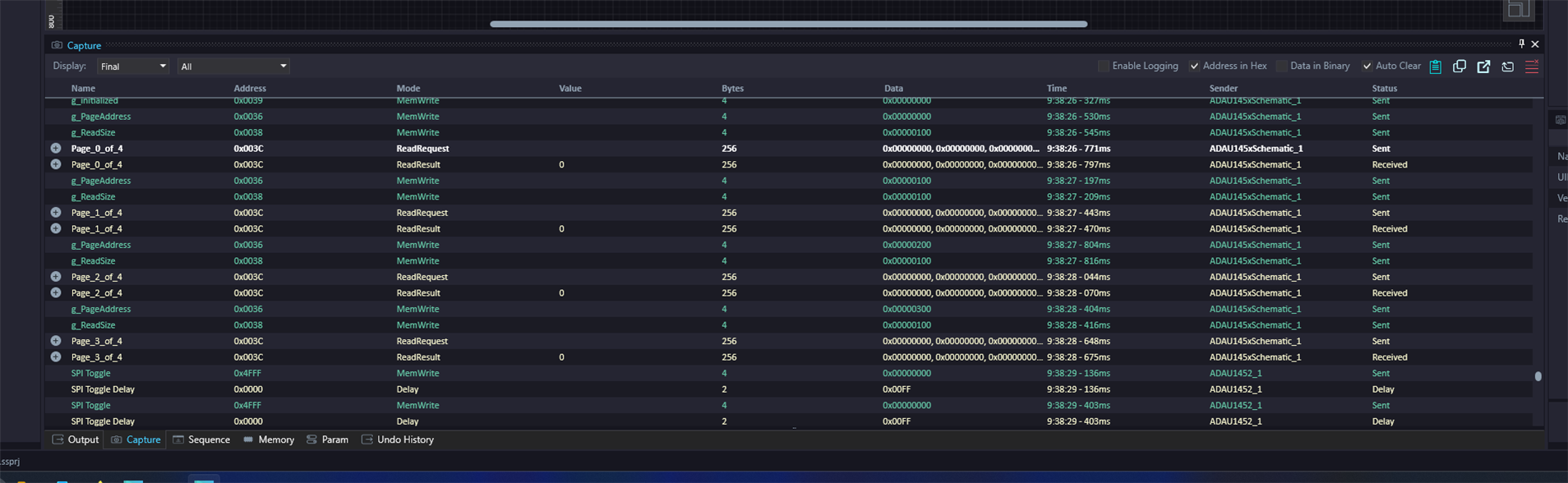
I set the chip erase cycle time to 10000 (my chip has an erase time of 20ms) and timed it with respect to the Download operation and can confirm that the Chip Erase Cycle Time parameter does have an offset of 1000x relative to the prescribed unit, but when I flash the EEPROM, it still does not retain the program.
When I Check Latest Compilation Through DSP, it says Self-boot check failed!
When I look at the Capture logs, it appears to be reading all zeroes.
See below for a screenshot.
Best regards,
Edwin
Hi RalleDSP
I'm using a similar board to yours. Could you please share your project so I can write to the EEPROM on Sigma 4.7?
I've tried many methods but still haven't been able to write to the EEPROM on that board.
Thank you very much.
Hello ChiruPalle,
I can confirm that the Erase Cycle Time must be entered in ms.
Problem 1: SigmaStudio+ waits for that time at the wrong place, precisely at the beginning, but not after the Erase command!
Problem 2: The values in “Write Speed” are not applied. The log (Capture) always shows “spi_speed 0x0000000A” no matter what you enter in “Write Speed”.
I think this is also faster than 10Mhz, but I have not measured it.
With SigmaStudio 4.7 the values in “Write Speed” are taken over correctly.
Best regards
Ralph
Hi Ralph,
Thanks for the feedback.
Problem 2, able to reproduce. We will inform to our development team and update you.
Problem 1: Using our ADAU1452 EVAL board, it is erasing all data.
It is not erasing all data for your board even after increasing Chip Erase Cycle Time setting (considering as ms in UI) as per your board specification using SigmaStudio+2.3.0 version. Is it correct?
Could you please confirm this?
Please let us know, if you have any other issues with SigmaStudio+2.3.0 version.
Thanks
Hello ChiruPalle,
Yes, I can confirm that.
You can also see this in the log (Capture). There is no delay after the delete command!
SigmaStudio 4.7 does wait after the delete command. The difference is clearly visible in the log (Capture).
SigmaStudio+2.3.0 only works with the ADAU1452 EVAL because the EEPROM installed there has a short erase time.
You can probably set the Chip Erase Cycle Time setting to 0 and it would still work.
As I said: SigmaStudio+2.3.0 is waiting in the wrong place! It waits at the beginning of the transfer.
Best regards
Ralph
Hi EdwinB
I'm using a similar board to yours. Could you please share your project so I can write to the EEPROM on Sigma 4.7?
I've tried many methods but still haven't been able to write to the EEPROM on that board.
Thank you very much.
Hi RalleDSP,
Thank you for confirming with your board.
We will check and update you.
Thanks
Hi EdwinB and RalleDSP,
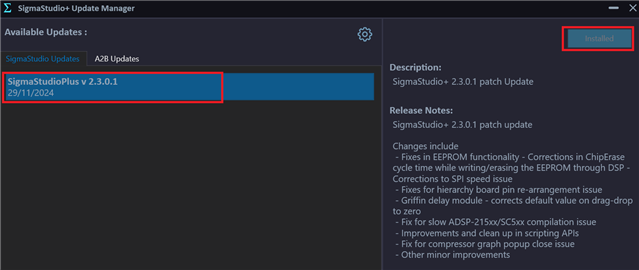
The above-mentioned issues (Problem 1: SPI Erase issue - Erase time support range in updated SigmaStudio+ 1-2000ms, and Problem 2: SPI Speed as per SigmaStudio 4.7) have been addressed in SigmaStudio+ 2.3.0 Update 1.
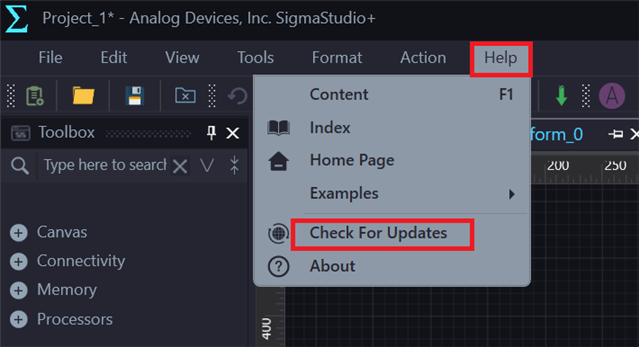
Please update to SigmaStudio+ 2.3.0 Update 1 using the SigmaStudio+ Update Manager (Help Menu -> Check for Updates).
If you are still facing the issue, please share the schematic.
Thank you for understanding.
Hello ChiruPalle,
thanks for your help!!!
I have again found a bug in SigmaStudio+2.3.0:
SigmaStudio+ does not apply the “PLL Input Clock Divider” setting to the hex file, so it is not written to the EEPROM
Best regards
Ralph
Hi RalleDSP,
We will check and update you.
Thanks
Please log in to reply.