Load adau1761.bin in Linux but no reaction
Hello,
I´ve a simple design on my evalboard and it runs. So i take it and create a adau1761.bin and copy it to the /lib/firmware folder on a customer hardware. In the log i can see, no error message and so i think it´s ok. The linux module driver runs but there is no reaction (the same result as i load no firmware). What must i do? Is there a activation necessary?
br,
Philipp
Audio Signal Processors
hardware
SigmaDSP Audio Processors
adau1761
linux
Hello Phillip,
The .bin file is not the correct file to use. There is a procedure to follow to start the PLL, load in the register settings and then load in the program and start it running.
Have a look at this page in the Wiki:
Tutorials, Guides, Walkthroughs, and other Information [Analog Devices Wiki]
Scroll down not far and see the microcontroller code generation and implementation tools. That should help you.
Dave T
This way is for a MCU system but I have a Linux System.
I found this : https://wiki.analog.com/resources/tools-software/linux-software/sigmadsp_genfirmware - why is this the wrong way?
The sources from AD https://github.com/analogdevicesinc/linux/blob/main/sound/soc/codecs/adau1761.c are implemented and I must use it.
With the logic analyser I can see the init seq (0x4000) which turn off the PLL, the Package on address 0x0000 and than the seq. (0x4000) which turn the pll on. This is the 3rd package:
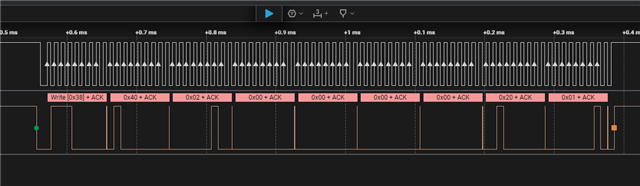
In the ADAU1761_Demo.zip is only a init for an stm32 MCU. No code for the handling of the adau1761 ???
Please log in to reply.