Trying to understand Limiters and Sound Volumes
I am using Bluetooth (Wondom BRB3v3 Bluetooth Receiver) as input, which goes to DSP (Dayton Audio DSP ADAU1701), which goes to input of AMP (Wondom 2x100W Amplifier Board), which powers component speakers (JL Audio C2650).
When I do no change to input, the signal starts clipping at -14dB max volume. I thought the signal had to get closer to -3dB.
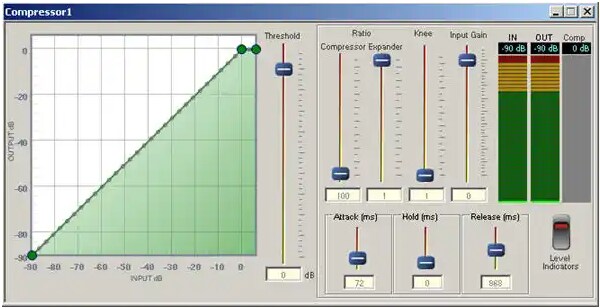
What I noticed is that if I limit THRESHOLD to -14dB, I lose max amplitude due to the curve created by knee since it lands around -20dB on the INPUT axis. Why don't I get -3dB at max volume? If I try adding gain at the beginning of the program, it doesn't fix my issue because I still don't get the same output amplitude and I feel like I am losing out on power output to the speakers. When I add INPUT GAIN, my output goes above -14dB and I start clipping.
QUESTION #1:
How do I set up this STANDARD RMS LIMITER to provide max power (72W) to the speakers without distortion?
QUESTION #2:
How do I account for EQ and Bass Boost since this will increase the input before the limitier?
Any information is greatly appreciated.
Thanks.
Hello Jendo,
You can do some neat things with these modules in a custom audio system, yet often as not, we need to sweat a few details to get the best performance. Looking at the ADAU1701's and the amplifier's specs:
ADAU1701 output 0.9V rms
Amplifier input 0.61V rms
Taking the ratio, dB = 20 log (0.61 / 0.9) = -3.8 dB, just as you said. SigmaStudio's GUI level meters are reasonably accurate, although different responses (RMS vs. peak, etc.) may produce differences of perhaps 3 dB. Yet this doesn't explain your 11 dB deficit. So, what's going on?
Your system's description didn't mention the power supply you're using -- is it the recommended 27V, 8 amps? The amplifier module works down to 15VDC -- yet it would clip at a much lower level down there. I would suggest hanging a voltmeter across the supply near the amplifier board's power input and checking it both with no sound and with the volume cranked up -- make sure the supply holds up under all conditions. This may not be the problem, yet it's something we need to check.
If you have full DC, voltage and are in fact producing fully 72 watts into your speakers (are you wearing hearing protection?), are you happy with the residual noise audible at your speakers with zero input? If the "hiss" level is annoying, you might consider reducing the amplifier's gain by perhaps 6 dB so that the whole system clips at closer to the same level. You can do this by inserting a simple pad (voltage divider) between the 1701 module's output and the amplifier board input. Or if the amplifier board has a way of adjusting its gain, set this up. But if you're OK with the way things are, leave it alone.
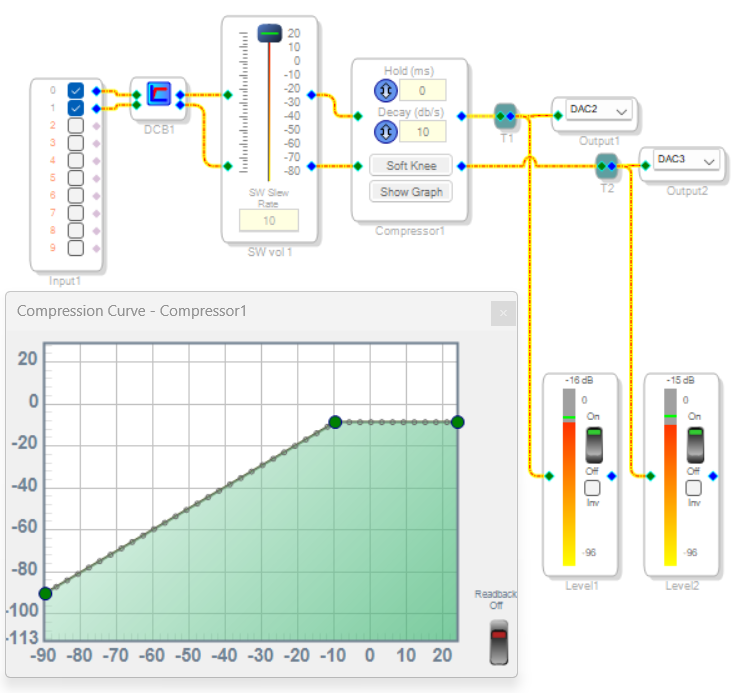
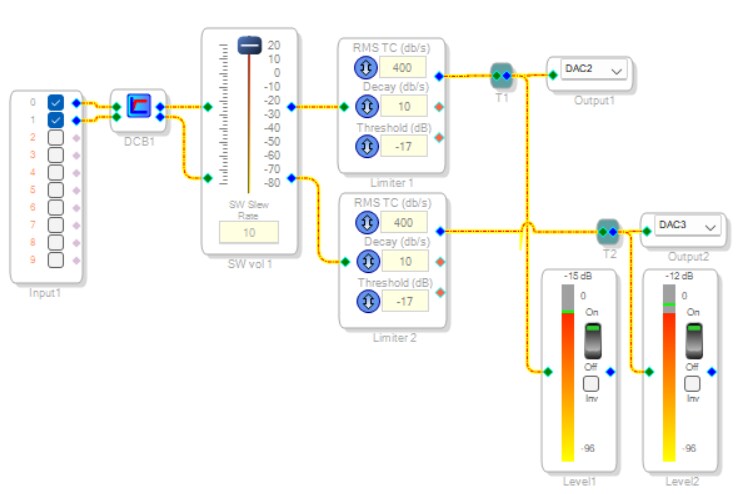
I never liked the "fancy" compressor with that huge GUI control panel -- and it does have some known bugs. Thus, I tested two simple ways to limit the audio -- a Full-range Peak Compressor, and a RMS Limiter. In both cases I added a DC Block Filter at the input end, to remove any residual DC from the audio. Sigma-Delta ADCs can produce such DC, and it messes with the compressors. The volume control is set for gain because my source (an iPad) is too wimpy to hit the limiting level. For test music I wanted something which consistently hits its max level for the entire song -- at my age (see my avatar), this means anything produced by Phil Spector. Be My Baby by The Crystals works great!
The above example uses the Full-Range Peak Compressor with No post gain, set up as a limiter. "Full-range" refers to the blocks' input as well as its output -- the Low-range version fell apart at very loud inputs. I set the limiting point on the graph using the Level meters as a guide.
This one shows the Limiter block. There's no stereo version; just use two. Again, I set the Threshold for the desired results according to the meters. Both these examples performed properly in my tests.
If you're using a significant amount of EQ (especially bass boost), this can reduce the headroom available for louder sound. Should you find that your amplifier and/or speakers are not quite up to the sound you want, try adding a Dynamic Bass block near the input end of your signal flow. You can set it to boost the bass when within the system's capabilities, while automatically reducing the boost at high levels. When set up properly, it won't boost the lowest bass frequencies which your speakers can't reproduce anyway. This gets the most out of what you have. Of course, you could also add a sub.
Long before I was born, my dad built a Heathkit 20 watt (!) vacuum tube amplifier driving a 15" University woofer in a refrigerator-sized reflex cabinet, a Cobraflex horn midrange and a horn tweeter. I never ever heard this thing distort while it rattled the windows!
Best regards,
Bob

Hello Jendo,
I am going to add a little detail to the great post from KJBob. He did a great job explaining that it is not just about clipping in the DSP but the entire system. You have to figure out where your system clips or when the amp will be delivering more power than the speaker can handle. That is best done using dummy loads and oscilloscopes to save your ears and save your speakers!
Then either you lower the gain of the system so it matches what we would call 0dBFS in the DSP core or you adjust your limiter settings in the DSP core to prevent too much level at the output of the power amp.
The little thing I want to expand on is the compressor limiters in the library have two types, full-range (-90 to +24dB in the ADAU1701) and the lower range of -90-+6dB.
It is important to understand what the behavior will be when you go above +6dB. By the way, in this video I explain our levels in the DSP cores and how we can break the laws of digital audio and go above 0dBFS.
The full range goes the full gain range of the DSP core. So there is no way to have a signal that is louder. However, the +6dB one you CAN send in a signal that is hotter.
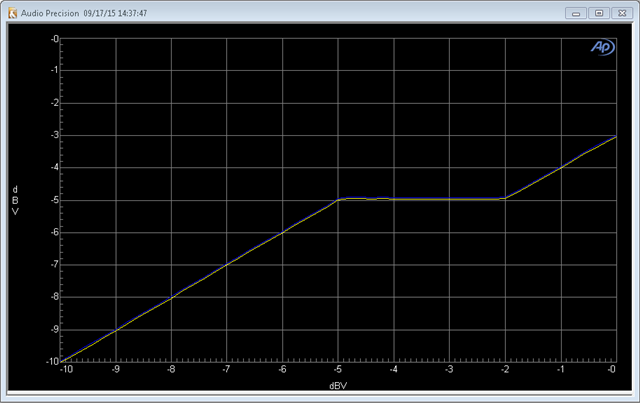
The compressors work with a table of gain-factors. For each 3dB step of input level there is a gain factor. The program will interpolate between the two points should the level not fall exactly on a 3dB level point. So the -90-to+6dB type has the last gain factor corresponding to a +6dB input to the sidechain of the compressor. Let's say that gain factor is 0.5 which is a -6dB gain factor. So you send in a +6dB signal you will get out a 0dB signal.
Here is where the problem lies. If you send in a +10dB signal, you will get a +4dB signal out! It will use the last gain factor with no further interpolation. I would have programmed it to have an infinite ratio at that point but that is not what you get. You end up with a gain curve like this:
Once you reach the max gain point the level will continue to rise minus the gain reduction of the last gain-factor in the table. So it is possible to exceed the max level that you think you set in the compressor.
This is really not a huge problem provided you understand this and use it in the correct place. If you place this limiter shortly after the input to the core and before you added and gain or EQ then you know 100% that the level will NEVER go above the 24 bit 0dBFS of the serial input port. So you are very safe to use it early in your signal chain and only when you are certain you have not increased the gain too much.
After EQs and other gain elements I would not use this limited range compressor. I would use the full range like Bob did for final compressors before leaving the core.
I hope I explained this clear enough...
Dave T
Please log in to reply.