ADAU1761 MIC Bias: What It Is and How It Powers Condenser Microphones
Hello!
I'm noticing the Bias control option in the ADAU1761 settings. It's clear it doesn't provide 48V for phantom power, but I assume it's meant for powering regular condenser microphones, like those used for PCs.
However, when measuring the voltage on the analog input, I consistently see 1.4V, regardless of the Bias setting adjustments.
Could someone clarify what this Bias is for and where I can observe its effect (if my assumption is correct)?
Also, I'm aware of the jack detection feature but haven't enabled it yet.
Hello OctopusDev,
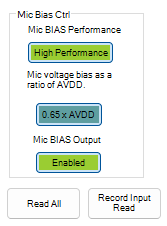
Yes, the mic bias is meant to power electret condenser microphones directly and those are what you find in computer headsets and similar equipment. They also are found in older cell phones and walkie-talkies. This part was originally designed to go into a cell phone before MEMS mics took over that application space.
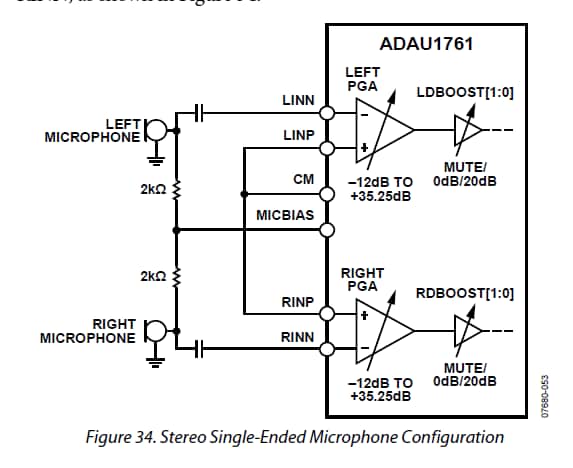
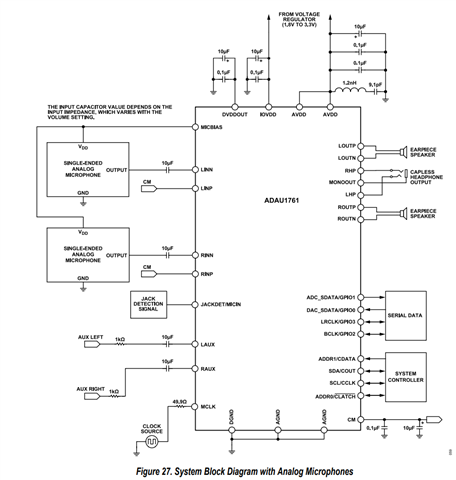
It is nothing like the 48V phantom power you see in pro audio recording studio applications. It is a single ended (unbalanced) configuration. We show how to connect it to a microphone in the datasheet. Figure 33 and 34.
The voltage is derived (divided) from the AVDD which is why AVDD is mentioned in the settings. 0.65xAVDD and 0.90xAVDD are the two settings.
So if you have 3.3V for AVDD then the two settings will be 2.145V and 2.97V.
If you look at the datasheet specifications you will see a max of 3ma for the bias source. The output impedance is not super low so if you start drawing more than 3ma the voltage may go down. I wish we had published the output impedance of the driver but we did not.
Regarding the jack-detect. I am sad to report that this feature was designed backwards for some applications. When you detect a jack insertion it mutes the line outputs. This may be OK with your application if the jack is a headphone jack. If it is a line output jack then it will not work.
Another way to do this is by using a GPIO input to the core and doing the switching in the core. So there are options available.
Dave T
Tnx, Dave. Unfortunately, wrong routed PCB make me confused.
Glad you found it!! Those sorts of problems can be tricky to track down!
Dave T
Dave, one more question. I will try to build this circuit using the electric microphone of the PC headset (it is not really necessary, just for testing).
But with the following changes - instead of BIAS(it is not routed on my board) I assembled the BIAS circuit using a resistive devider and got 1.3V, also I use 4.7uF instead of 10 (it should not play an important role). I see an oscilloscope analog signal from the microphone with a VPP of about 80-120mV.
CM is connected correctly. I should see this signal on the Sigma Studio signal detection units, but it is not.
I took as a basis a demo project from *\Analog Devices\SigmaStudio 4.7\Projects\Sample Schematics\ADAU176x\BasicDSP Examples\Basic_Stereo_InOut.dspproj.
I have several suspicions - BIAS is necessary and I replaced it incorrectly, secondly - the microphone is faulty and produces insufficient level, although all gain is at maximum. I also suspect that the level detection block does not work as I expect, but I have already disassembled the circuit and have not checked the signal at the analog output. And the last thing is that 1.3V is not enough, because my desktop PC have 1.8V.
Tell me palease, what can I check?
Hello OctopusDev,
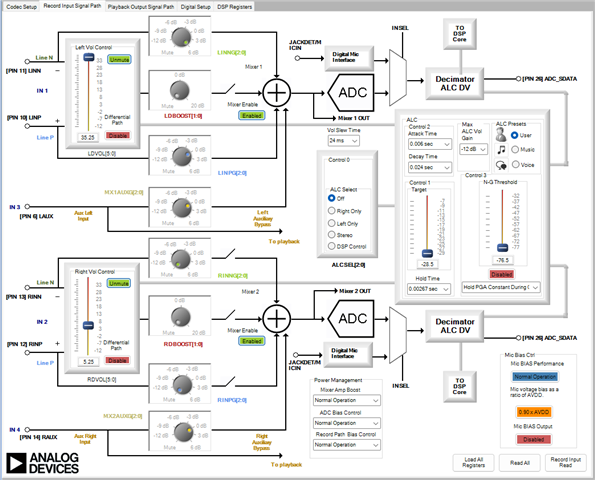
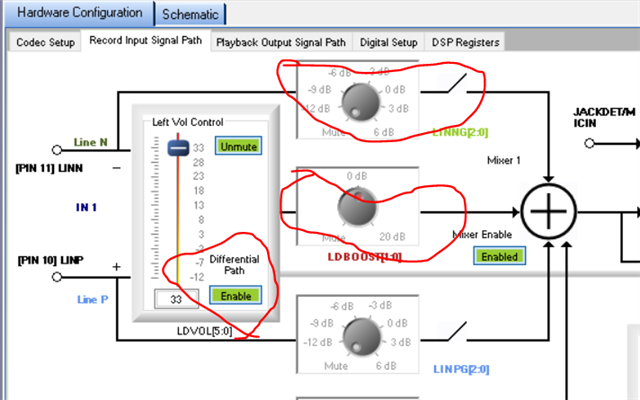
Even though you are running single ended technically, you are going into the differential input so you have to setup the registers that way. Do not use the Line_IN_N input like you are. Enable the PGA and use it. See my screenshot. Plus, you have a post PGA gain setting of up to +20dB which will help your noise floor because you will not need max gain on the PGA stage.
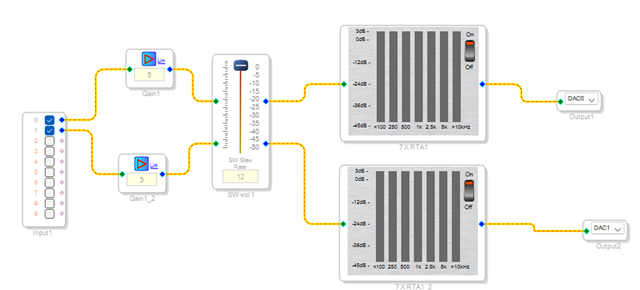
Regarding the meter. I would not use that RTA meter until later if you need to see different frequency bands. You have to setup the filters for that meter and you might not have done that which is why you see nothing.
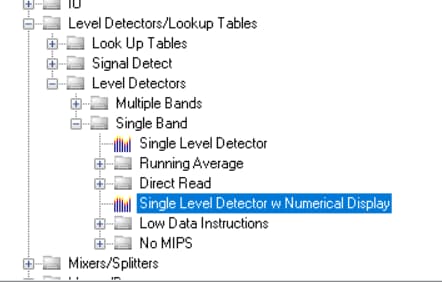
Use this meter. It is my favorite one and it is the latest design. I also really like the numeric output.
Regarding the voltage to power the microphone. You will have to check the datasheet for the mic to see if 1.3V is enough. The fact that you do see some audio is promising that it does work but the output might be a little lower due to the reduced voltage.
I think the issues you are having has to do with the register configuration I mentioned above. Plus the meter you are using.
I think you should get further at this point.
Note, I am out of town giving a workshop this week so it will be tough to keep up on the forum.
Dave T
Tnx, Dave! My schematic running well now. I'll make a note for others that ADAU1701 can freeze at maximum gain due power insuficient. I encountered this using a non-official USBi as a power source.
Please log in to reply.