ADC capture > RPi > DAC output - is this possible?
All I want to do is use the ADAU1761's ADC and DAC separately to capture and play back audio. ADC to Raspberry Pi for processing, then the Raspberry Pi to the DAC for playback. Is this possible? SigmaStudio shows the ADC hard-wired to the DSP Core as well as Pin 26 (ADC_SDATA). Sigma Studio is also confusing as to what feeds the DAC, as Pin 27 (DAC_SDATA) does not appear on the "Playback Output Signal Path" page. I need the ADC and DAC disconnected so no signal passes through. The Pi will do all the heavy lifting (FFT transforms, etc.). Is it possible to use this part for my purpose? I bought EVAL-ADAU1761Z and Sigma Studio. Thanks!
Audio Signal Processors
hardware
SigmaDSP Audio Processors
adau1761
Hello BillWardlow,
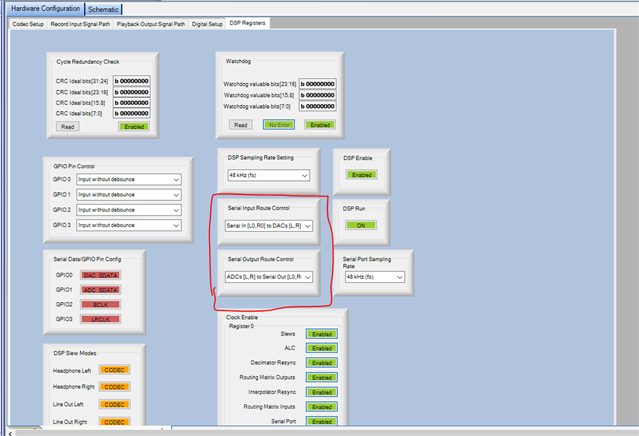
Yes, it can be done. It can be done by configuring few registers.
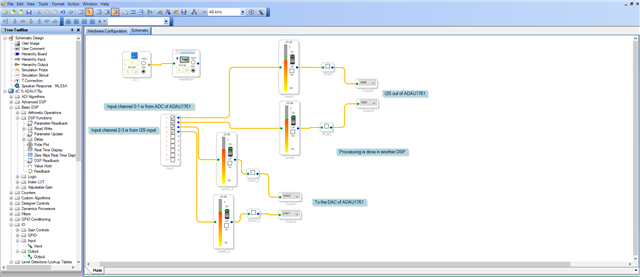
I have attached two projects here; one project is where the input and outputs are drawn in the schematic just for debugging purpose, you can see the audio in and out levels.
ADAU1761 as CODEC_ input_output drawn.dspproj
The second project is where the audio is routed thru registers, no schematics.
only reg_config.dspproj
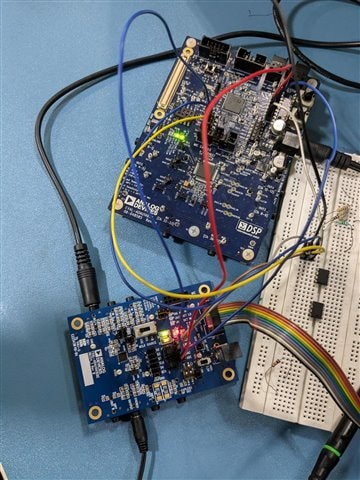
I have attached my set-up picture here; I'm using the ADAU1761Z as the CODEC and I use another board to process the signal. I just simulated your set-up.
I use the ADAU1761Z as serial clock master (it can either be a master or slave to serial input and output ports, since it has only clock source for both input and output ports).
Hope this helps.
Regards,
Harish
Thank you Harish! I'll be trying this setup this weekend.
Please log in to reply.