SigmaStudio EEPROM write speed parameter breaks "Write last compilation through DSP"
While playing with SigmaStudio v4.7 I found something that looks like a software bug.
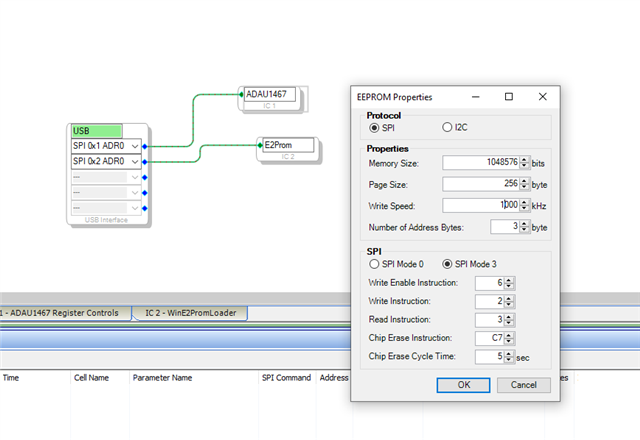
If write speed (=SPI clock) for EEPROM is set different to 10.000 kHz, e.g. 1.000kHz, then "Write last compilation through DSP" is broken. The "Chip Erase" command is not sent here. And also invalid data is sent with the included Write commands. Checked by logging SPI bus with logic analyzer between DSP and EEPROM. Smells like there are hardcoded timings/timouts for 10.000kHz clock within the routines, either in SigmaStudio itself or the DSP code that provides the pass-through to EEPROM. So some code seem to ignore the adjusted SPI clock. Seen on eval board EVAL-ADAU1467Z and a custom board.
software
sigmastudio
Hello Andreas,
This is entirely possible and I will have to check this. The internal settings for the write speed on the part is kind of strange so the programmers could have easily messed this up. I will report this to the programming team after I check this on my system as well.
Dave T
Thanks a lot for taking care.
Hi Andreas,
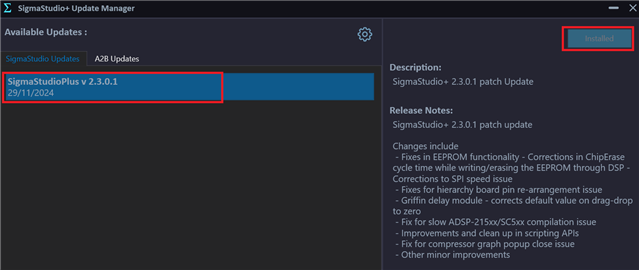
There is a new update in SigmaStudio+ 2.3.0 that includes an SPI speed limitation.
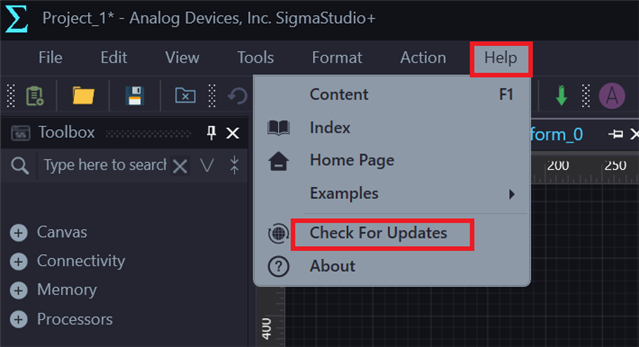
Please update to SigmaStudio+ 2.3.0 Update 1 using the SigmaStudio+ Update Manager (Help Menu -> Check for Updates).
If you are still facing the issue, please share the schematic.
Thank you for understanding.
Hello ChiruPalle,
thanks for the info. But as mentioned above I use Sigma-Studio v4.7 and not Sigma-Studio+.. I could not migrate to Sigma-Studio+ because it lacks support for Codec ICs and AEC plugin.
I hope that ADI considers to patch the original Sigma Studio as well.
Hello andreas
Based on your mention of the eval board I assume you are using the ADAU1467?
Are you trying to adjust the SPI speed for when the part boots up from EEPROM or are you trying to adjust the speed that SigmaStudio uses for writing(programming) the EEPROM?
Correct, I use ADAU1467. I adjust the speed within the dialog that pops up when I write/check/erase configuration to EEPROM via DSP (e.g. "Write Latest Compilation Through DSP"). I tried to reduce the SPI speed because I found the SPI connection to my custom board unstable (I guess because of additional adapter cable and length), especially the MOSI signal.
Hello andreas.ru,
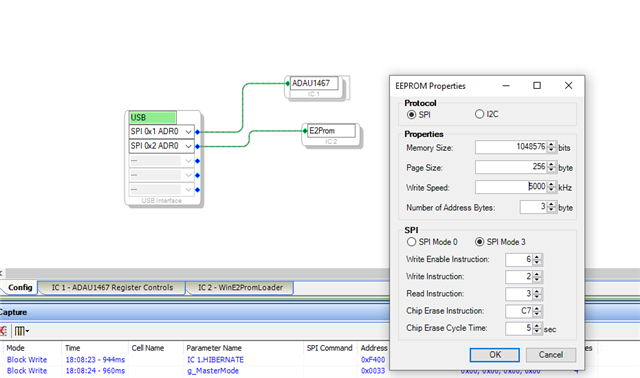
The changes that we make in the pop-up window does affect the self-boot speed (reading EEPROM from DSP). The SCLK frequency changes as we change the value in sigma studio.
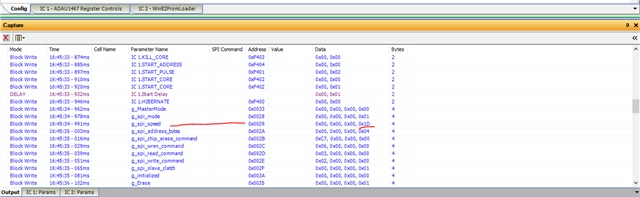
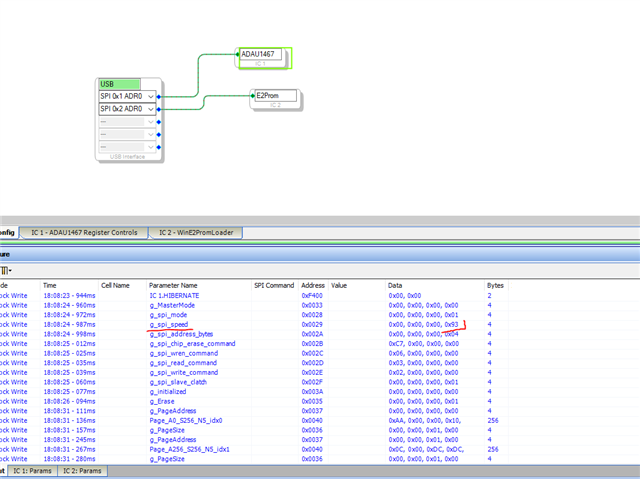
When you change the SPI speed in the window, you can see a value is updated in the capture window. Have a look below.
1) You can see the value 0x1D in the spi_speed parameter. I have set the SPI speed as 5MHz in the window, so it shows 0x1D as a value. Below is the calculation.
speed_config_value = ceil (SYSCLK/(2*SPI_CLK)) = (294.912MHz/2*5MHz) = (29.49) = 29 (0x1D)
I have configured 5MHz in the window and verified it's 0x1D in the capture window and continued the self-boot procedure. when I initiate self-boot, the starting sequence was at 500KHz (it's the same for few transactions regardless of the mentioned speed) and the rest was at 5MHz as configured.
2) when you self-boot with a default window setting which is 10MHz, then you can find the spi_speed in the capture window as 0xF.
speed_config_value = 294.912MHz/2*10MHz= 14.7 = 15 (0xF)
I have probed the SCLK while self-booting and it was10MHz.
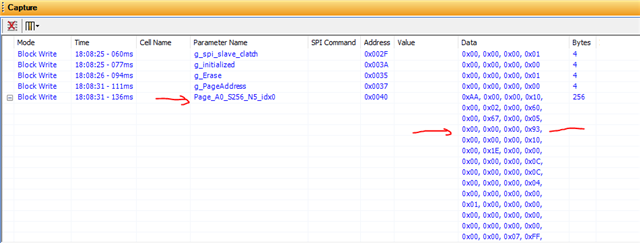
3) If you want to have 1MHz then the value is 147.456 = 147(0x93)
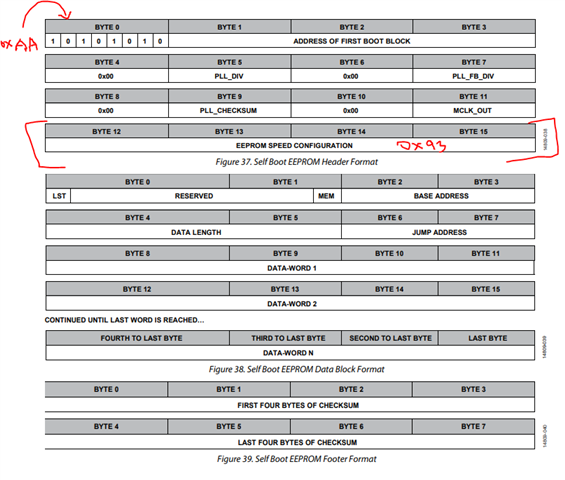
Have a look below this is where it's stored.
when I configured like this and measured the clock while self-booting it was 1MHz. I probed the signal for three different clock settings (that I made in the properties window), and all came out as configured. I have tried this all with ADAU1467Z eval board.
Have you looked at the capture window? Has it changed when you change the SPI speed in the window and proceeded?
Regards,
Harish
Hello Andreas,
If I am reading your response correctly, it is the SPI speed between the USBi and the DSP that you want to slow down. Not the speed that the DSP reads the EERPOM when it is selfbooting. Correct?
Well, I do not have a good answer on that. the USBi speed is hard-coded into SigmaStudio and there is no way to change it.
Dave T
Hello Harish and Dave,
thanks a lot for your comments and explanations.
Harish's explanation was really helpful. Now it is fully clear what this parameter in this E2PROM dialog is doing. If I correctly understood, it changes 2 things.
1. The SPI speed between DSP and E2PROM when programming through DSP. This is the write to parameter g_spi_speed.
2. The SPI speed is also part of the header block within the E2PROM, that generated and written. That info from the header block is always read first on boot from E2PROM (still at a low default SPI speed). Then SPI speed is changed to the value from the header for further boot process.
So far fine.
@Dave: Ok, understood that the SPI speed only for the DSP to E2PROM Bus is adjustable here. actually this was clear to me. I just was confused when I replied to your question above
But still my original bug report from above applies. Could you replicate that problem?
Hello andreas.ru,
andreas.ru said:
But still my original bug report from above applies. Could you replicate that problem?
No, it is not. I don't think there is a bug here. it still works as expected for me.
This is what you wrote in your original post, "when you adjusted the SPI clock speed in the EEPROM window, the 'write latest compilation thru DSP' is broken and the Chip Erase command isn't sent and invalid data is sent hence it leads to self-boot failure and it looks like the10MHz SPI speed is hardcoded, so changes made in the EEPROM window for SPI clock rate is ignored "
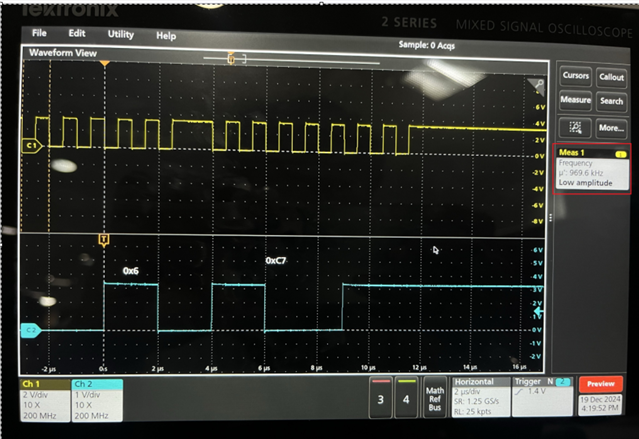
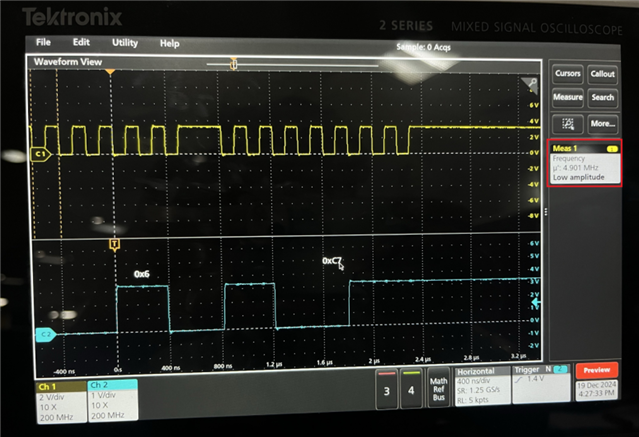
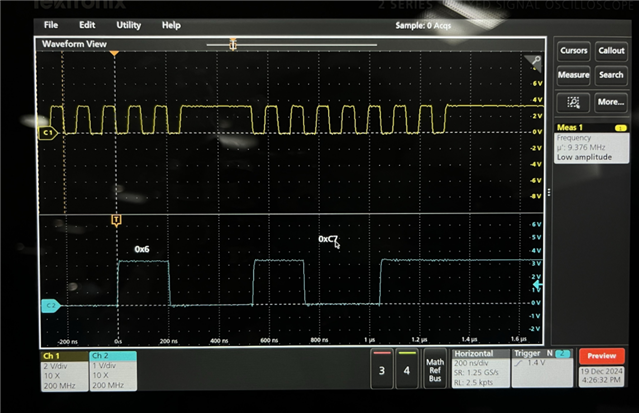
Well, I have explained in my previously reply that, I changed the SPI clock speed to 1MHz,5MHz and 10MHz (default) and verified the respective changes in the capture window. I probed the SCLK, and it was always what I set in the EEPROM window.
We have tested this scenario using three different SPI clock speeds, including 10MHz and other variations such as 1MHz, 5MHz on the EVAL-ADAU1467Z evaluation board. During our testing, the "Chip Erase" command was sent correctly across clock speeds, and no 'invalid data sent' scenario was observed.
To support our findings, we captured the signal waveforms using a Digital Storage Oscilloscope (DSO). The results confirm that the "Chip Erase" command and data communication were functioning as expected at all tested SPI clock frequencies.
The DSP always self-booted successfully with all SPI clock speeds.
please find the scope images below
For 1MHz SPI clock:
For 5MHz SPI clock:
For 10MHz SPI clock:
Regards,
Harish
Hello Harish,
thanks a lot for test this at your end. I also tried to replicate the problem on "Write latest Compilation through DSP" when using different Clock speeds again on a ASAU1467Z eval board.
I have to correct myself. Indeed at speeds of 10MHz and 1MHz the behaviour is as expected. And both write and selfboot uses the specified clocks.
1. Read 4 bytes from page 0 by command 0x03
2. Set Write Enable command 0x06
3. Send Flash Erase by command 0xC7
4. Set Write Enable command 0x06
5. Start writing by command 0x02
But when I set it to 100kHz, then the behaviour is not as expected:
- I started with erasing the flash at speed 10MHz. Just to be sure that nothing left from previous tests.
- The clock when writing through DSP between DSP and EEPROM is correctly set to 100kHz
- But the sequence as shown above is broken. #1 and #2 is sent. But instead #3 another #2 is sent and from here on it is all wrong.
- When I then selfboot, the DSP is just reading the initial bytes of the eeprom. As these are not as expected doesn't boot further. After trying this 3x it stops.
I created captures using Salea Logic Analyser. You can download their software here:
www.saleae.com/.../downloads
To load the captures you do not need any hardware attached.
- "write using 100kHz.sal"
- "selfboot after writing with 100kHz.sal"
Summary:
- clock speed 10Mhz and 1Mhz is fully ok.
- clock speed 100kHz fails.Downloads.zip
Hello andreas.ru,
I can reproduce your issue.
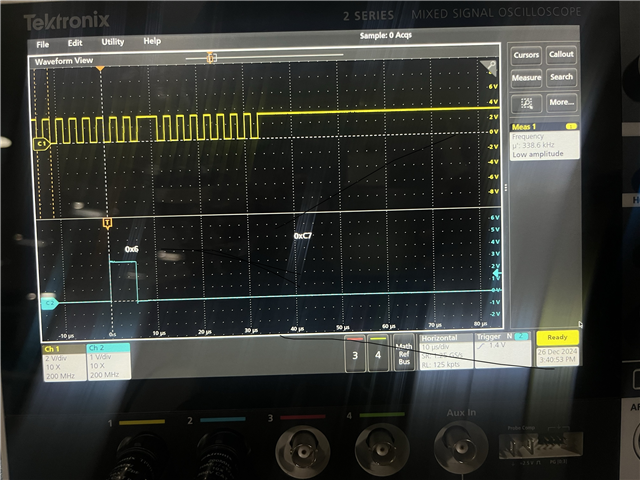
when the SPI clock is set to somewhere below 400KHz, it's not sending the erase command.
Below the SCLK is around 340KHz and it's not sending the command.
Below the SCLK is above 400KHz and it's working as expected.
Sorry for the trouble caused.
Regards,
Harish
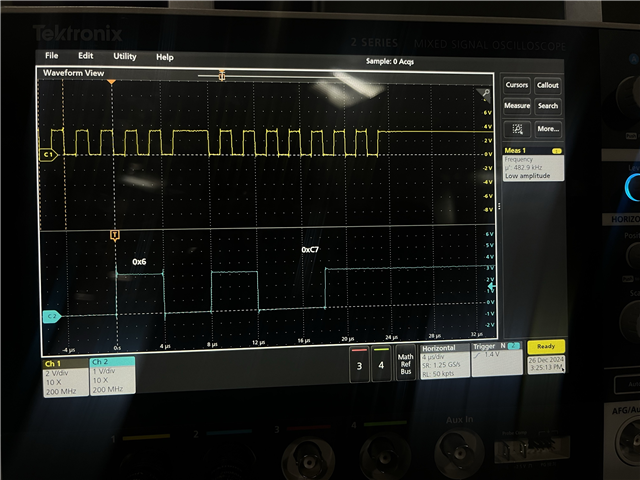
Hello Andreas,
You should not be setting the SPI speed below 400kHz. This has to do with an internal detail with how the SPI speed is created. In our new SigmaStudio+ program we limit the SPI speed to a minimum of 400kHz. You need to set the SPI speed to 400kHz or greater.
Dave T
Please log in to reply.