Fading clicks (similar to echo in a cave) ADAU1761 HP out
Hello!
I encountered strange artifacts at the output of the ADAU1761 headphones. System: some USB-I2S transport + ADAU1452 + AD1938 + ADAU1761.
The sound is normal on the analog outputs of the AD1938.
The system is clocked by ADA1452. The device at the time of development was assembled in a very tight case, all the chips on different boards and connected by wires 2-3 inches long, but it does not look like any inductive consequences (or does it?). Please tell me what to check or what information to provide?
Please listen to the recording (do not mix it up with mouse clicks to start the sound check in Windows). Doesn't look like clicks of clocking problem.
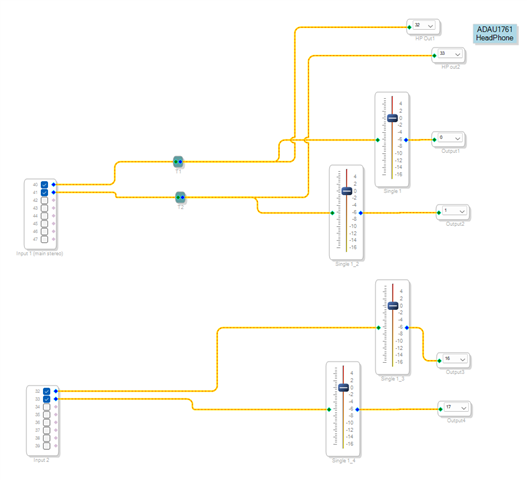
ADAU1452:
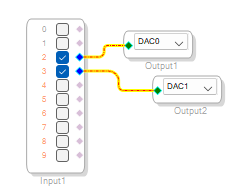
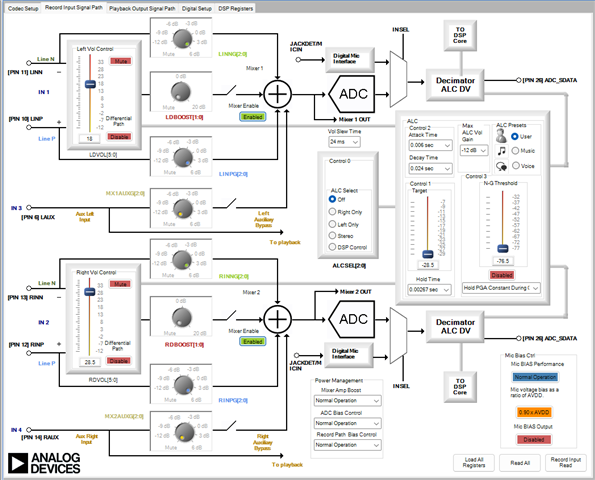
ADAU1761:
Edit Notes
Aditional info
[edited by: OctopusDev at 8:58 PM (GMT -5) on 17 Nov 2024]
Audio Signal Processors
software
Integrated/Special Purpose A/D Converters
SigmaDSP Audio Processors
adau1761
Audio CODECs
Show More

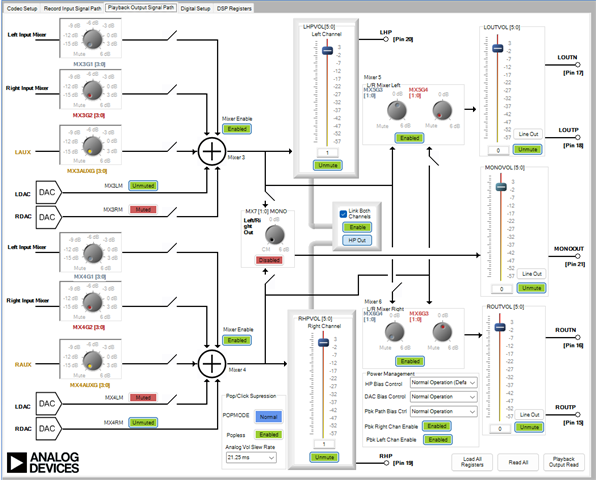
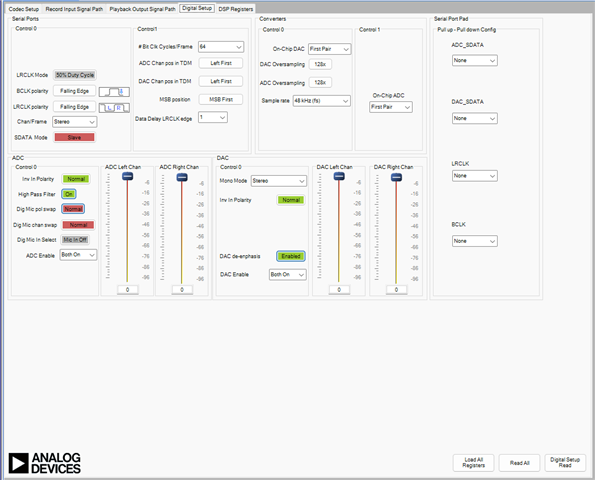
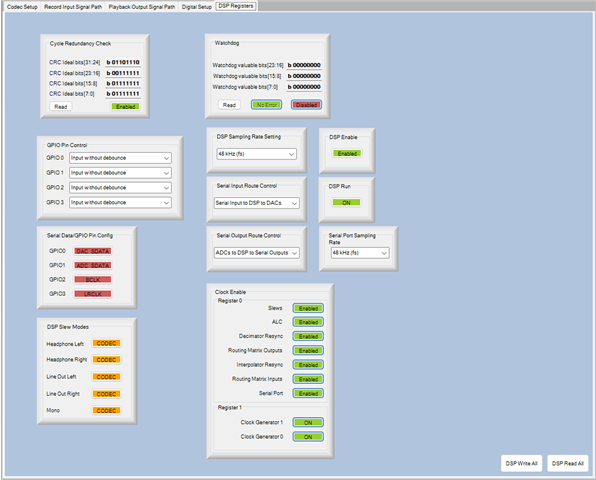
Hello octopusdev,
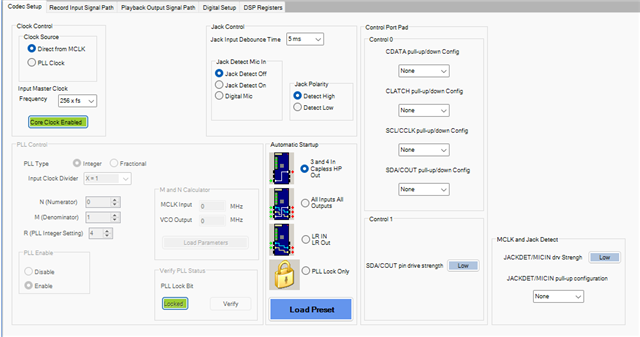
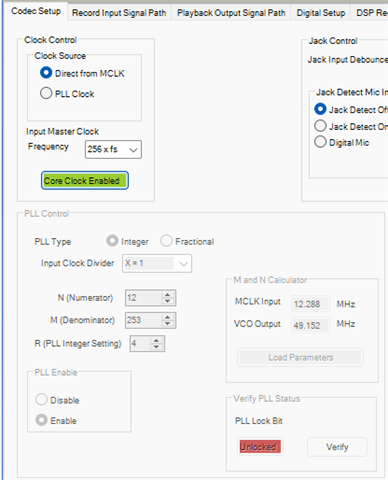
I have noticed that your core clock source is set as 'direct from MCLK' which means you are bypassing the PLL. So, you are only using 25% of the core's potential.
when you use 'PLL clock' as a core clock source then you will have 1024 instructions per sample at 48kHz. The output of the PLL is 49.152MHz. which is usually the core clock to utilize core's full potential.
which is 49.152MHz/48KHz = 1024 instructions per sample.
If you are using direct from MCLK then your core clock is 12.288MHz (your MCLK In) and you will only have 256 instructions per sample at 48kHz.
12.288MHz/48KHz = 256 instructions per sample.
So, why are you bypassing the PLL? Is it how you designed originally?
If you can send your project, then I will have a look and try to simulate it here.
Regards,
Harish
Hello Harish!
Project files and some photo of system in develop state:
Thanks for the clarification on the PLL. I am using it on the recommendation of another engineer, but that was a completely different project.
I don't have a differential signal receiver at hand to check by ear what is happening on the main analog outputs. I can assemble a differential receiver based on ADAU1701 or disassemble the circuit and use 1938 to check the differential analog outputs of ADAU1761, if there are no other options for investigating the problem.
I also noticed something strange. These sound artifacts are only heard on Windows test sounds. I don't hear them on YouTube music.
TNX!
Harishgowtham said:
when you use 'PLL clock'
Are my PLL settings for 48kHz and 12.228mHz cristal correct?
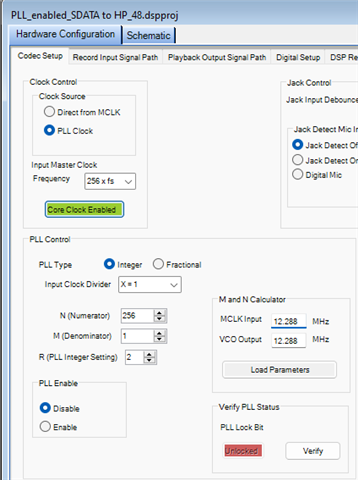
Hello OctopusDev,
No, the settings are not correct.
In Integer mode the N&M are ignored. This means the formula is Divide by X and multiply by R.
12.288MHz /1 *2 = 24.576MHz which is half the core rate.
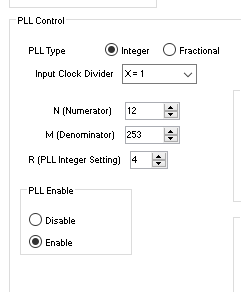
You need to set R to 4.
Here is a screenshot of my settings for the basic starter project using a 12.288MHz crystal. Remember the N and the M are not used in integer mode so it does not matter that is loaded in those registers.
One little side note for other engineers who may read this in the future. I did run into an issue with a customer who had issues with the PLL not always reliably locking. So I looked into it and was able to replicate the issue in the lab. The issue was when you used a 24.576MHz crystal, the datasheet says to use an R of 2. Here it is:
Well, if you do that the PLL does not lock at startup about 1 out of four times. I really do not know why but internally there must be an issue with the PLL. So the solution was to set the input divider to 2 and the R to 4. Then it worked fine every time. Basically, it divided the 24.576MHz down to 12.288MHz and then the rest of the PLL worked fine.
Dave T

Hello Dave!
I simplified the system now it consists of: USB-I2S transport (in master mode) -> ADAU1761.
I also switched to using PLL, but still have artifacts when playing Windows test sound. I don't hear this on YouTube music. I tried to pause music and hear these strange peak fades, but they are not there. System running on standatd Windows USB Audio 2.0 driver.
Let me remind you that AD1938 or ADAU1701 as a DAC works perfectly with this USB-I2S transport. Tell me plese what can be checked before looking for another solution for outputting to headphones.
By the way, the manufacturer of USB-I2S transport and the ADAU1761 module (the same company) did not give any explanations. It seems they do not understand what is happening.
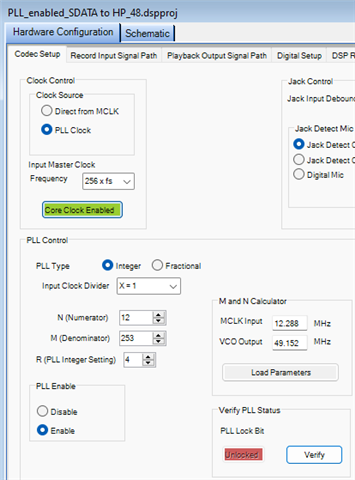
And, PLL works for me with settings (earlier, I made a mistake and did not click "PLL enable" checkbox):
Hello OctopusDev,
AHH!!!
OctopusDev said:
USB-I2S transport (in master mode) -> ADAU1761.
Master Mode!! This is understandable, you have to operate in this way but the problem is that the master clock off of the crystal is not in sync with the master clock coming from the USB. So you will get clicks and pops and the digital filters will have issues with that so you hear interesting sounds.
The 1761 has one feature that the older 1701 does not have. The 1701 you HAVE to use the master clock out of the USB to drive the DSP.
Here are your choices:
1) You do as I just mentioned, you take a master clock output of the USB interface to drive the 1761 MCLKIN and let that drive the PLL. Hopefully they have a 256xfs output. That makes it easy. If not then you have to change the PLL settings. That gets a little more complicated.
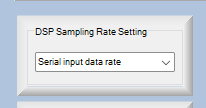
2) You use the crystal to drive the internal system clock but you synchronize the DSP core to run the program only when the serial port data has arrived and is ready. In our newer DSPs we call this the start pulse. This is the clock that tells the core to start running the program. Here is where you find it in this core:
You can set it a I showed in the screenshot to the serial input port rate.
Give this a try.
Dave T

Hello Dave!
Unfortunately, no success. I set it up as you showed on the screenshot:
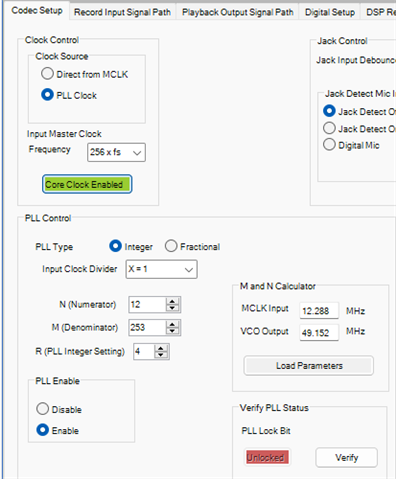
Then I tried the settings with PLL:
And in the usual mode for me:
Absolutely the same distortions on the Windows test signals. I also noticed extraneous clicks when switching tracks in Winamp.
Hello Winamp,
The PLL MUST be set as we discussed earlier. The direct setting is wrong.
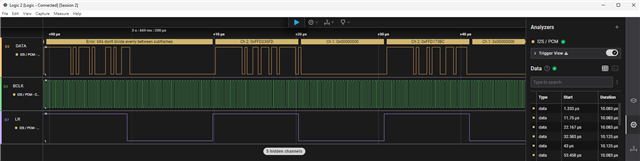
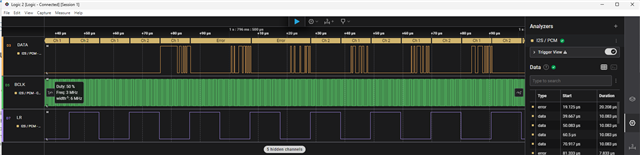
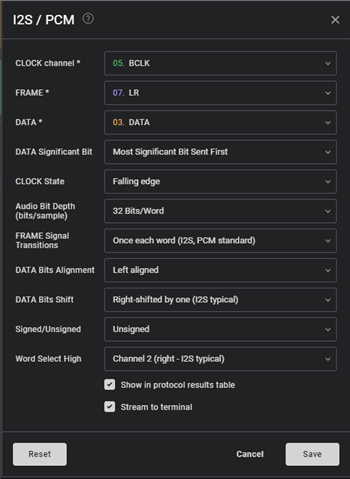
Take some screenshots of the I2S data and clocks. Also, watch it on the screen to see if you see disruptions in the clocks when you hear the clicks. There may be fast changes and interruptions in the signals.
Here is an older post I wrote a few years back about taking I2S screenshots.
(+) How to Take Meaningful Screenshots of I2S Audio Signals - Q&A - Audio - EngineerZone
It would also be good to have a short sound file with the sounds. Sometimes it helps to hear what the issue is.
Thanks,
Dave T
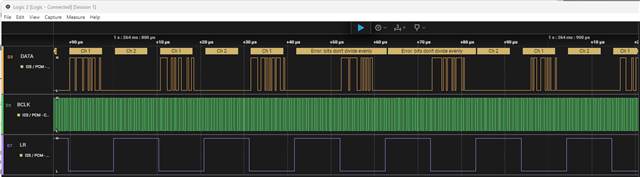
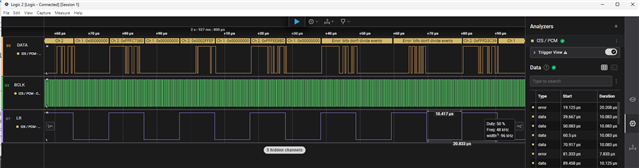
The logic analyzer shows some frame errors. I don't understand why this could be, but my USB-I2S transport is working well with AD1938, ADAU1701, PCM5102.
I recorded a screen video and screenshots. This is the same Windows test sound. I switched the system to 24 and 32 bits. Same result with errors. I'm use PLL settings.
Dave, thanks a lot!
Updated: I noticed that if you connect a logic analyzer to USB-I2S, it also displays a few errors. I also noticed that the errors come in pairs. That is, the logic analyzer marks 4 samples as erroneous.

Hello Winamp,
This is a tough one... Have you tried to use the MCLK out of the USB interface instead of the crystal? We had talked about that earlier in this thread. Does the 1701 board use the USB MCLK output? It should have to use it.
Dave T
Hello Dave!
DaveThib said:
Have you tried to use the MCLK out of the USB interface instead of the crystal?
I do it only like that. MCLK only from USB-I2S transport in my current experiment.
1761 and 1701 it don't use their own crystal on their boards when working with my USB-I2S transport (because it's a master). This is selected by jumpers on 1701, 1761 boards, and I set the slave position.
I just realized, maybe I should use the crystal on 1761 for normal PLL work?
Let me remind that the problem was discovered when the whole system was clocked by ADAU1452. I simplified the system to work only with USB-I2S transport(master) and 1761(slave).
Please log in to reply.