How to make the digital Mic ICS-43434 with ADAU1761 work well?
I ever use the analog Mic to work with ADAU1761, and it works well. Now I would use one digital Mic ICS-43434(made by TDK InvenSense,alike INMP441,), but it doesn't work.
The Hardware conection as below:
ADAU1761 BCLK--->SCK of ICS-43434
ADAU1761 LRCLK--->WS of ICS-43434
ADAU1761 JACKDET/MICIN--->SD of ICS-43434
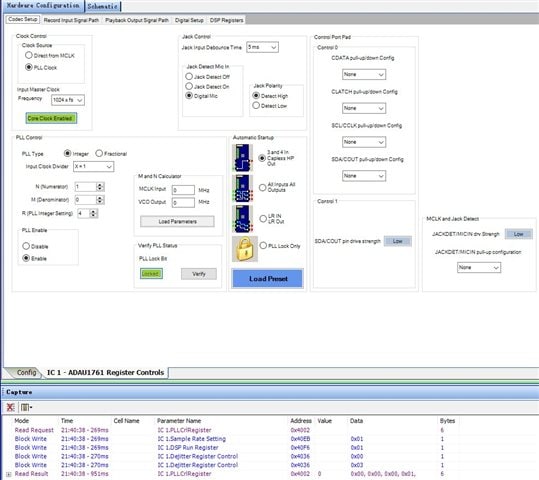
I test one digital Mic, so I connect the LR to GND(VDD also tried), other pins like VDD and GND connect normally. The Mic was also configured as Digital Mic on the codec setup of SigmaDSP, like above picture mentioned.
I link compile and download via USBi, but the digital Mic doesn't work. I tried with many ways but all failed, I don't know if my hardware connection or confirguration is wrong, Could anybody help check or advise what's wrong?
many thanks.
Audio Signal Processors
hardware
SigmaDSP Audio Processors
adau1761
Hello BigGeorge,
Thanks for providing plenty of good information. There is a very understandable confusion going on here.
I could see this being a funny skit for a comedy program. It would go something like this: " Oh that input is for a digital microphone but you are trying to connect a digital microphone! You have to do it differently. You cannot connect THIS digital microphone into THAT digital microphone input!" LOL. Something like that. Your confusion is really understandable.
Here is what is going on that is certainly not clear in the datasheet. By the way, I can defend the people who wrote the datasheet because when it was written there was no such thing as an I2S digital microphone. All of the digital microphones were PDM type of digital signals not I2S. You have an I2S digital microphone so you need to bring in the data into the I2S/TDM data port.
The BCLK and LRCLK connections you made are perfect! That is exactly what you need to do.
The SD of the ICS-43434 needs to be connected to pin 27 on the ADAU1761. This is the DAC_SDATA pin that accepts the data that is being clocked in using the BCLK and LRCLK signals.
So this is your Monday morning chuckle to laugh and move on. I have been there and done that enough times!! No point getting upset, laugh and move on. No stress!
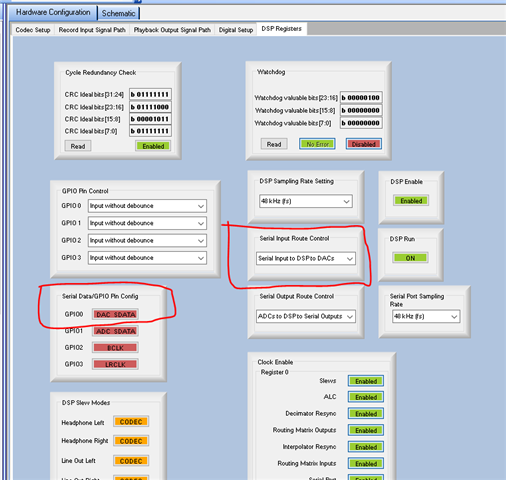
Here is what you need to setup in registers.
Setup the GPIO pins correctly. I circled the DAC_SDATA but the BCLK and LRCLK also need to be set as shown.
Then select the data routing internally. You will not want to bring in the data directly to the DACs. I am fairly certain you want to process it in the core so I circled the setting for the data routing.
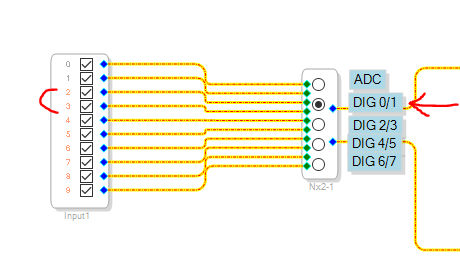
In SigmaStudio Schematic the signal will appear on inputs 2&3 as shown in this screenshot on my program.
The program I was doing used TDM8 so I was using all the digital inputs.
Once you make these changes I think you will be good. I am assuming the BCLK and LRCLK frequencies are setup correctly.
Also, go back and deselect the Digital Microphone selection and select Jack Detect Off.
Dave T
I2SMicDAC.dspproj
Dear Dave, it's very pleased to see your enthusiastic reply, and your humor has given me a wonderful start. I apologized for not providing a detailed description, actually . I just want to bring in the data directly to the DACs, I use the headphone to hear and check if the digital microphone works or not. I followed your instuction to modidy the hardare connection and setup, but unfortunately, the digital microphone still did not work, there was no sound in the headphones. I suspect there are wrong in the setup. So I attached the engineering file directly here. Could you please help me check where it's wrong?
Many thanks.
Hello BigGeorge,
Glad you got my humor. It is difficult to do when on a forum with people who do not have English as their main language. I try to have fun at work and this was funny. The datasheet made no mention of PDM 1-bit signals verses PCM digital because all of the digital mics at the time were all PDM mics.
Have a look at the screenshot I had supplied in my last post where I drew some red arrows to let you know where to pick up the digital inputs. You still had it connected to the on-chip ADC signal.
Do this:
My quick look at the other registers look good to me. I think this will work now.
DaveT
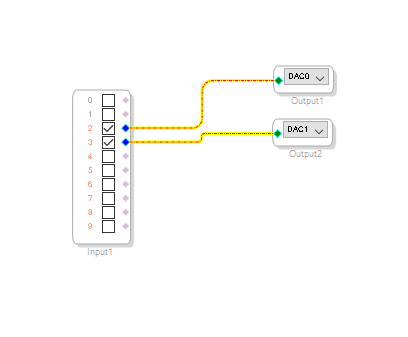
Dear Dave, it's my mistake on the ADC signal, it works well after I correctted. You are really kind and helpful, I can continue my next process, many thanks.
Please log in to reply.