ADAU1761 PEQ biquad filter question
Hello,
ADAU1761.dspproj
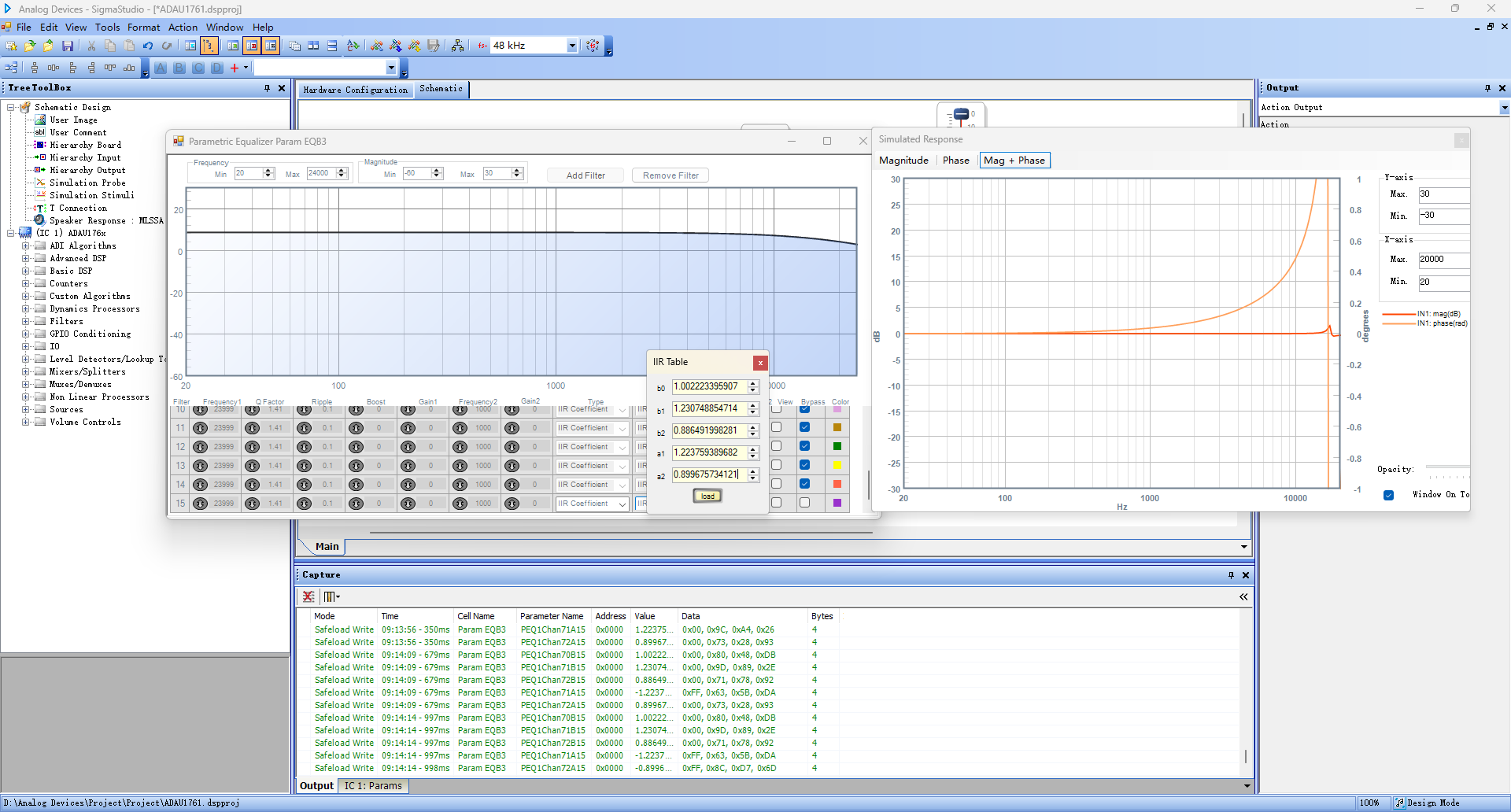
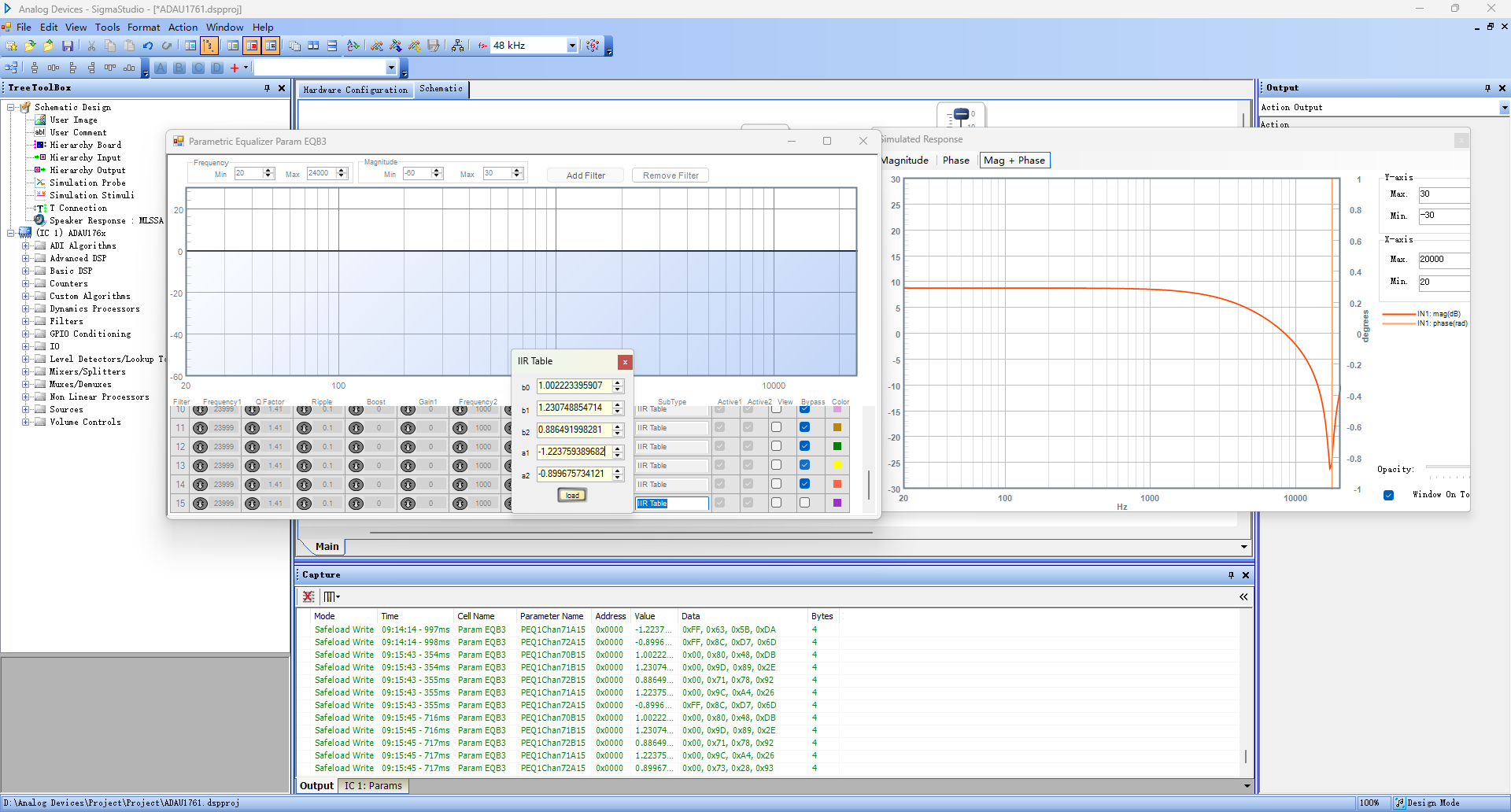
biquad question again. When we tested the output waveform, we found that the simulation differed from the PEQ window. so which result could we trust?
this result is what we expected.
what we need is to use the biquads to output specific frequency response signal. so if this is the PEQ window problem can we just simply use the simulated response window instead?
Audio Signal Processors
software
sigmaStudio 4.7
SigmaDSP Audio Processors
adau1761
ADI North America will be on winter shutdown starting December 24, 2024; perhaps another community member can assist you until our return on January 2, 2025.
Hello Powerpan,
As I mentioned in one of your older posts, it seems the PEQ window is broken. The filter behaves according to the frequency response shown in the stimulus and probe function. Please have a look below. I checked with two different input frequencies and the output of the filter is observed with respect to the response in the stimulus and probe.
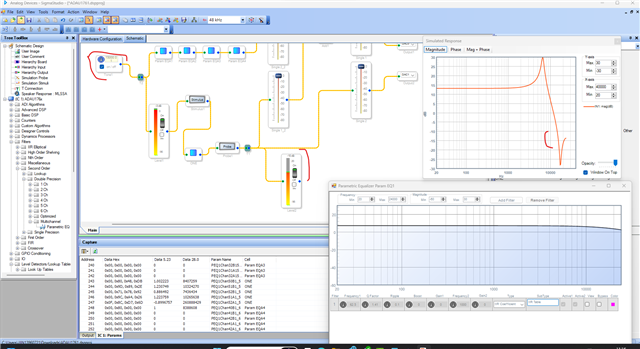
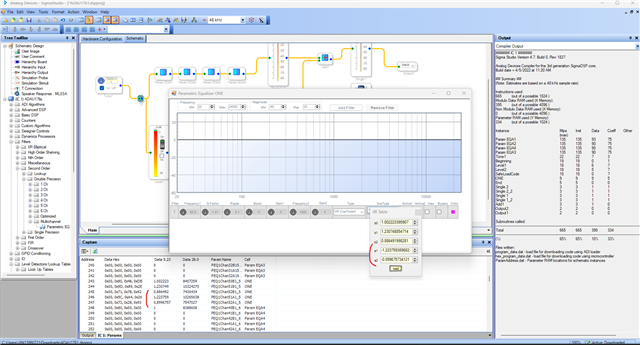
I happen to notice in the picture that your attached above is, in the first picture, both a1 and a2 is positive and in the second picture, both a1 and a2 is negative. while entering coefficients in IIR entry mode, you should make a1 negative and a2 positive. Sigmastudio will flip it and sent to the DSP in correct order. You can that in the capture window. The DSP expects a1 as positive and a2 as negative.
If you make both negative while entering, SS will flip them and send both positive which will not be expected. please look below.
Regards,
Harish

Hi, Harish
thanks for the detailed reply.
in your previous reply you said that: when you are entering the coefficients into the IIR entry mode, make sure that the A1 is negative and A2 is positive, because the SS will flip them and send to the DSP in the correct order (A1 and -A2). You can see that in the capture window that I entered A2 as positive in the IIR entry block and SS changed it as negative in the capture window. SS will send them to the DSP as A1 and -A2. You have to send the same (A1 and -A2) if you are sending from your uC.
but I learned that we need to send -A1 and -A2 to the DSP to get the correct result instead of A1/-A2, so I keep asking the same question. check the original A1/A2 in the picture I attached, both are positive. according to your suggestion, A1/-A2 the result will be wrong. if the biquad is standard, then I have no more questions. just flip both A1/A2 then the result will be correct. can you confirm this?
Best regards
Power Pan
Hello powerpan,
Let me start with a simple example. Below I have two filter blocks, one is a general LPF, and other is an IIR direct entry mode which is ready to be entered with new coefficients. The LPF's cutoff frequency is at 1KHz and Q=0.7, please refer the frequency response. Once I Link compile connect, I will get the coefficients for this LPF from the capture window. which will be B0,B1,B2,A1,-A2.
If I take those coefficients and enter into the IIR entry block in the same order, I don't get an expected response. Have a look at the meters.
If I make both A1 and A2 positive or negative, I don't get the proper output in both cases.
I will get an expected response when I enter the coefficients in the order like -A1 and A2 (SS will invert them both and send them as A1 and -A2). People who are calculating their own coefficients and sending it from uC should sent them as A1 and -A2.
Have a look at the filter formula here and you can see in all type of filters formula that the A1 is negative but when you drag and drop the filter block and set that particular filter and compile then look at the capture window you can see it's flipped. So, you should send A1 and -A2 to the DSP for it to work as expected.
PowerPan said:
t I learned that we need to send -A1 and -A2 to the DSP to get the correct result instead of A1/-A2
May I know how you came to this conclusion, both with same signs haven't given me a correct response above.
PowerPan said:
check the original A1/A2 in the picture I attached, both are positive.
I'm not sure from which formula you derived these coefficients, did you use the formula from the wiki page that I attached above, and for which filter you derived those coefficients.
Please have a look at this post as well, it has some info on it.
Regards,
Harish
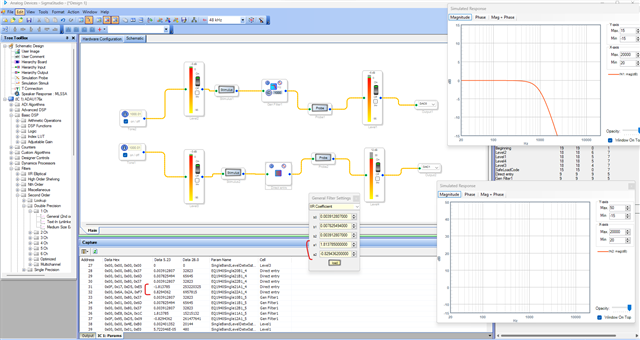
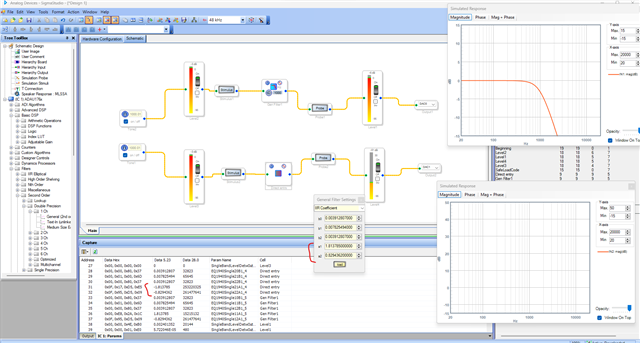
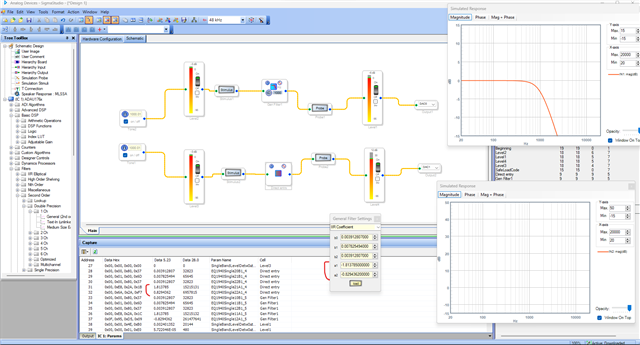
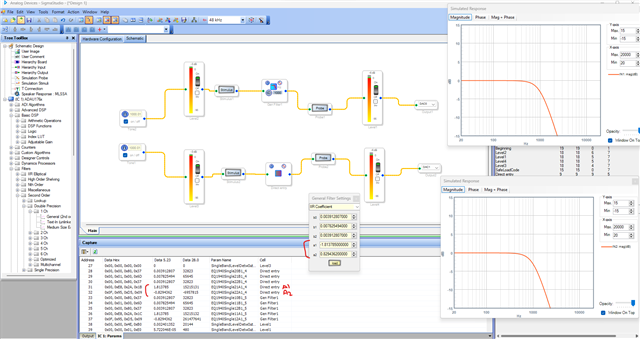
Hi Harish
as I told I'm not using the formula on the wiki page. but the coef works fine in EqualizerAPO. and in the link above said: In the implementation on the DSP, when the coefficients are stored in parameter RAM, a1 and a2 needed to be inverted.
that's what I need.
Best regards,
Power Pan
Hello Harish
I'm having trouble with the biquad IIR coefficients, when input the IIR coef, DSP dies.
Fullscreen
1.txt
Download
1.062611804969673113
-1.892309377378459612
0.834819516160352104
1.851474175667279898
-0.904438283741360816
that's the reason I keep asking the same question. As I know, a common biquad equation is
y[n] = b0 * x[n] + b1 * x[n-1] + b2 * x[n-2] - a1 * y[n-1] - a2 * y[n-2]
I don't know if the IIR filter uses this or not. if not, then the simulation output is correct like
compared with equalizeAPO
so, could you tell me how I could use my coefficients? there 2 groups of PEQs, one is the normal symbol for A1/A2, and the other without probe is reverse
ADAU1761-m.dspproj
and the PEQ window graphic is very unstable, while I input the IIR coefs it shows the frequency response, and after that, it shows nothing.
Best regards,
Power Pan
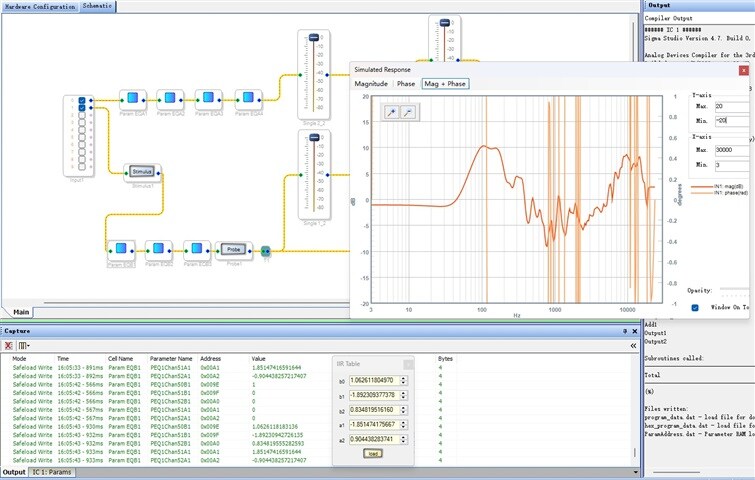
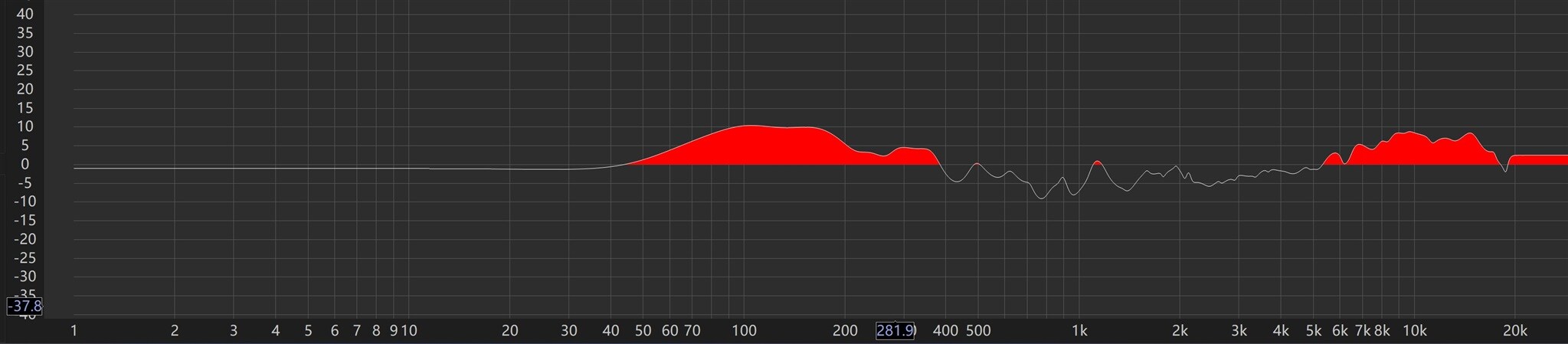
Hello power pan,
You said that you derived the IIR biquad coefficients from Matlab. What is the frequency response for the IIR filter? what is your desired frequency response?
When I take your attached coefficients and entered it in SS (A1 and A2 flipped), below is what I got. you can see the meter's level before and after the filter which confirms that the filter is working as per the frequency response graph in sigma studio.
In your schematic below, the circled part is the correct one with coefficients entering.
And the frequency response of the circled part in SS and another plot you attached are equal as you compared.
If you still have doubts, then use a single IIR block like me and plot the frequency response in SS and measure the input and output levels, then you can be sure that your filter is working as expected and your coefficient order is correct.
PowerPan said:
y[n] = b0 * x[n] + b1 * x[n-1] + b2 * x[n-2] - a1 * y[n-1] - a2 * y[n-2]
Yes, these filters are DF-1, and this equation is right. Please refer this thread for some more info on sign inversion.
Regards,
Harish
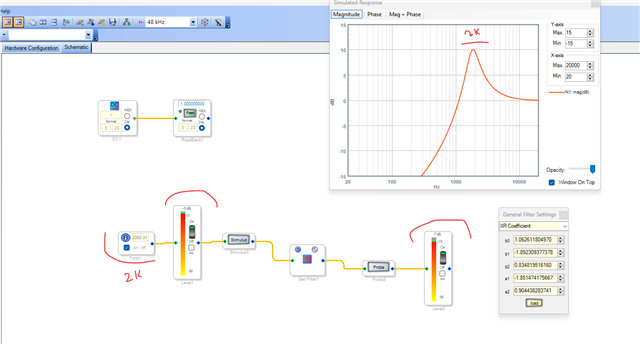
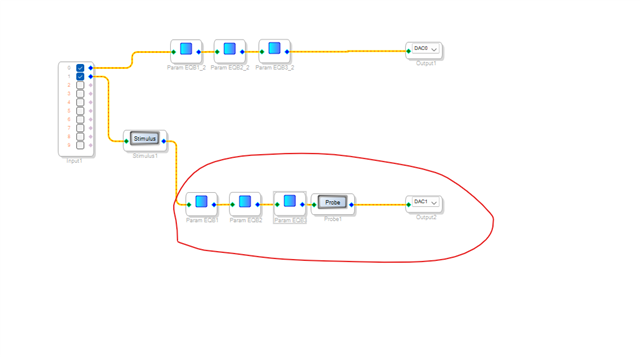

Hello Harish
Seemed that we fell back to whether we needed to flip the A1/A2 symbol question. As you referred(https://ez.analog.com/dsp/sigmadsp/f/q-a/166557/the-coefficents-a1-and-a2-needed-to-be-inverted-in-the-iir-coefficents-caculation-procedure/377794), SS will flip A1/A2 before sending it to the DSP, so I just copied the data into two parts, one is the result of the correct coefs, and the other with A1/A2 flipped to test the filter. Now the problem is neither flipped data nor correct data could work.
could you please help me out? I have been fighting with this for weeks :(
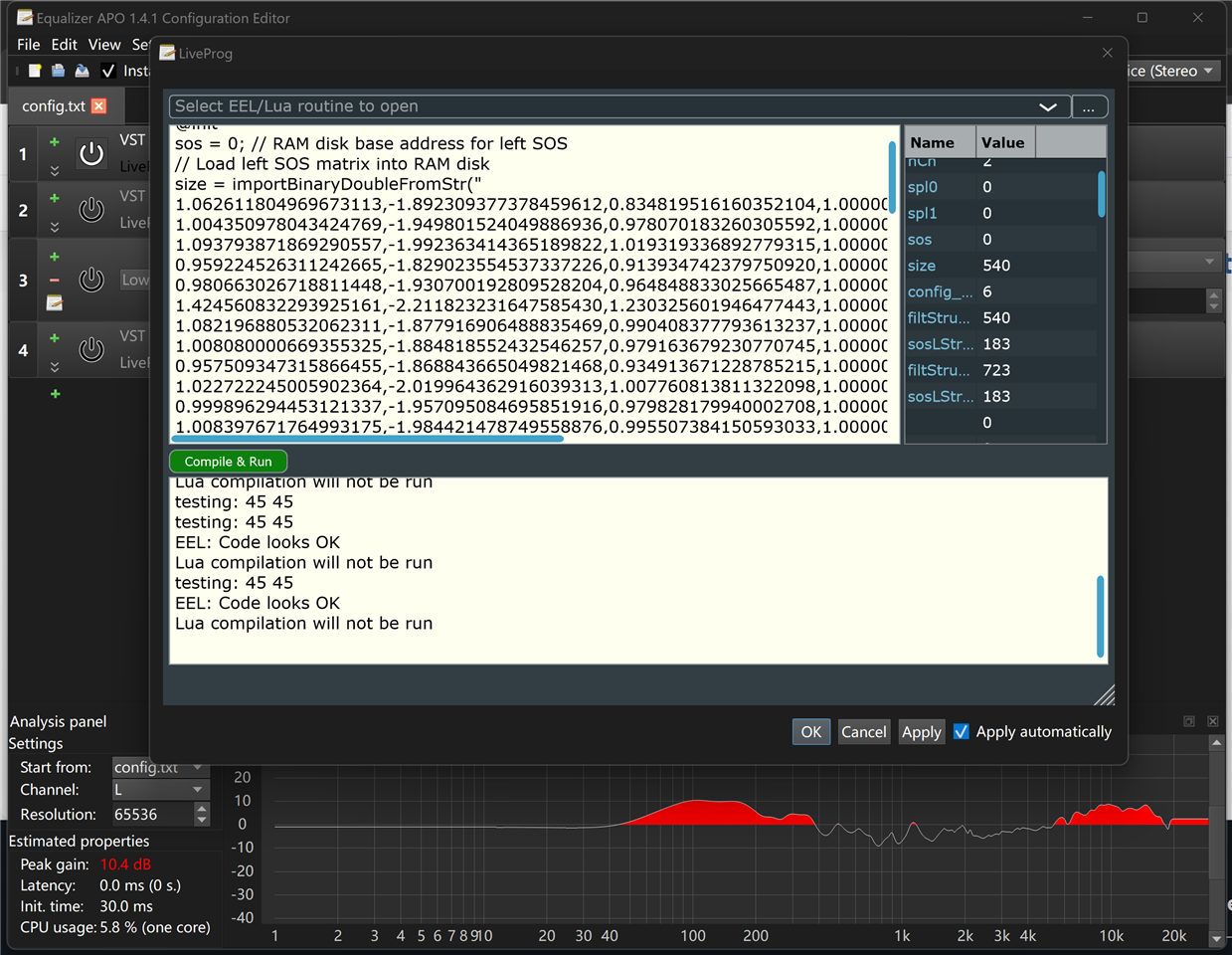
attached picture is from equalizeAPO, an open source EQ software that could run the data we provide without any problem. our working procedure is: sampling, calculating, comparing, simulating using some mutual software, and finally download to DSP board.
Best regards,
Power Pan
Hello Powerpan,
Sorry for the confusion. I have a couple of questions, and it would be helpful if you address them.
In your attached project, you have two sets of PEQs, one is correct (A1 and A2 flipped IIR entry) and other one is directly entered from Matlab (Incorrect according to sigma studio). You say, you don't get the correct output from either of them? If that's the case, you must be sure that your derived coefficients are correct and it's giving you the correct frequency response that you desire.
Are you sure that Matlab coefficients that you derived gives you the correct frequency response that you desire?
Easiest way to plot the frequency response with a set of biquad coefficients is to use sigma studio direct IIR entry mode and check if the coefficients are giving the correct frequency response as it is designed to give. If I was given a set of biquad coefficients, the first thing I do is to plot the frequency response graph using Sigma studio.
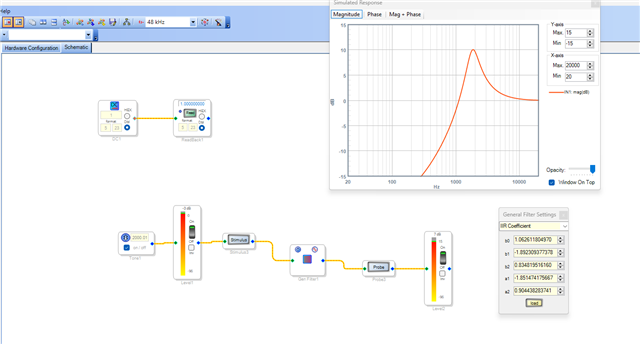
when I took the coefficients that you attached in the text file above and entered it in sigma studio, below is what I got. Is that your desired frequency response for that single IIR biquad filter?
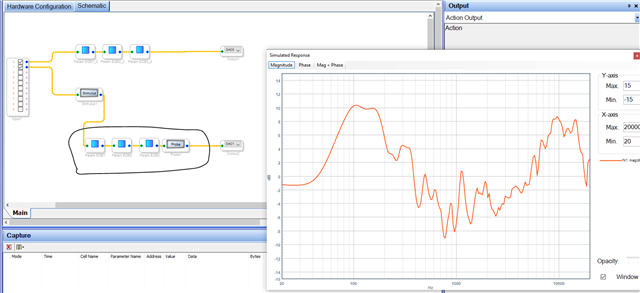
And you are adding 5 different filters per PEQ block, and you cascaded 3 PEQ blocks. So, there are 15 IIR biquad filters cascaded and your final frequency response is like below.
and your loaded coefficients in the equalizeAPO tool also gives the same response as sigma studio.
So, is it safe to assume that this is your desired frequency response?
PowerPan said:
Now the problem is neither flipped data nor correct data could work.
Above shown is your desired frequency response, but you don't get an expected output? Is that the problem now? Or the actual problem is that the frequency response shown above is not the desired one?
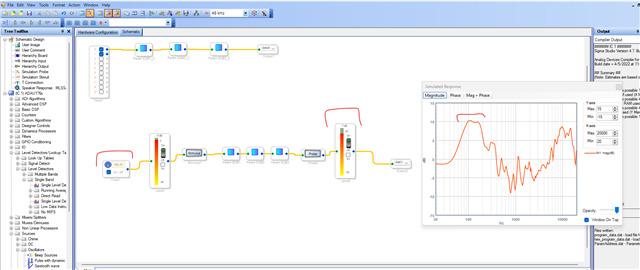
I will add one last detail; I ran your project, and I got an expected output. The filter works with respect to its frequency response. I will add couple of pictures here. The filter works correctly based on its frequency response (coefficients inputted).
Could you please explain a little about the problem that you are currently facing?
PowerPan said:
Now the problem is neither flipped data nor correct data could work.
Is it in the filter designing side (response graph) or in the audio output side?
we need more info on the issue you are facing.
Regards,
Harish
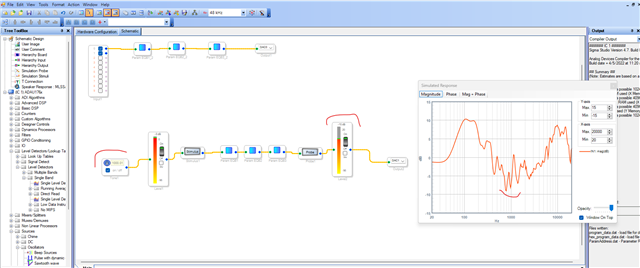
Hello Harish
sorry for the late reply cause I moved to a new place and had lots of work to do like pack and unpack.
Harishgowtham said:
Are you sure that Matlab coefficients that you derived gives you the correct frequency response that you desire?
yes, sos filter is very common.
Harishgowtham said:
Is that your desired frequency response for that single IIR biquad filter?
yes
Harishgowtham said:
Above shown is your desired frequency response, but you don't get an expected output?
NO by using PEQ block. in all the 45 filters, just enable the first one then fail with noise as I told.
Harishgowtham said:
Is it in the filter designing side (response graph) or in the audio output side?
yes. 3rd party software could run very well.
I tried to recreate the simple project but failed. I attached the NG test project below. try to adjust the output volume after PEQ and will output noise.
ADAU1761.pptest.dspproj
and with 45 IIR other with 3 PEQ blocks both works in the below project. but the compile output is different. 45 IIR uses 45*10=450 mips PEQ blocks uses 135*3=405 mips. so IIR filter is not equivalent to PEQ IIR?
ADAU1761-gt.pp.dspproj
Best regards,
Power Pan
Hello Harish
any idea of what happened for the projects?
best regards,
Power Pan
Hello power pan,
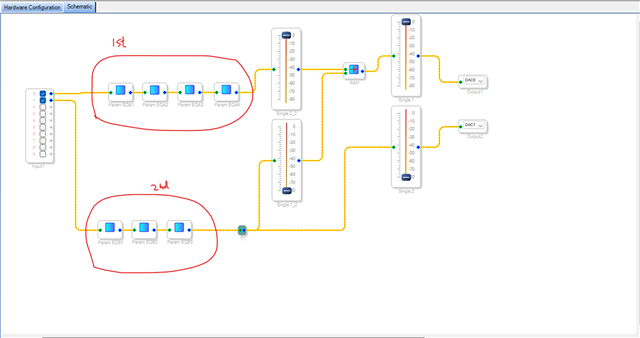
You have two different PEQ sets which I attached below. Each PEQ block has 15 IIR filters.
The first set (that I marked as 1st) has 4 PEQ blocks and 60 IIR filters in total. You enabled the first IIR with 0.5 boost then the rest 59 IIR are not in action (it's all set for 0dB gain). This individual path is working fine for me.
Your second set (3 PEQs and 45 IIRs) has a problem. It has A1 and A2 sign conversion problem (SS expects -A1 and A2 but entered A1 and -A2). I don't know why you still entered it this way. So, it will produce some undefined frequency response like below. we can't say what these filters do with the input signal.
You are adding these two paths (one has an undesired frequency response). So, it may be the reason for the noise.
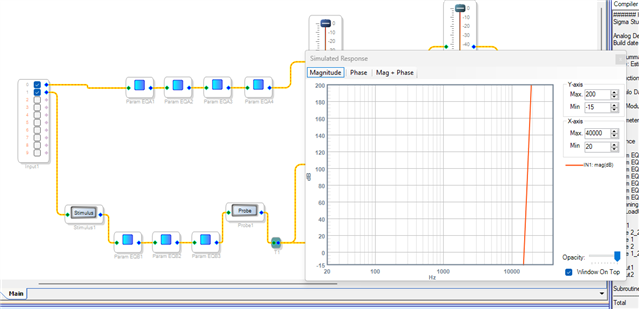
I adjusted one of the filters in the fourth PEQ (between 45th to 60th) and it works fine. Please look below in the meters.
So, your first set of PEQ works fine. Did you check the first path alone without adding with the second path which has coefficient inversion error.
And where do you measure the noise, and can you please send the scope shot of it?
what is your MCLK frequency coming in? I noticed that you used "Direct from MCLK" setting in the core clock source, it's always recommended to use PLL to avail various advantages. So, you may have a problem with your system clocking. please clarify your clocking setup.
Regarding the second project,
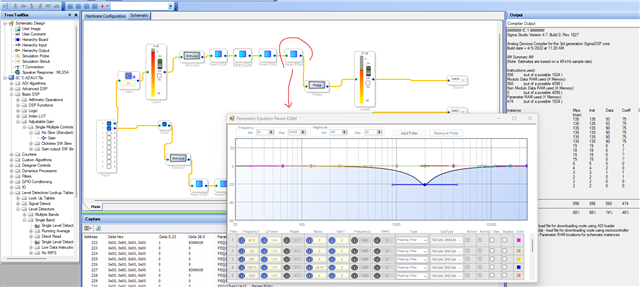
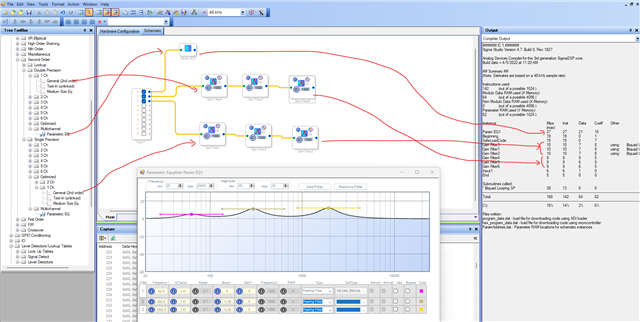
The 45 IIR filters that you used are "optimized version" which uses 10 instructions and also has a subroutine.
whereas the PEQ module uses the general IIR DP filter which uses 9 instructions.
There is a difference of 1 instruction (excluding the subroutine), so 45 filters result in 45 instructions between the PEQ filter and the optimized filters. please have a look below.
Regards,
Harish
Hello Harish
PowerPan said:
and with 45 IIR other with 3 PEQ blocks both works in the below project. but the compile output is different. 45 IIR uses 45*10=450 mips PEQ blocks uses 135*3=405 mips. so IIR filter is not equivalent to PEQ IIR?
ADAU1761-gt.pp.dspproj
I need the answer to this question. could you please explain this?
On my side, sometimes it works sometimes it doesn't, but the project I attached with IIR above and PEQ below, both works.
Best regards,
Power Pan
Hello power pan,
PowerPan said:
I need the answer to this question. could you please explain this?
I have posted a screenshot above by comparing three filters, Is that not understandable?
As I already said above, The PEQ uses general 2nd order SP/DP IIR filters, but you used ''optimized version'' which will take few instructions more than the general filters.
The "Optimized version is optimized for program memory usage but the tradeoff is MIPS usage. The non-optimized version uses much more program memory but uses less MIPS.
The reason is that the optimized version uses "subroutines" that are called many times for a repetitive function so that it saves on memory. However, the overhead of dealing with switching context uses up some more instruction cycles than the non-optimized version that is just in-line code for the entire algorithm.
They both work the exact same way and perform the same. So, you can make a choice based on code-size or instruction usage.
This is the reason for the MIPS difference that you are seeing in the compiler output. You are comparing the PEQ filters (which are non-optimized) with the optimized filters, hence the difference. However, both will perform in a same way.
One other thing that I noticed, you are using 45 individual IIR filter, instead of it you can grow the filters which will save you some MIPS. I guess you use 45 individual IIR filters for testing purpose but still.
Regards,
Harish
Hello Harish
thanks for the explanation. you explain why there is a difference between IIR and PEQ, and after carefully comparing the picture you posted, maybe this is the difference between single and double.
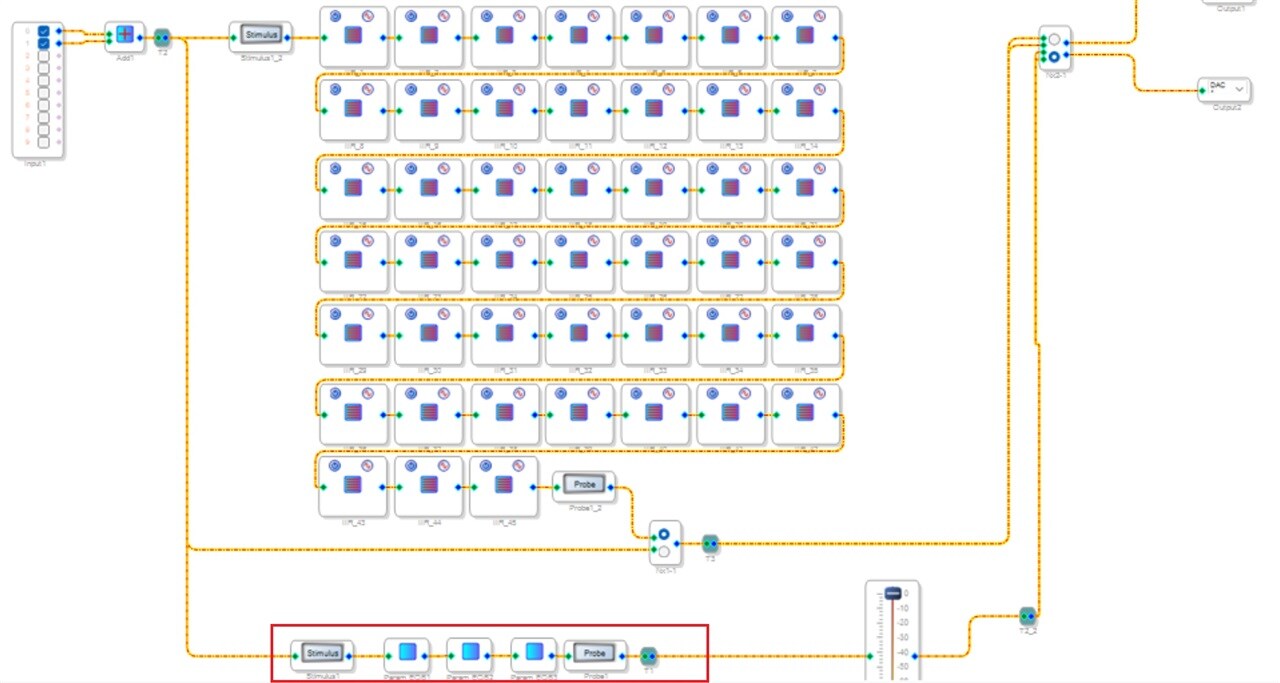
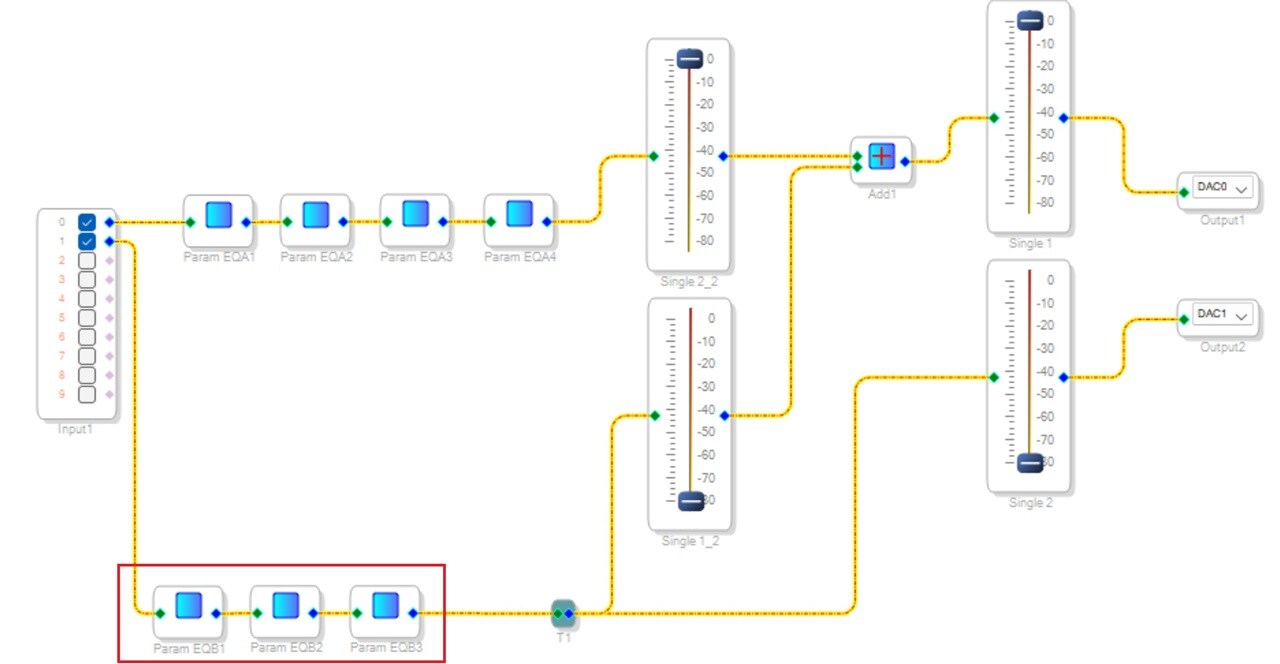
Still, I have another question, one PEQ could work and the other could not while they have the same coeffs,
above PEQ in the red box could work, and the below with the same coeffs in the red box couldn't.
Best regards
Power Pan
Hello Power pan,
PowerPan said:
above PEQ in the red box could work, and the below with the same coeffs in the red box couldn't.
We now again have come to where we started. The coefficients are not same in two of the pictures you posted. You still got the coefficients entry wrong in your second picture.
In the first picture, you let SS to take care of the filter coefficients for your required parameters. So, it takes care of the coefficient inversion. so, it works fine.
In your second picture, you use IIR filter entry mode. so, you have to the enter the coefficients in -A1 and A2 order into the coefficient window. But you entered it as A1 and -A2 which will produce wrong results, and the coefficients are not same between your two projects.
As I have been saying, you MUST enter the coefficients in the correct order to get expected results. Please have a look at my earlier replies.
Regards,
Harish
Hello Harish
thanks for the prompt reply.
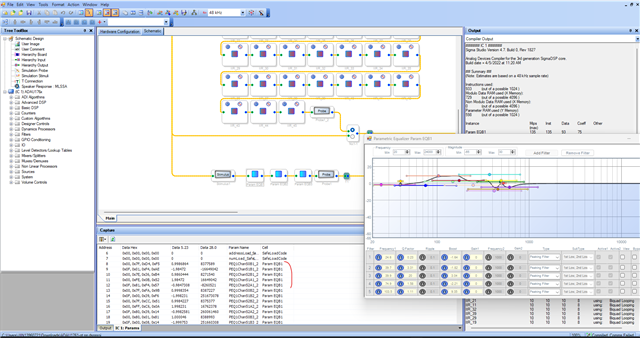
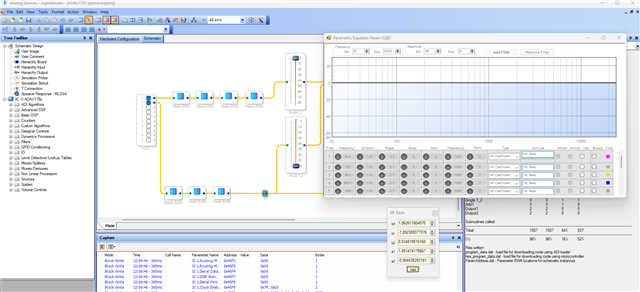
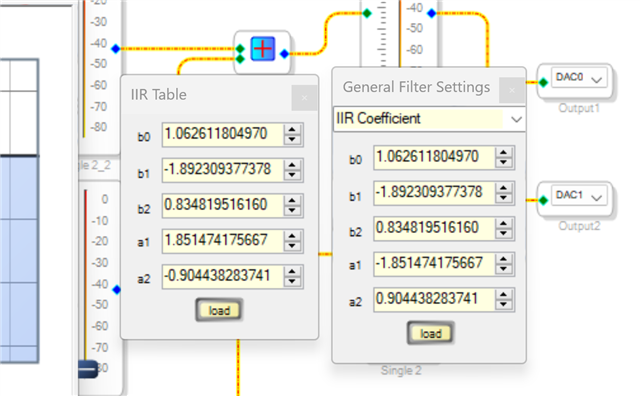
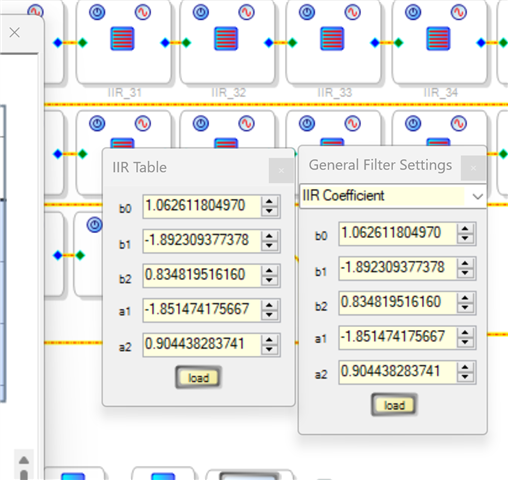
I compare coeffs above, which are inverted. but could not work.
In the below coeffs, it is not inverted, but it could work, so that's why you told me not to inver the coeffs in one reply above. and I need to explain more, we make another filter that after SOS filter, we convert to PEQ, so that there are 2 choices we have, one is customized SOS and the other is peaking filter—both work after I tested. but I could not verify now and will do it later when I get back to the office and post the result to tell more detail. so I think this problem is solved.
Best regards,
Power pan
Please log in to reply.