Is there a way to edit values of cells outside there pre-set limits
I have two of the ADAU1701 chipset and use sigma studio for development, although i get by with the values that are set and there limits. i wish to know if i can go over by a DB or so as a call either placing two cell in parallel doesn't add or double there effect or the resources of a cell is high to use two and be over the processing limit of the layout. For example : the phat-stereo, for the gain level max value is 6DB can i edit the cells code to have 12DB. And is there a way to crate custom cells, the selection is good but can you create more your self or download other outside the ones that come with the software as is. Thank You for your time.
Audio Signal Processors
dsp
software
4.7
sigmaStudio 4.7
problem
parameters
Integrated/Special Purpose A/D Converters
sigmastudio
SigmaDSP Audio Processors
adau1701
Show More
Hello ZaneGG,
This is a good question and you are by far not the only person to have ever asked this. Creating custom cells is not a feature that we expose to everyone. It is not a simple process and proprietary information has to be revealed so this is not an option at this time. Perhaps in the future...
As far as limits that are set in the blocks I have found they are usually good and things you do not want to change. However, there are a few that are somewhat arbitrary and the programmer did not fully anticipate usage of the block.
The Sigma300 parts have the ability to write to their own registers and memory locations so we have blocks to do that. The down-side of this is that the write is done every sample period. But, the ADA1701 is the Sigma100 core and it cannot write to its own registers.
If you have a system controller you can figure out the location of the parameter and then change it from a system controller. This can get a little tricky to find the location and if you ever recompile the project you have to find it again. Not very practical. However, you can use the Capture window to tell you the address of the parameter.
I compiled a small program and I think I found a small bug that is not a huge deal.
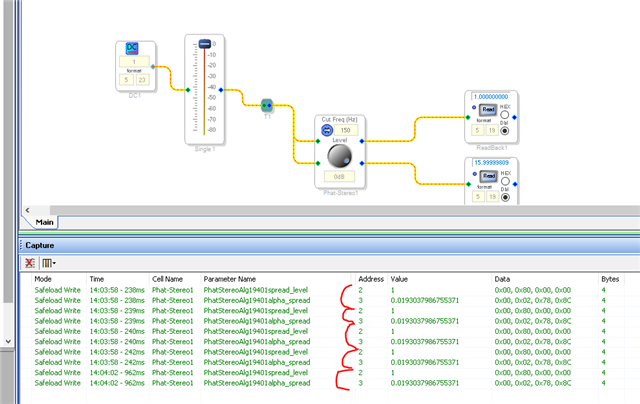
I clicked in the cell and I entered 0dB and this is what I found in the capture window.
You can see that it wrote two parameters. A level and an alpha-spread which I have no idea what that is.
However, the bug is that it wrote it five times!!!
The level is at address 2 and the alpha-spread is address 3. So you can write into these with a system controller. But, there might be other issues and reasons why they limited it to 6dB max.
Note that the level parameter = 1. This makes sense with a 0dB setting. That would be no gain change so it is clear that the parameter is a gain factor. To verify this I changed it to +6dB
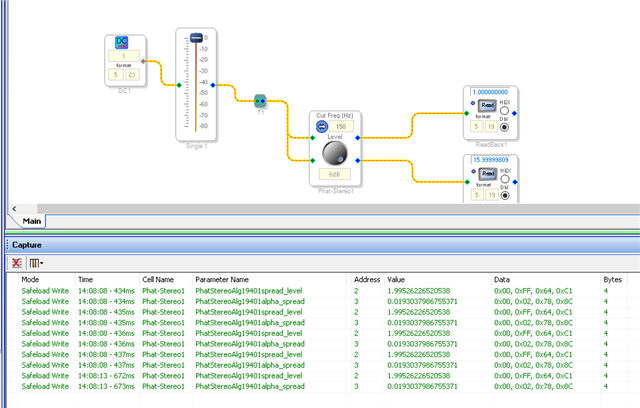
Here is the result:
You can see that the level is now set to 1.995... Almost 2. This is because the gain factor of "2" would be roughly 6.02dB so 6dB would be slightly less than 2 and it is. Also the other parameter did not change.
If I change the frequency then the Alpha-Spread changes which makes sense. So see, we just figured this out using the Capture window.
when I changed the Cut Frequency it wrote both parameters again but this time it only did it once.
I hope this helps.
Dave T
Thank you for the awareness of the capture window as before, if I went over will the 1020 byte limit (1020 or so ) the chip would output a constant tone at extreme volume ( sounds like white noise ) which has claimed 6 speakers last year alone. So at least knowing how close I am saves me a lot.
You show me there are limits to these things which may not be as fixable as others.
The images you in included inciteful, although there not targeted to the problem head on. But I'm grateful for you explaining the workings at hand.
I recently saw your reply on another question that user made cell are coming, and await there update to add such ability. As Some cell have features others often don't need, have 2 channel when you only need one (there no mono version for some cells) which could free up bytes for other cells. I'm happy it being looked in to.
Thank you for your time, responding, and I wish the team and devs all the best in there coding.
Hello ZaneGG,
It is great that you are learning about the tricks of using SigmaStudio. Have you found my YouTube channel yet? I do have a video about the Capture window and a few other topics. I have several videos that are specific to the 1701.
Here is the link:
Channel Welcome Video!
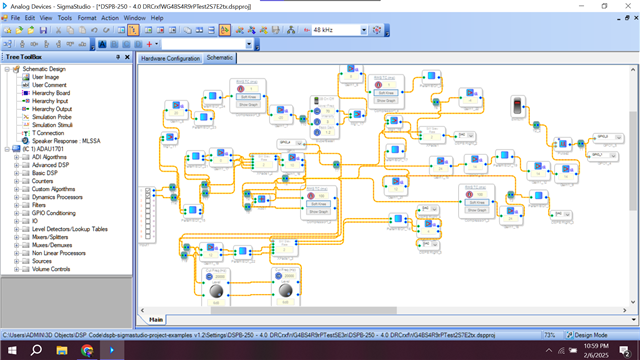
Thanks for showing a screenshot of your project. I have several quick comments about it.
The first is that the ADC converters will put out a DC offset. I always put in a DC block at the front of the schematic to block it. However, that uses instructions! If your parametric filters are setup to roll off the low end it will remove the DC offset or reduce it so you will not get pops when switching signals, muting or things like that.
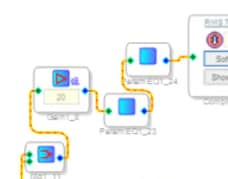
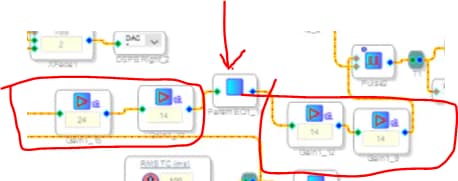
Looking further, there are places where you can save a few instructions here and there. Take a look here:
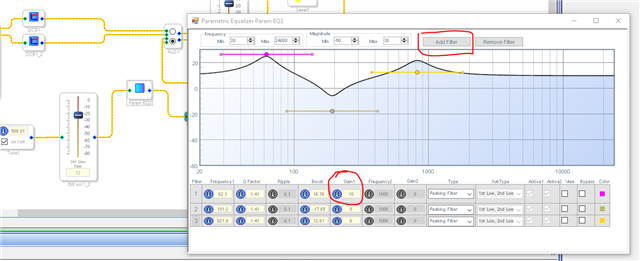
You have a gain cell then two parametric EQs. To pass data between blocks the block has to complete its code and write the result to memory. Then the next cell has to pick it up from memory. This adds a few instructions. It is not a lot, I forget exactly but it is two or three. Then if you look at the parametric EQ block, you will see that you can add filters to the block. So combine the two EQ filter blocks together into one block and save a few instructions. Then within the filter settings you can add gain to the entire filter. You are only allowed to add 10dB per filter but you can get the 20dB you currently have the gain block set to by getting 10dB using two filters. Or spread it out to a few dB per filter to get what you need. This is seperate from the boost or cut for the filter.
Here is an example, and you also see the DC blocks I always use.
So you can combine those three blocks into one most likely.
In this section below, you have gain blocks in series again but in this case you need to because you can only get 24dB max in the block due to the number format. You are getting 38dB and 28dB. Depending on what you have in the filter block you might be able to get some gain in the filter block to remove one or more of the gain blocks. By the way, that is a heck of a lot of gain! I am not sure exactly what you are doing here? You are using a voltage controlled pulse width block but you only have a manual switch? I guess you might be flipping the switch with a system controller of some kind? I l also see if I look further back the signal that is feeding these set of blocks is going through another 10dB boost gain block and then summing two channels! However, the summing is probably not adding 6dB of gain because the block feeding it is a cross fade block so they both will not be at full volume at the same time. I have a feeling that what you are doing probably could be done in other ways more efficiently. There can be many many ways to do the same thing in SigmaStudio. It is such a creative environment to work it.
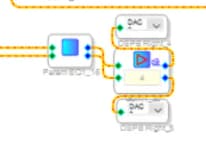
Here is the outputs to the DACs. This gain block can be folded into the filter block .
I need to run off onto other things so I do not have time to study your schematic further. I think you can trim this down and save instructions and get the same tasks done possibly better.
Thanks for taking the time to write!
Dave T
Please log in to reply.