[Bug Report] Application Exception with Hierarchy INput, Hierarchy Output and Speaker Response MLSSA Modules
[I'm a brand new newbie to this forum so I apologize if this has been asked and answered already but I've spent a couple of hours now searching and havn't found anthing like this. If it has been answered please just submit a pointer to it and I'll follow up there.]
I am learning SigmaStudio 4.7 running on a Windows 11 system. I haven't even received my hardware yet (KABD-4100 and KPX Programmer) but I want to be ready to play with it when it arrives...
There are three SigmaStudion modules that "throw up on their shoes" when I add them to my schematic:
Hierarchy Input, Hierarchy Output and Speaker Response MLSSA are the "culprits."
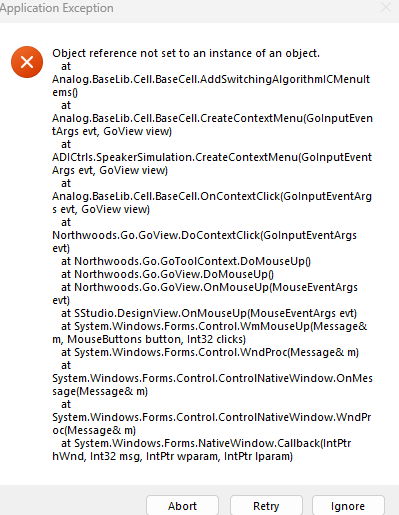
Clicking (left or right) on the Speaker Response MLSSA dies badly with an "Application Exception" error listing, "Object Reference not set at instance of an object at Analog.BaseLib.Cell.BaseCell...<blah, blah, blah>."
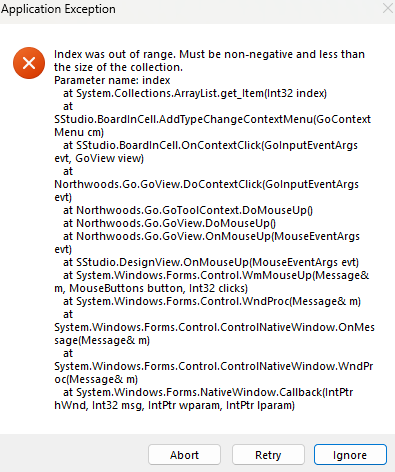
Clicking (right or left) on the Hierarchy Input or Hierarchy Output modules dies with similar Application Exception window: the text starts out, "Index was out of range. Must be non-negative and less than size of the collection... <blah, blah, blah>"
I cannot even delete (right-click to select Delete) the module from the schematic window - the Application Error window opens and nothing more can be done.
Any help greatly appreciated.
Hello kdericson,
Glad you are jumping into this with both feet! Awesome! This is most likely an example of not using the blocks correctly. You should attach your project but I am going to make some educated guesses.
I expect you are not using the hierarchy input and output correctly. These must ONLY be used within a Hierarchy Block. If you try to use them outside of one the software may very well have no idea what to do and crash. The MLSSA block I am going to guess that you did not point the block to an actual MLSSA data file.
There are some resources you need to be aware of and bookmark in your browser.
The first is the Wiki help files. You can highlight a block and press <F1> and it will take you to the page for most blocks but not all. But here is the root of the help files:
SigmaStudio and SigmaDSP Documentation [Analog Devices Wiki]
Then there is my YouTube channel. This is a good place to start. It is a pet peeve of mine that often software does not start simple enough for the first time user. Just the simple thing of how do you start a project? There often are no help pages that are that simple! So on the YouTube channel there are a few basic videos.
Here is a link to the welcome video on the channel:
Channel Welcome Video!
But, let me help you further. These two videos are the ones to watch for newbies.
(23) Intro to SigmaDSP and SigmaStudio - YouTube
And then one for the 1701:
Creating a Starter Project for the ADAU1701
Then there are many more for various subjects.
They are not too terribly long.
Dave T
Please log in to reply.