E2PROM Selfboot Mode not working
Hello, I encountered a problem while trying to program the 25LC1024-1 EEPROM using our custom-designed board with the ADAU1466Z. When I attempt to load a program onto the EEPROM via the DSP using SigmaStudio, it appears to upload successfully. However, after resetting the board in 'Selfboot' mode, the uploaded program does not run. Additionally, when I check 'Check Last Compilation,' I see the message 'Succeed.' But in the WinE2PromLoader section, all values appear as 'FF.' Moreover, I have verified that the CS, WR, and other related pins are correctly set.
What could be the possible technical issues causing this problem?
By the way, on the Eval-ADAU1466Z board, I can successfully load the program onto the EEPROM at a 48 kHz sampling rate. However, on our custom board, which has a sampling rate of 192 kHz, the program cannot be loaded into the EEPROM. Also we can perform all other DSP activities on the pcb we designed.
Thank you in advance for your response.
Sincerely,
Busra
Audio Signal Processors
hardware
eeprom
sigmastudio
SigmaDSP Audio Processors
selfboot
adau1466
Show More
Hello Busra,
There are many little things that can derail this process. We have to eliminate things one at a time. Does your board have the ability to defeat the "selfboot"? It is best to program the EEPROM when selfboot is defeated. Because SigmaStudio will initiate a reset when programing and that will start the DSP to do a selfboot while you are trying to program the EEPROM.
The WinE2Prom loader stuff is for other DSPs where the EERPOM is directly connected to the USBi. It will not work wit4h this DSP because the EERPOM is not connected to the slave port. It is connected to the master comms port so you HAVE to program the EEPROM Through the DSP.
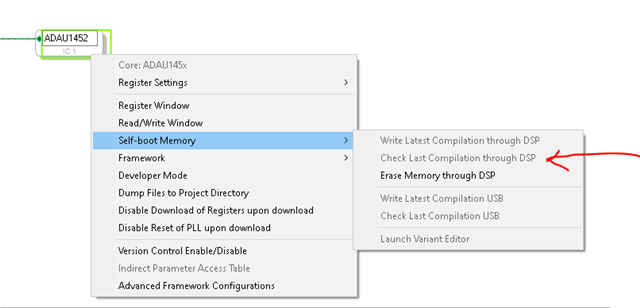
Have you checked it by using the Check Last Compilation through DSP command?
Is the EEPROM connected to the DSP in the exact same way as it is on the eval board? It could be a hardware connection issue.
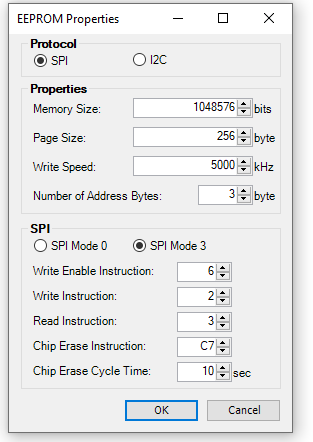
What are your settings for the EEPROM properties? Provide a screenshot. If those are not set properly it will not work.
Sampling rate makes zero difference.
This is a start.
Dave T
adau1466 said:
I have verified that the CS, WR, and other related pins are correctly set.
What do you mean by this? Do you mean correctly connected?
Hello Dave,
First of all, thanks for the answer, I can confirm that there are no hardware issues—everything appears to be correctly connected. However, there is one point to consider: if the DSP's host is changed, it can also be controlled by an MCU.
Additionally, as I mentioned earlier, I tried the "Check Last Compilation through DSP command," and it returned "Verification SUCCEDDED."
Regarding the EEPROM properties, I filled them in based on the information from the EEPROM datasheet. You can check it as well.
Best regards,
Busra
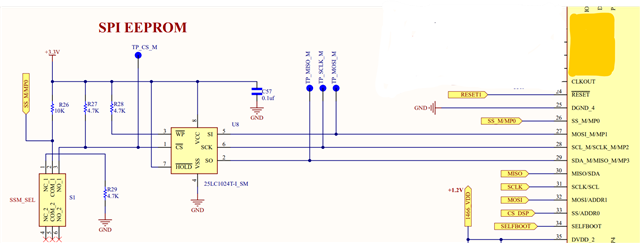

Hello Busra,
I will add few points with what Dave said above.
The EEPROM properties are properly configured for the intended operation.
I wanted to provide an overview of the self-boot process for the DSP and its interaction with the EEPROM, as well as some key considerations to ensure proper functionality:
Self-Boot Process:
When the reset pin on the DSP goes low and then high, the DSP checks the state of the Self-boot pin.
If the Selfboot pin is low, the DSP does nothing. If it is high, the DSP attempts to self-boot.
During self-boot, the DSP reads the first memory location of the EEPROM. If it reads 0xAA, it continues to read the EEPROM.
If the DSP does not read 0xAA, it re-tries three times. If all attempts fail, it goes into hibernation.
Self-Boot Failure Indication:
If self-boot fails, the DSP writes a failure code into the Software_Value_0 and Software_Value_1 registers (addresses 0xF433 and 0xF434).
You only need to check one of these registers. If the value is non-zero, it indicates a self-boot failure.
EEPROM Writing Considerations:
Important: Ensure that the Selfboot pin is disabled when writing to the EEPROM through the DSP. This prevents the DSP from attempting to self-boot during the write process, which could lead to unintended behavior or corruption of the EEPROM data.
Please ensure the above points while writing the EEPROM and get back to us with what you get.
If you're still facing a self-boot failure, kindly share the project. we will also have a look at the configs once.
Regards,
Harish
Hello Bursa,
Harish added a lot of great info explaining how this all works that I did not have the time to write up. It does help to understand what the selfboot state machine in the DSP will do.
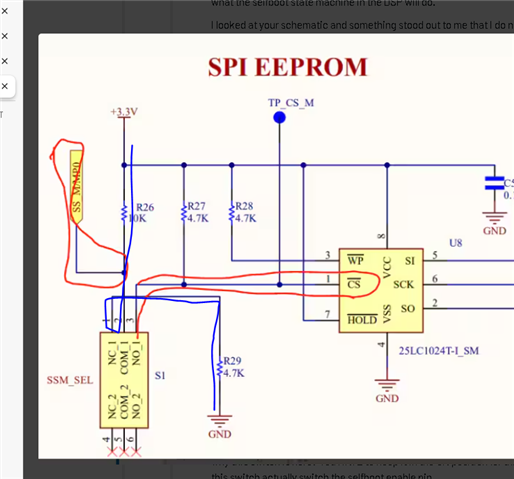
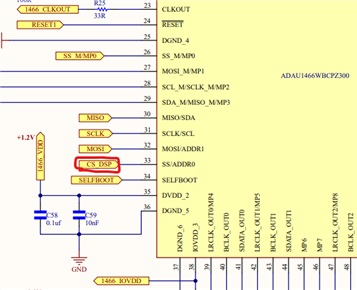
I looked at your schematic and something stood out to me that I do not understand.
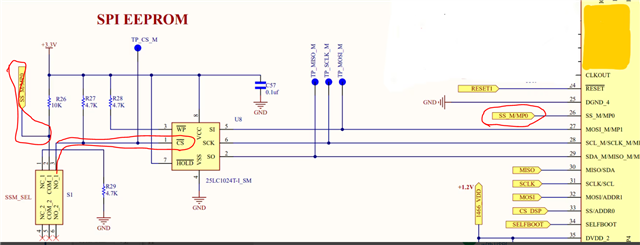
I took a screenshot:
The SS pin of the DSP needs to be able to drive the CS pin of the EEPROM low to select the chip.
I am guessing that S1 is a switch? A DPDT switch with half of it unused correct?
So in one position pin 1 and 3 are connected, this is the common to the NC (Normally Closed)
This connects the SS pin to a divider of 10K and 4K7 between 3.3V and Ground. Roughly 1/3rd of 3.3V. So the SS pin will be sitting at 1.1V and tied to nothing else. Are you using this as an MP0 function as an input? If you are then you are setting it to an undefined logic state.
If you flip the switch you connect the common to the NO contact, pin 2 to 3. So this ties the SS pin to the CS pin of the EEPROM. It also means you have two pull up resistors. R26 and R27. That is starting to get into the really strong pull up range but this is not a problem.
So with the switch flipped you can program the EEPROM but it must be in this position for it to selfboot as well. So I have no idea why this switch is here? You HAVE to keep it in the ON position for this to work. Yes, it will prevent selfboot but it is better to have this switch actually switch the selfboot enable pin.
It would be handy to have it be able to shut off the Selfboot function so when you program the EEPROM you can defeat the selfboot. However, that is not how you designed this to work. right now the only purpose of this switch is to prevent you from programming or reading from the EEPROM or to allow you to do it. I do not know why you need that?
Dave T
Hello,
Thank you very much for your responses. I couldn't reply earlier as I had to attend to another task. Let me explain the steps I followed in order:
While the Selfboot pin was inactive, I selected the "Write Latest Compilation through the DSP" option from the Adau Selfboot menu.
After the writing process was completed, I selected "Check Last Compilation through DSP" and received the message "EEPROM Data verification SUCCEEDED."
I set the Selfboot pin to high mode and pressed the DSP Reset button, but the self-boot program I loaded did not run.
I checked again using the "Check Last Compilation through DSP" option and once again received the message "EEPROM Data verification SUCCEEDED."
Then, I read the DSP's failure registers using the MCU. These registers are 0xF433, 0xF434, 0xF427, and 0xF428 (labeled as PANIC_CODE in the ADAU Datasheet). I read the value "FFFF" in all of them except one.
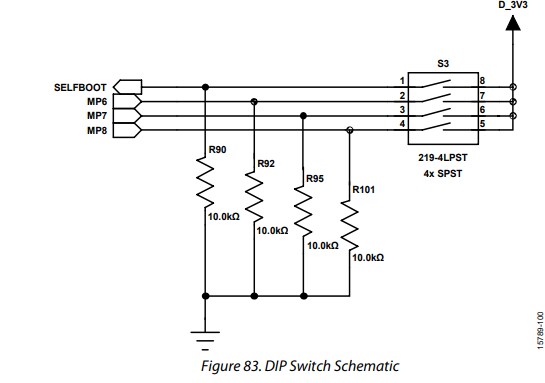
Regarding the switch design, I should mention that the schematic was designed with reference to the 'EVAL-ADAU1466Z User Guide' (Page: 29).
Additionally, I am attaching the reset circuit for your review.
Best regards,
Büşra
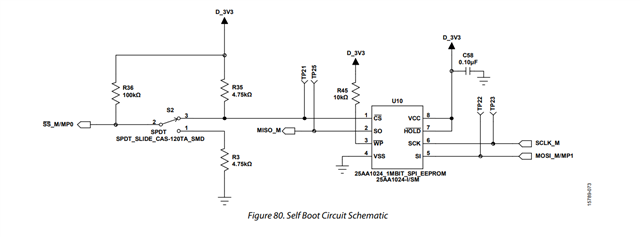

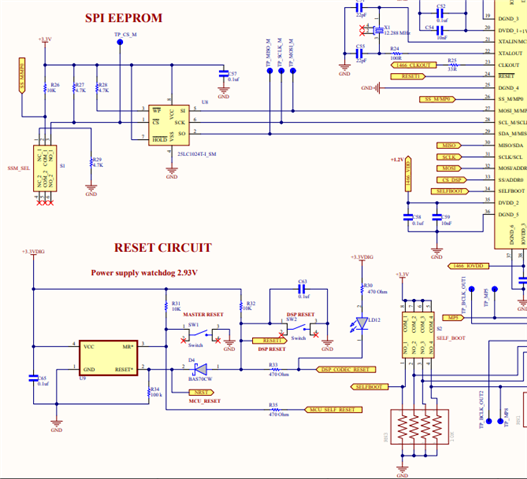
Hello https://ez.analog.com/members/adau1466,
When you said the selfboot pin was "inactive" do you mean it was held low? You are using a 10K pull-down which is somewhat weak. I am not sure if an internal pull resistor is enabled by default on that pin. If there is one then it probably is not a problem because it will be super weak, >100K so you should be OK with a 10K pull down as I think about it.
The registers you are reading. Let me add a few more details.
Address 0xF433 and 0XF434 are the only two you should be reading.
These will come out of reset as zeros. So the fact you are reading 0xFFFF tells me it is likely the DSP is not in SPI mode. It takes three toggles of the SPI SS pin to put the slave comms port in SPI mode. So the first three reads will be all "F"s and the fourth will be good and in this case that is exactly what you are seeing.
If selfboot fails this is what you will see in the two Software_Value registers. (Note, look this up in the ADAU1452 datasheet Rev D. I had updated all of this in that new revision and these details are the same in the 1466)
The chip designer had a sense of humor. This is what you will get if there is an error:
0xF433 = 0xBABE
0xF434 = 0xCAFE
The other two registers that are associated with the Panic Code features do not apply to selfboot. These are for Runtime and there is a procedure to set it up and clear it out for use. So after selfboot chances are you will read a panic code but it means nothing.
Take a scope and place four channels on pins 26, 27, 28 and 29 of the DSP and see what you get when you try to selfboot. This is where you will see the problem. It should try to read address zero and it should get back 0xAA for the first byte stored in the EEPROM. I am guessing there is an issue with the slave select on the master port.
I still think your problem is with this circuit. Here is a quote from the datasheet:
When the self boot operation begins, the state of the SS_M/MP0 pin determines whether the SPI master or the I2C master carries out the self boot operation. If the SS_M/MP0 pin is connected to logic low, the I2C master port carries out the self boot operation. Otherwise, connect this pin to the slave select pin of the external slave device. The SPI master port then carries out the self boot operation.
Look at this blue line:
You have a 10K and a 4K7 in series with the SS pin tied between the two. This means the voltage will be roughly 1/3rd of 3.3 which is 1.1V. This is in the "undefined" zone of being a high or low. There is something about this circuit that just does not seem right to me. Yes, I am guessing when it is selfbooting you will have the NO connection made which will have two pull ups. a 10K and a 4K7. So that result I think will be around a 3K pull up.
This is why I am asking for you to tack on probes as close to the pins of the DSP as you can to see what is actually happening?
Let us know what you find. Harish and I will help as much as we can. Today has been busy for me.
Dave T
Hello Dave,
First of all, I’d like to mention that the correct spelling of my name is Büşra, but due to keyboard layout differences, "Busra" is also fine.
Secondly, yes, by "inactive," I meant that the Selfboot pin was held low. I am using a 10K pull-down resistor, which was designed based on the ADAU1466 User Guide.
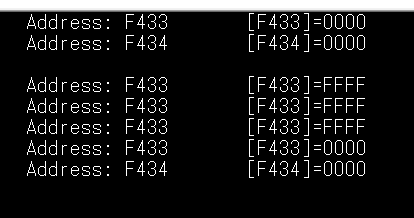
Regarding the failure registers, I initially read 0x0000 from 0xF433 and 0xF434. After setting the Selfboot pin to high and pressing the DSP reset button, I read the registers again. On the fourth read, I was able to read the values, and as shown in the attached image, the value remained 0x0000, meaning no error was detected. Additionally, when I read the EEPROM contents through the DSP, I still received the "SUCCEEDED" message.
As for the SS_M/MP0 pin, I understand that its voltage level is crucial in determining whether the DSP uses SPI or I2C for self-boot. The switch was always in the NO position, but for the NC position, we removed R26 and shorted R29. We believe this should resolve the issue, but if you think this is not a suitable solution, please let us know.
Finally, I examined pins 26, 27, 28, and 29 of the DSP using an oscilloscope, and everything seems to be functioning correctly:
The SS pin transitions from high to low, indicating that SPI communication has started.
MOSI pin shows bit transitions as expected.
SCLK continuously generates a square wave.
MISO initially reads 10101010 (0xAA), which, as you mentioned, is the correct first byte for the EEPROM address.
I would appreciate any further recommendations on what else I should check. I will also make sure to respond as soon as possible.
Sincerely,
Büşra

Hello Bursa,
Sorry for your name. Yes, my keyboard does not have those letters but the real issue is my dyslexia not my keyboard. I just swapped the letters in my rush to write up the response. My mind is on technical details... I teach as an adjunct professor and in the first class of the semester I always tell my students that I will mess up a lot of names. I am NOT making fun on their names, I am making fun of my ability to read and to pronounce names! LOL. So this falls into that category. It is a good thing I did not attempt to be a secretary as a career. LOL
So feel free to make fun of me and call me Daev.
This issue is really strange. What is often hard is to get the verify to succeed. I have had difficulty verifying but the program will work and selfboot!
So something is going wrong when the DSP is trying to read the data. It seems that with the recent tests you did you verified that it is trying to read. You see the 0xAA...
It might be a good idea to attach your program so we can look for other less obvious things.
I am wondering if the EEPROM properties are incorrect but then the verify is working...
Here is what the Selfboot state machine does for logic.
Read the first byte, is it AA? Yes, then continue, No, then try two more times and then quit. Place the data in the software value registers.
If the first byte is 0xAA then continue to read the header. (look at the selfboot header contents in the datasheet)
Then it sets up the PLL, after the PLL is active it will continue to read in data but at the increased speed that is part of the header data.
It reads data blocks until it sees the "Last" flag. Then it completes the reading of the data.
Then it reads the footer which is the eight byte checksum.
It tests the checksum it computed when loading in the data to the checksum saved on the EEPROM that is in the footer. If these numbers do not agree then it stops and does not start running the program.
It does not store anything in the software value register.
So it could be this checksum issue or data somehow being corrupted. One thing you could try that is not super easy is to zero out the checksum. If the checksum is zero then it will run the program no matter what checksum was calculated.
There is not too much to go wrong here. It is a rather simple process and I do not think your PLL settings are wrong since your program works when you run it from SigmaStudio correct?
Dave T
Hello Daev,
No worries at all about my name—it happens! And I appreciate your humor about it. By the way, I just wanted to mention that "Bursa" is actually the name of a city here.
Regarding the issue, I completely agree that this is quite strange. Typically, the verification process is where problems arise, but in this case, verification succeeds, while self-boot fails, which is quite unusual.
The PLL settings are fine, and there are no other issues with DSP tasks.
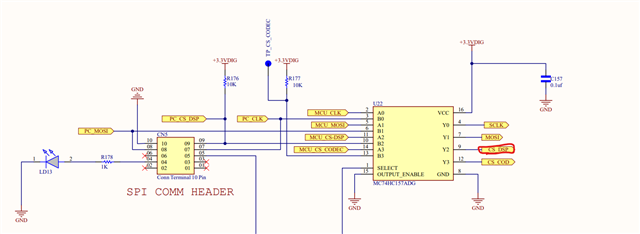
I wasn’t able to check the data today I will check tomorrow, but a senior engineer here proposed an idea: In the system, an analog switch is used to select either the MCU or the PC as the host for the DSP. If the CS signal is not handled correctly, could this result in the wrong host becoming active during EEPROM initialization, or potentially cause SPI bus conflicts?
In short, could the way the MCU is managing the CS signal be interfering with the process?
Best regards,
Busra
Hello Busra,
Is there any "bridge" between the slave and master ports of the DSP?
An MCU or PC would be connected to the slave comms port in the DSP. The EEPROM is connected to the master comms port in the DSP. Two different ports and two different SS pins and signals.
So in theory they should not interfere with each other. I have seen and experienced problems where SigmaStudio is loading in a program and does a reset as part of the process which starts the selfboot state machine going if the selfboot pin is enabled. Then what happens is two things are writing to program memory at the same time and that corrupts both of them. If the program is small what happens is the selfboot quickly loads and completes when SigmaStudio is still compiling and then it overwrites the program that was just loaded in and it works fine.
As long as the MCU is not writing to memory or loading in anything it should not be a problem.
Is there a chance where the switch for the SS pin on the master port is being switched during the process? You are seeing the AA but I wonder if it is left over from a previous program? So part of the program in memory is new and part is old and so the checksum would not be valid and the program is never started.
Try this. Erase the EEPROM and verify it is erased. Then program it and see if you get the AA and all the other things I had mentioned.
I am still scratching my head as to how it is being verified... There is something obvious we are missing...
Dave T
Hello Dave,
There is no "bridge" between the slave and master ports of the DSP. As shown in the image, both ports are separate.
I couldn't check the data individually as you mentioned, but it seems to me that the issue is probably not with the EEPROM because the data inside it can be verified.
Let me know if you need further details or if there’s anything else I should check.
Hello Busra,
adau1466 said:
There is no "bridge" between the slave and master ports of the DSP. As shown in the image, both ports are separate.
If that's the case, then it will not be a problem. The MCU/PC communication will be at the slave control port side whereas the self-boot will happen at the master control port side. So, it won't be a problem unless both of them trying to access the DSP's RAM at the same time.
As Dave said in one of his replies above, can you try zero out the checksum value and see if it self-boots? Because, if the checksum is being corrupted and will not agree with each other, then it will not self-boot. So, if we zero out the checksum then it will not compare and will run the program anyway.
In this thread Dave explained it how to do this in a detailed way. This thread originally is for some different issue, but it does show how to zero out the checksum which is what we want right now. Please go to the second reply of Dave and follow the steps carefully and please get back to us with your results.
I tried this once now; I zeroed out the checksum, but I also made another change in the parameter. My program is simply a LED blink. I set the duty cycle to 25% (0x00,0x40,0x00,0x00) originally (also noted what is the parameter value for 75% duty cycle). when I normally self-boot by clicking 'write latest compilation to DSP' and self-boot works as expected. Now as explained in the thread I copied all the commands into the sequence window and found the checksum and zeroed out it and I also found the pulse module parameters and changed the duty cycle to 75% (0x00,0xC0,0x00,0x00) and I download it to the DSP (to EEPROM as well). Now if I enable self-boot, my program runs with 75% duty cycle, but when I try to verify the program, it fails. It seems it's comparing the old compilation values and the current values (that I modified) in the EEPROM. It exactly tells that, the value 0x40 at index x is modified to 0xC0 So, it fails, however the program runs fine with self-boot.
(Maybe it's too much info unrelated to the issue but someone may find it useful)
The same thing with checksum, if you zeroed out the checksum and downloaded it to hardware and if you try to verify it (check latest compilation) then it will fail, but the program will self-boot fine.
This is just to inform you that, even if the verification fails, the program runs fine in this case.
You don't need to change any parameter like I did. You just zero out the checksum and see if it works.
And how are you verifying the successful self-booting? Your program has some LEDs or audio pass thru or something? we didn't see your project yet, so we don't know what's going on in your project. Please attach your project.
Regards,
Harish
Hello Dave, Harish;
Apologies for the delayed response. With the start of the school term last week, I had to attend university, and due to heavy snowfall, my workplace was closed, so I couldn't reply on time.
On a side note, last week at a university event, I had the chance to visit the Analog Devices booth, chat with the staff there, and even got an agenda
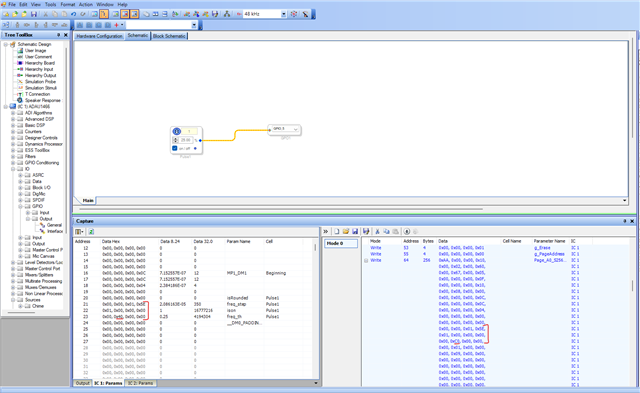
Regarding the issue, I followed your suggestion and erased the EEPROM. Upon verification, I confirmed that all registers were set to 0xFF, except for the first register, which remained 0x00. After that, I reloaded the program and checked it again, and I received a "SUCCEEDED" message. However, the program doesn’t seem to be working as expected. The program I uploaded is supposed to make only one of the LEDs blink at intervals, as shown in the image. But when I self-boot, all the LEDs turn on and stay on, meaning the program isn’t running correctly.
Despite my own research, I still haven't been able to pinpoint the root cause of the issue. Could it be related to a problem in the DSP reset mechanism?
Regards,
Busra
Hello Busra,
We are running blind here and need a lot more information from you. You are saying all the LEDs are on and there may be a simple reason for it but my crystal ball is in the shop getting repaired so I cannot "see" onto your desk.
We really need the hardware schematics and the SigmaStudio schematics to fully test and get an idea of what is going right and what is going wrong. Both questions add to the understanding of the problem.
I also want to ask if you have watched my videos about troubleshooting? You can add elements to your program to allow you to "see" into the operation of your program to see again, what is working and what is not working. You can let the DSP selfboot and then do a link/compile/connect to not overwrite the program in memory but be able to interrogate things like Readbacks and meters to see if an LED should be on or off. You can also look into registers. You can add a MUX to allow you to switch control from something else in a program to a manual switch you control for testing. This can help answer basic questions like is a program even running!
SigmaStudio is such a powerful troubleshooting tool. Learn to use it to your advantage.
Dave T
Hello Dave,
I completely understand your point, and I appreciate your help. SigmaStudio schematics don’t really contain much. I’m simply trying to test self-boot using a sine signal and LEDs. However, I can send the hardware schematics privately if needed.
Busra
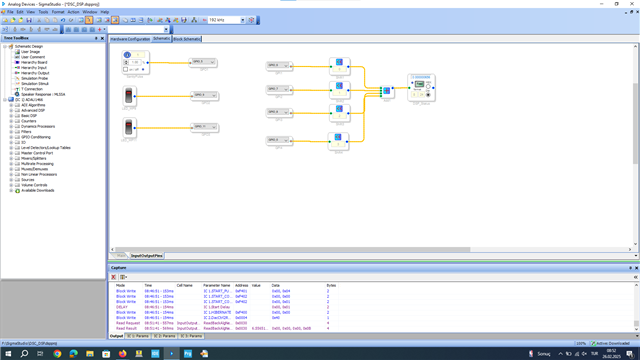

Hello,
This SigmaStudio schematic is nothing proprietary so please include it.
I see how you are bringing in the GPIO inputs and shifting them so you can see them all with one readback. That is good but you probably should set the Readback to HEX mode would be more meaningful for you.
I will need to interrogate the register settings as well.
Then you may be able to just show the DSP GPIO pins to the circuit that is driving the LEDs. Just those sections of your hardware schematic should not be proprietary. There are only a few ways to turn on an LED and none of that should be secret.
Dave T
Hello,
I had sent you the complete schematic via private message last time. I was wondering if you were able to figure out what the issue with the EEPROM might be. What could be the reason for it not working, and how should it be fixed?
I look forward to your feedback.
Please log in to reply.