Volume dependent a high pass and peaking parametric EQ filter
Hey all, I am struggling to implement sliding and dynamic filters in SigmaStudio. To maximize fidelity in a pro grade speaker, I want to have a high pass filter set to a certain frequency (e.g. 30hz) below a certain threshold. However above a certain level (for example -10db), the filter will shift to a higher frequency (e.g. 60hz) after the threshold is reached. when the volume/signal content is below the threshold, the filter shifts back to the lower frequency so that there is more bass content. I need to use a 24db/oct filter for both cases.
In addition, I am trying to implement EQ that changes boost depending on level. Below a certain threshold (for example -6db), the EQ will be a 6db boost. However above -6db, the amplitude of the boost should reduce to 0 as the volume approaches 0db (in order to maximize volume and prevent clipping). When the level reaches below 0db (for example, -1db), the filter adds a db of boost so that the filter is boosted as much as possible without clipping the amplifier.
For both these processes, the filters changing should be inaudible when transitioning between states, so I believe a slew has to be used. I don't think the dynamic bass boost function will work well for me because of the lack of control in parameters and my application here is quite specific. Can anyone help me out?
Audio Signal Processors
software
sigmastudio
SigmaDSP Audio Processors
adau1701
Hello themakers2907,
I will respond quickly here with several partial examples. At the moment I do not have the time to put together the entire program and also there are a few more details I would need to know.
As with most things in SigmaStudio there are several ways you could solve this. I think the best way is to use an index controlled filter. You might do this two different ways because you described two slightly different problems. For the HPF frequency problem, I would still use an index controlled filter and have several steps to ease the transition. The filter does slew the level difference between the two filters as you change them but this processor is not powerful enough to slew the actual filter coefficients.
You also could just do a level sensing circuit and switch a slewed MUX to switch between two different high pass filters. These are almost the same solution.
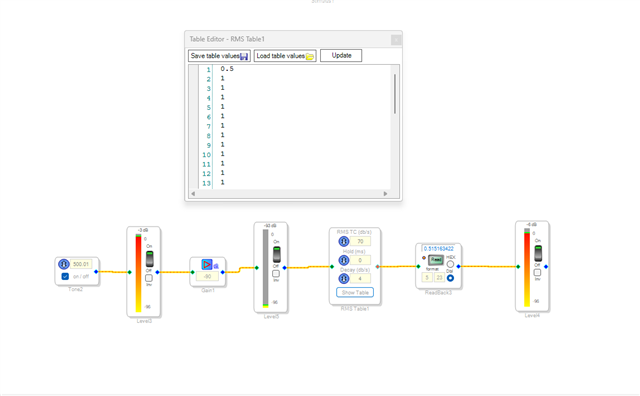
You second paragraph is describing an externally controlled compressor. So you could use one of those. But if you really want the filter to actually change the amount of boost then again, an index controlled filter is the answer. In this case I would control the filter with an RMS table that senses the level and outputs the value in the table for that level. So you can set the filter to use for each level in the table.
I will attach several projects that uses pieces of what I discussed.
This one uses an index selectable filter. The funny thing about this project is that I never connected the Up-Down counter to the filter control but for you that does not matter.
ADAU1701 Index Selectable Filter using Up-Down Counter.dspproj
This next one uses a MUX to switch signals and it switches it based on level.
7220.ADAU1701 Level Sensing Audio Switchover.dspproj
This next one is uses a different DSP processor. The ADAU1452. However, the basic functioning of the RMS lookup table is the same.
2577.ADAU1452 RMS Lookup Table test.dspproj
I hope this helps!!
Dave T
Dear Dave,
Thank you for your responses and it is really helpful! I guess that I would use the RMS table to sense the input gain and resolve that to a output. One problem is that the index selectable filters are not working in sigmastudio 4.5 and above according to the wiki, so can I use "General 2nd Order w var Param/Lookup/Slew" or "General 1nd Order w var Param/Lookup/Slew" for peaking filter? Also, I don't understand how to input the decimal values for the RMS tables so that the DSP will understand which filter index to select? I do understand that the table starts from -90db and ends at +6db in 3db increments though. I think it involves complicated decimal values which I don't understand. I also am kinda lost with how to convert a db value (for example -6db) into a constant that the switchover project can understand. Is there any spreadsheet that I can use to convert between the 2 data formats?
I apologize if my questions seem basic, but I am just a collage freshman who is really interested in audio signal processing and audio itself.
Hello themakers2907,
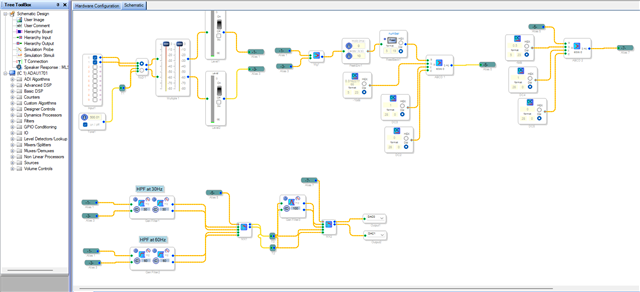
I have just quickly created a project with your initial conditions. This project uses peak envelope detector (sorry, I couldn't try the RMS table-based solution with the time I have). This project will give you an idea and get you going.
I couldn't even test this because I don't have the 1701 board with me. So, you can try this and if it works, then we will modify and optimize it further.
Here I didn't use the index filter which is a 2nd order filter, because you mentioned, you need a 24dB/oct, so I cascaded two 2nd order filters.
For the second condition also, I used a Mux because you just want a 0dB boost if the input is above -6dB. we don't need to include an index filter and set one of the two filters to 0dB boost which is just the input itself. we can save a filter resource there. So, I passed the input thru a 2nd order filter for that 6dB boost needed path and directly passed it to the MUX input for 0dB boost path.
I used the peak detector's output to feed a ABCD block for level comparison. You can replace the peak detector with RMS based blocks.
You can change the filter cutoff frequency and threshold levels as you wish. I have used -10dB and -6dB as you described, here is the conversion.
dB to decimal,
decimal_value = 10^(dB/20)
for -10dB,
decimal value = 10^(-10/20) = 10^(-0.5) = 0.316227766
for -6dB,
decimal value = 10^(-6/20) = 10^(-0.3) = 0.50118723
decimal to dB,
dB = 20*log (decimal_value)
for 0.50118723,
dB = 20*log(0.50118723) = 20*( -0.300000) = -6
themakers2907 said:
One problem is that the index selectable filters are not working in sigmastudio 4.5 and above according to the wiki, so can I use "General 2nd Order w var Param/Lookup/Slew" or "General 1nd Order w var Param/Lookup/Slew" for peaking filter?
For newer SS versions, I don't think there is a limitation with using the index filter for 1701. I think the limitation is till SS 4.5. Now, we are using SS 4.7. So, I guess it will work fine.
So, you can try this little project and see how it works for you. I will try to attach RMS table-based solution in my next reply.
themakers2907 said:
Also, I don't understand how to input the decimal values for the RMS tables so that the DSP will understand which filter index to select?
You can directly input decimal values into the table or load the table values stored from a text file.
test project.dspproj
Dave, please take care if any correction or information is needed.
Regards,
Harish
Hello themakers2907,
Have you found my YouTube channel yet?
How to SigmaDSP and SigmaStudio - YouTube
I have a video about fixed number formats. I want to make one based on the RMS table example I gave you earlier but have not had time to make a new video in a while. I am also an adjunct professor and it is getting to the crazy part of the semester!
Harish, I will have a closer look at your great response a little later. It is getting late for me here now. 7PM...
Dave T
Thanks, this helped alot. I also took a look at one of Dave's older posts and that helped me construct the table!
Please log in to reply.