SigmaDSP (SDSP) to the FastDSP (FDSP)
I recently purchased the EVAL-ADAU1787Z evaluation board and have been working with SigmaStudio 4.7. Despite following the documentation and building a correct signal path from the SigmaDSP (SDSP) to the FastDSP (FDSP), I am unable to make use of the SDSP OUT block – the block does not provide an output pin, even when channels are correctly enabled.
After extensive testing, I suspect the following:
The ADAU1787 may not be fully supported in SigmaStudio 4.7, even though the board is publicly available.
The SDSP OUT block appears to be non-functional or incomplete in this version.
The ADAU1787 is not listed among the officially supported parts within SigmaStudio.
I would appreciate it if someone could confirm:
Whether there is a known issue with ADAU1787 support in SigmaStudio 4.7.
If there is a newer internal version of SigmaStudio (e.g., 4.8 or 4.9) that fully supports the ADAU1787.
How I can obtain access to a working development environment for the EVAL-ADAU1787Z.
I was trying to produse a sine tone and to use the stereo out jack but whatever i do i cannot create a single signal.
Thank you for your assistance. I would be very grateful for any clarification or updated software that enables proper use of this board.
software
ADAU1787
eval board
4.7
adau1787z
Integrated/Special Purpose A/D Converters
Audio CODECs
Show More
Hello talasnetraG,
It would have been easier if you had attached your project. Anyway, there are no problems with SS 4.7 or previous versions of SS supporting the ADAU1787.
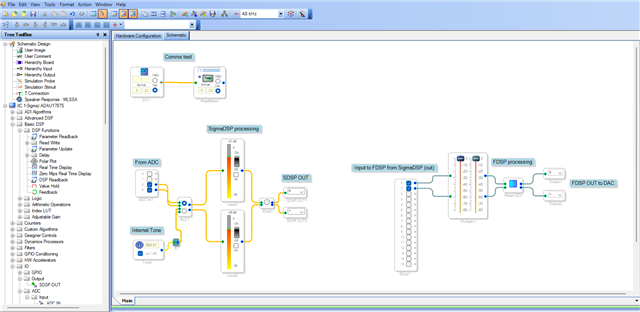
Below is the pass thru program that I quickly created for the ADAU1787. This works fine with my Eval board, so you can try running it on your Eval board.
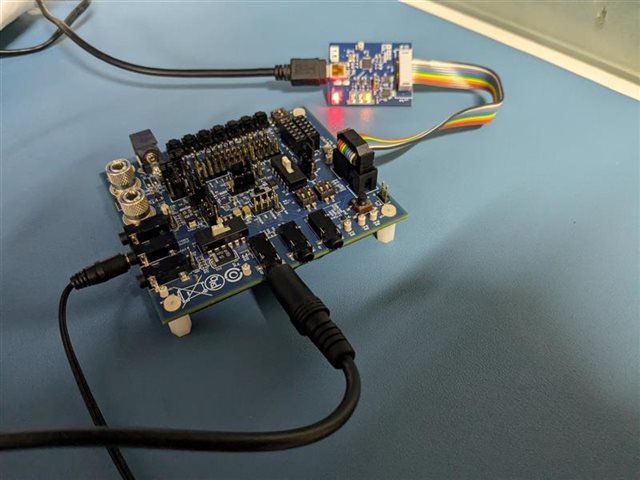
Connect your stereo Aux input to J22 and your headphones to J23 (stereo output)
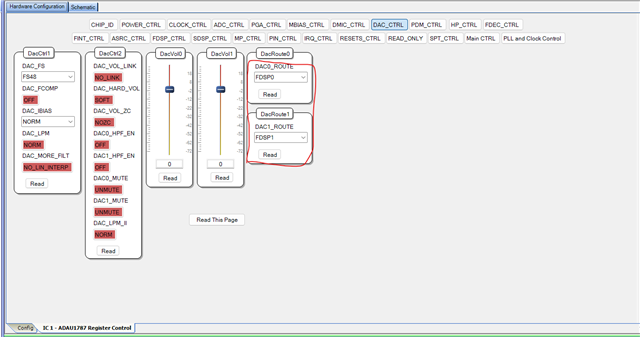
The only register change I did is the below, I just routed the FDSP outputs to the DAC (By default it would be SDSP out).
Make sure that the USBi is set to output 1.8V IOVDD, if you use the USBi which comes with the Eval kit then it is already set to output 1.8V by default. you can verify it by looking at the switch S1 on the USBi module.
The IOVDD max of ADAU1787 is 1.8V.
I have attached the project below, please try this and get back to us if you have further questions.
ADAU1787 pass thru SDSP_FDSP.dspproj
Regards,
Harish
Hello Harish,
thanks a lot for your quick reply, this was incredibly helpful !!!
Best regards
Please log in to reply.