ADAU1761 not working on the ADAA24XX-EV-B2BX Eval Board
Hi
I am using the ADAA24XX-EV-B2BX board which contains a ADAU1761.
I want to implement a basic audio input output with an audio jack connected to P8.
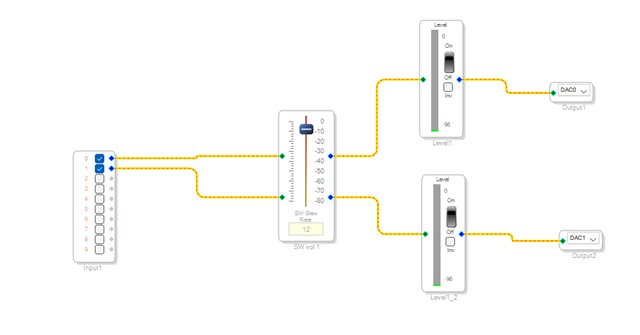
Implementing the system below in Sigma Studio the the device is not reading in the data.
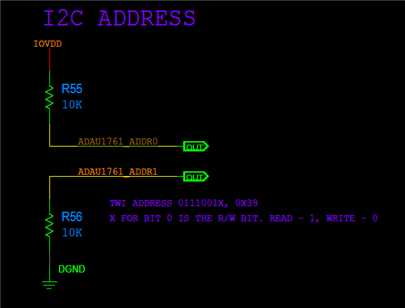
The I2C address is 0x39.
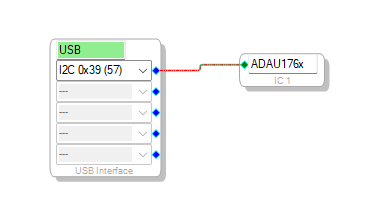
This I2C address is not listed in the USBi block. I manually entered it like below but nothing happens.
The status is Active: Downloaded and I get no errors.
Is there some extra configuration needed for this eval board?
Thanks.
Audio Signal Processors
sigma studio
software
adaa24
4.7
usbi
SigmaDSP Audio Processors
evaluationboard
adau1761
SigmaDSP
Show More
Hello MarkG1,
You have to include the read/write bit too in calculating your address, so your address will be 0x72.
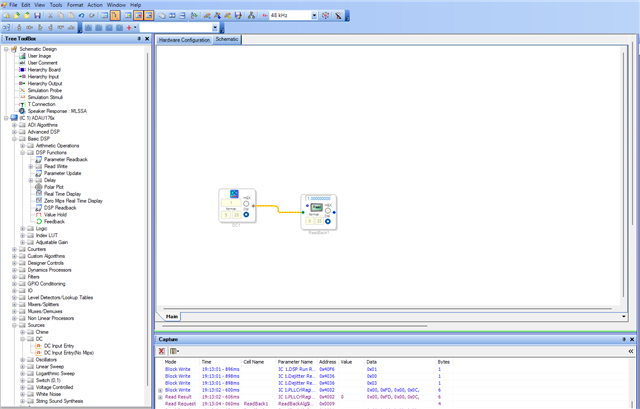
Also please include a comms check circuit like below.
Please try this and let us know.
Regards,
Harish
Hi Harish.
I have changed the address to 0x72 like you suggested, there is still no input
When using the DC and readback, it only reads 0 when there is a 1 or another number in it, so comms is not working.
Any other suggestions?
Thanks,
Mark.
Hi Harish.
I actually created a new project with your suggestions. It works now.
I must have changed some settings in the previous project when trying to debug.
Thanks,
Mark
Hi Harish.
While the above recommendation works for theADAU1761. On the same Eval board there is an ADAU1452. There does not seem to be any communication with this device. I have tried all the SPI addresses. There is no readback from the DC constant, even though there is no error reported.
Is there any additional configuration required for this device?
Thanks,
mark.
Hello Mark,
Could you please send the link to the Eval board user guide/schematic?
Regards,
Harish
Hi Harish.
I only have a pdf of the schematic. Can I send you that?
Mark.
Hello Mark,
Yes, please attach that.
if possible, also attach your sigma studio project (remove if any proprietary info is there)
Regards,
Harish
Hi Harish
See attached
I_O_1.dspproj
Regards,
Mark.
Hello Mark,
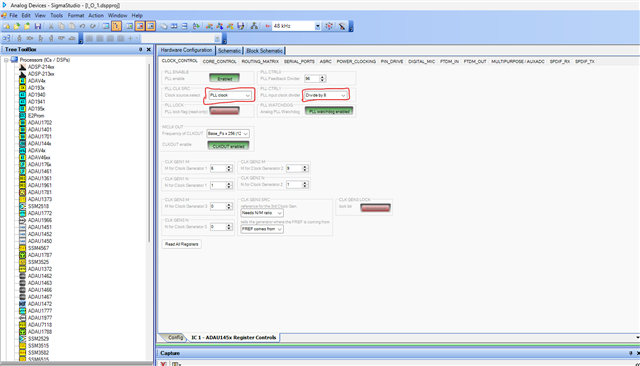
We have noticed that your PLL registers need to be changed for it to work properly.
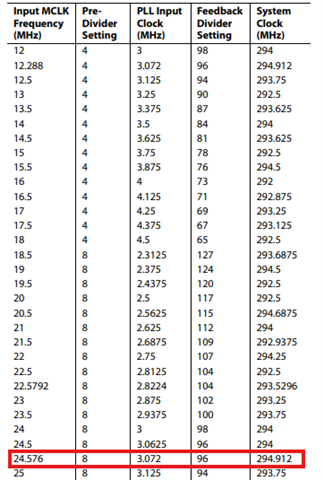
1) Since you are using 24.576MHz MCLK input, your PLL input clock divider must be set to 'divide by 8'.
2) Then PLL clock source register is not quite correctly named so I understand the confusion, it is NOT the source to the PLL but the source to DSP (DSP core clock). So, it must be set to 'PLL clock' instead of 'Direct from MCLK'.
You have to use PLL clock out to be your core clock, so that the core will run at its highest speed which is 294.912MHz.
If you set 'Direct from MCLK', what would happen is, your MCLK in will be your core clock, in your case it's 24.576MHz which is 12 times slower than the nominal core clock, then the other clock generator rates derived from this clock will also be very low, so it won't give you the nominal sample rates.
Please refer the below screenshot and try again.
Regards,
Harish
Hi Harish.
I have experimented with the clocks and it was originally set to PLL. The file I sent to you was changed. With the above settings and the default SPI address I still have no communications with the device.
Do you have a verified file on your end you could share?
Regards,
Mark.
Hello MarkG1,
Is there any way you can change the MCLK frequency? Is there a bitclock that is always on you can use?
The reason why I am asking is that a few years ago I troubleshot a problem that a big customer was having and I was able to replicate it on the bench. I found that about 1 out of 4 times starting up the part with a 24MHz clock the PLL did not lock and had no output.
This was all tested when the part we initially designed and characterized but since it is flaky it got past those tests.
There may be another reason for the issue you are seeing but if you could test this it might shed some light on your problem.
So let's look into some other possible problems.
First, I need to say that regardless of the PLL running (locked) or not locked or bypassed, you will always be able to read and write to register R0 and R1. 0x4000 and 0x4002. Those can be directly clocked out using the I2C clocks.
Now, I looked quickly at your conversation with Harish, by the way, Harish was not aware of this issue with the MCLK frequency and he started on the forum a few years ago supporting the Sigma350 and 300 parts. But he has been awesome at learning some of these other SigmaDSP parts as well. Thanks Harish for the great support!
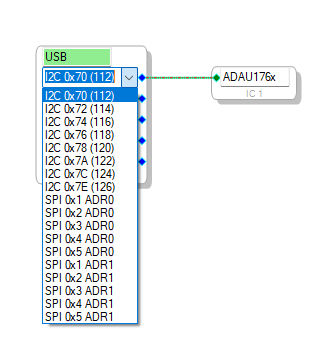
So I could not help but notice the STRANGE I2C addresses you are getting in SigmaStudio?
I opened up an ADAU1761 project and here are the addresses you should be seeing:
Back to the PLL. If you bypass the PLL and feed it a 24Mhz clock you will get half the instructions in a 48kHz fs frame. Because 24.576MHz is 512 x 48k.
But, if you have a small simple project it will work.
Then what procedure are you using the setup the PLL? Page 25 of Rev E datasheet has the procedure detailed.
But, you should be able to read and write to the first two registers and that is your first goal and it looks like you have been trying that.
Got to run...
Let me know how it goes.
Dave T
FYI,
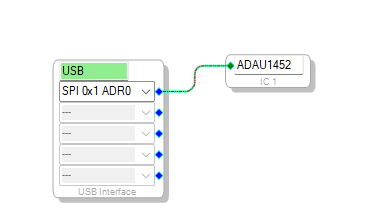
I just opened up your project you attached and it has a 1452 in the configuration not a 1761
Hi Dave.
The eval board has both 1761 and 1452. The issue with the I2C address was resolved by Harish.
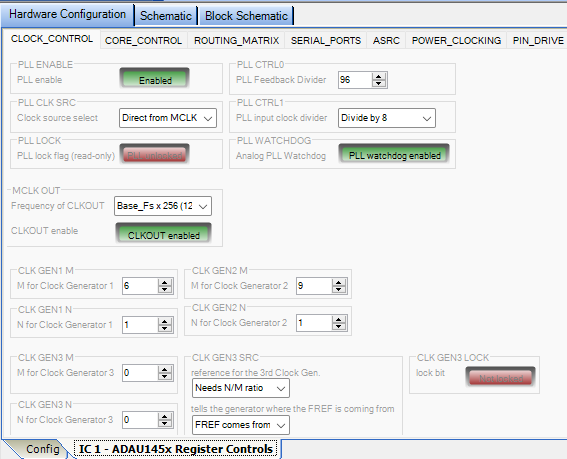
The problem now is with the 1452 not responding. There is a 24.56MHz clock connected to MCLK and according to the datasheet pg 25 as you suggested I have tried these settings:
Its still not responsive.
Can you confirm these settings?
Regards,
Mark.
Hello Mark,
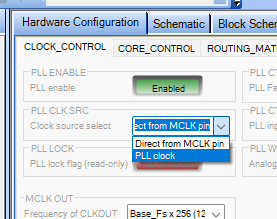
No, you need to set the PLL CLK SRC to be "PLL Clock"
As Harish has mentioned, this is very misleading. It is not the input to the PLL but the input to the core or what we call the system clock.
So instead of it being ~295MHz it is ~24Mhz so you have a lot fewer instructions per frame. 12 times less to be exact.
Instead of 6,144 instructions per frame you have 512.
The rest of the PLL settings look good.
Dave T
Hi Dave.
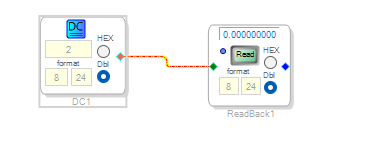
Even when I use PLL clock there is no communication. The simple readback check that you advise reads a 0.
This should be a fairly straight forward process. Can you provide me with a file that you have verified on your end so I can try, and prove that its not a hardware issue.
Regards,
Mark.
Hello Mark,
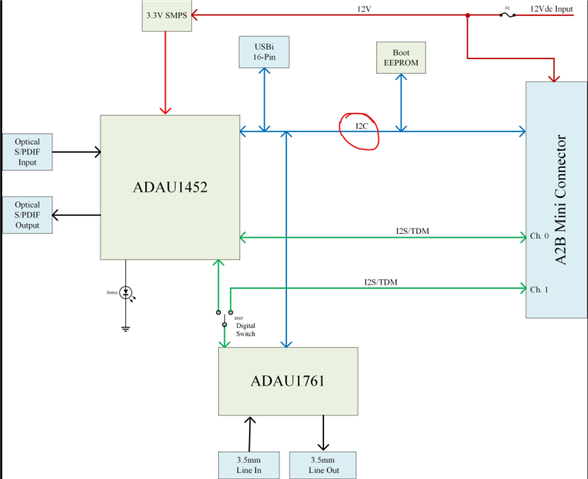
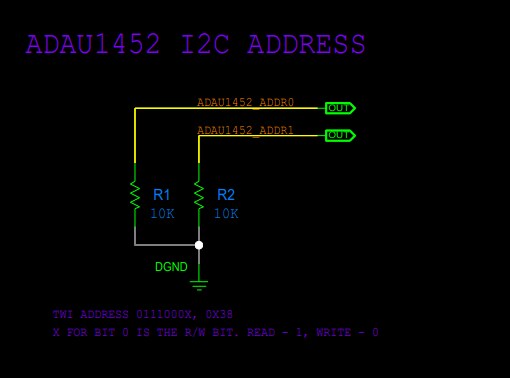
Looking at your schematics, it does seem like your system doesn't have an SPI interface. Please look at the screenshots below from your schematics.
Every chip is connected in I2C bus.
It seems the ADAU1452 is also using I2C to get programmed. You should try the address 0x70 from USBi.
Please try this and get back to us.
Regards,
Harish

Hi Harish.
Yes it works using I2C. I think there was some confusion about it defaulting to SPI. A lot of the manuals and guides did when using that part. Anyway plenty learned. Thanks for the help.
Mark.
Please log in to reply.