Looking for a detailed guide on configuring ADAU1467 I/O routing (ports, pins, and SigmaStudio correlation)
Hello, dear friends,
I’m working with the ADAU1467 on the standard EVAL-ADAU1467Z evaluation board, and I’m struggling to fully understand how to configure input/output routing so that it matches what I expect in SigmaStudio.
Here’s where I’m getting confused:
In SigmaStudio, when I add hardware input/output blocks to the Schematic, they have certain channel numbers (i assume they're also called DSP channels).
In the Hardware Configuration -> ROUTING_MATRIX, the output ports have numbered channels (assuming they're same as DSP channels), but the input ports don't.
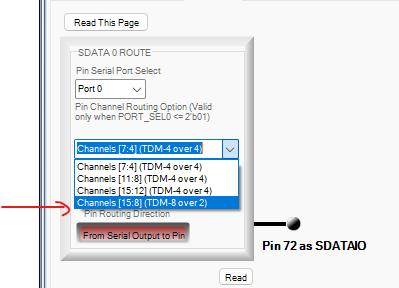
On the hardware side (and in Hardware Configuration -> SERIAL_PORTS -> SDATA_IO), there are SDATAIO pins that can be assigned to serial data input and output ports. In the Pin Channel Routing Options, I can select port number, choose if it's input or output port (which is more or less clear) and also map them to channel ranges; but I don’t clearly understand how these ranges relate to the DSP channel numbers I see in input and output blocks within Schematic screen.
Each serial port can be configured for 2, 4, 8, etc. channels (I2S, TDM4, TDM8 etc), but these configurations don’t always line up with the actual channels I get in SigmaStudio after routing. For example, when i was setting up my evaluation board, i understood from the documentation that SDATA_IN2 port together with SDATAIO4 pin handle 4 output channels, while SDATA_OUT with SDATAIO5,6 and 7 handle 8 outputs.
And i think i understand the logic when i set up Input Port 2 in 4-channel mode (2 inputs from the pins of the port itself, 2 from additional SDATAIO4 pin).
But for the output, even if it's 8 outputs that are "bound" to Port 0 (with port itself and 3 additional pins) i only get proper audio output when i set up this port as 2-channel. And when i try to select 8 channel mode, some outputs stop working or start transfering incorrect audio signal.
And i also don't understand DSP output logic and structure. What makes DSP output 0 and 1 to be the output of SDATA_OUT0? What makes DSP input 36 and 37 "read" the data from SDATAIO4? Etc
What I’d really like is:
A clear explanation of how DSP input/output channel numbers in SigmaStudio correlate with physical ports and SDATAIO pins.
How to correctly configure these for a simple case: two stereo inputs and four stereo outputs on the EVAL-ADAU1467Z, plus, for example, TDM-encoded 8 channels of audio from SDATA_OUT2.
An understanding of the logic behind the mapping, not just a ready-made configuration file.
Any tutorial video, app note, or this forum post that goes into detail on this topic would be very helpful.
As i mentioned above, sometimes, by trial and error, I can get all outputs to work, but I don’t fully understand why they work in that configuration. I’d like to build a proper mental model so I can configure I/O routing correctly for future projects.
Thanks in advance for any guidance or resources!
spectral_analyzer_4x8_orig_devboard.dspproj
Audio Signal Processors
ADAU1467Z Rev B
ADAU1467 Evaluation board
hardware
ADAU1467 SigmaStudio SigmaDSP
Channel Routing
sdataio
adau1467
SigmaDSP Audio Processors
Show More
To help clarify my issue, I’m attaching an updated project (its in the end of my reply) and some oscilloscope screenshots.
In this test, I attempted to send data out through Serial Port 2 on the EVAL-ADAU1467Z.
On the board, this port is available via the OUT2_SDATA, LRCLK, and BCLK pins. I connected four wires from this header: one ground wire and the three signal lines.
I then connected these signals to my oscilloscope.
In SigmaStudio, I created a branch from my main signal chain. I used a built-in oscillator block to generate a test signal, routed it to outputs 16, 17, 18, and 19, since, as per the routing table, those outputs are linked to Port 2.
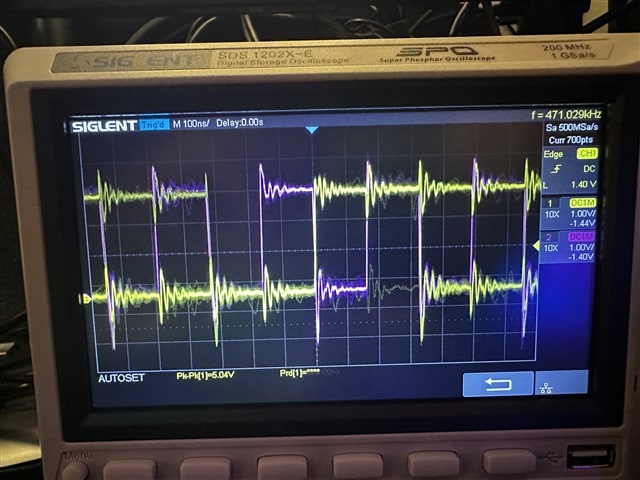
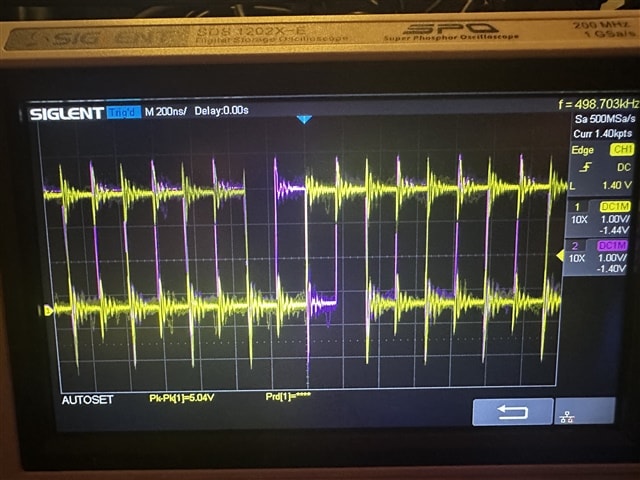
The oscilloscope screenshots show the following:
When probing BCLK (pink) + LRCLK (yellow), I can clearly see valid digital clock signals.
When probing BCLK (pink) + OUT2_SDATA(yellow), the trace for OUT2_SDATA only shows noise.
But if in the SigmaStudio routing table I configure channel 16to take its source directly from the serial input (instead of from the DSP core), then I immediately see a valid data signal on OUT2_SDATA, there's a picture that also shows that.
So it seems that I can pass the input stream directly to the port, but I cannot send processed audio from the DSP to Port 2 outputs.
I would like to understand why this happens, and whether I am missing an extra configuration step for enabling DSP-to-Port output routing in this case.
5153.spectral_analyzer_4x8_orig_devboard.dspproj
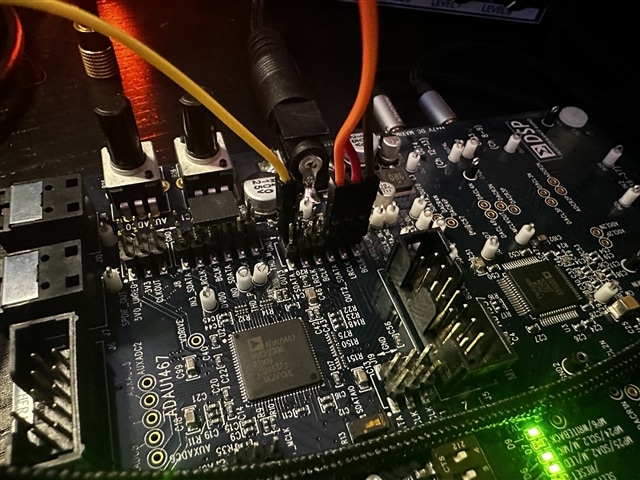

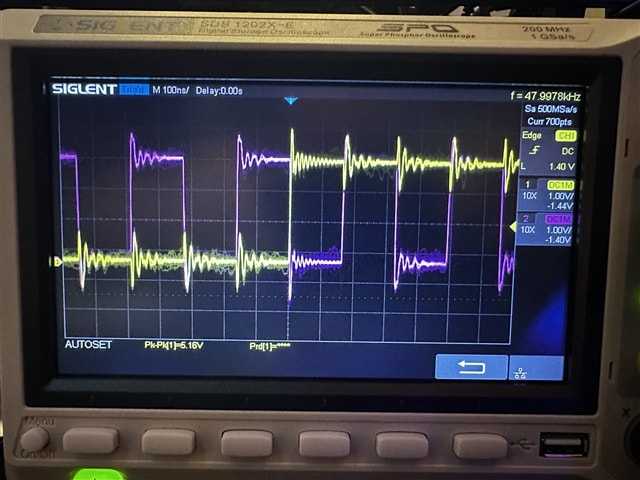
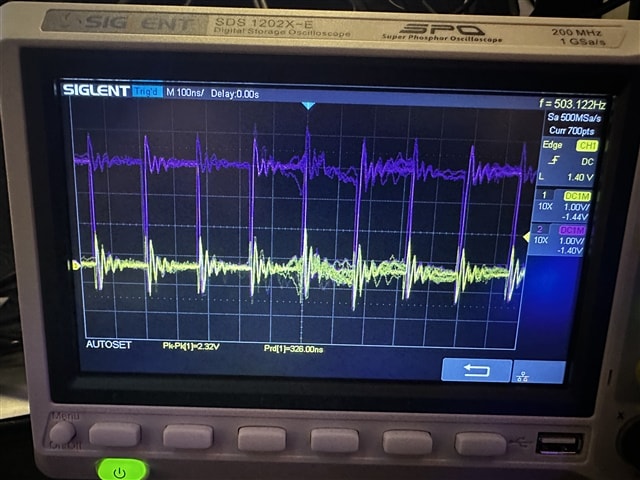
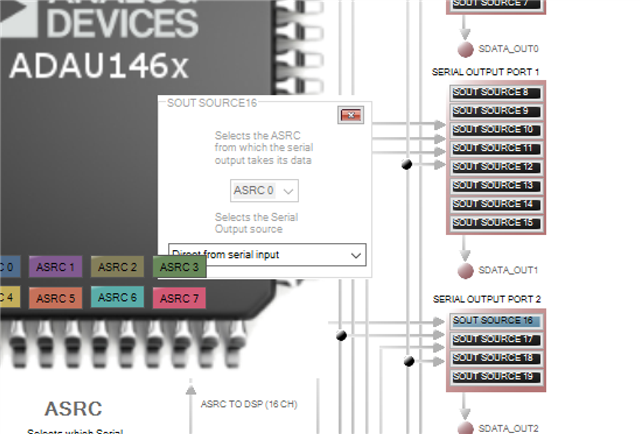
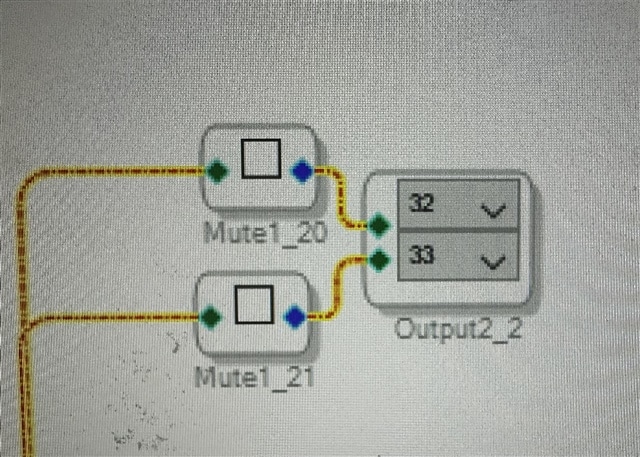
Another update: i was able to send DSP output to SDATA_OUT2, using DSP Output Channel 32 and 33. But why of all channel numbers its 32 and 33, and not 16, 17,18,19, as per routing screen? Please help me understand the whole logic behind this!
Hello bfck,
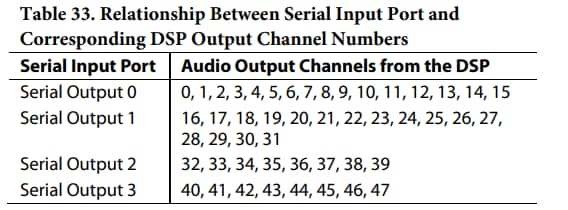
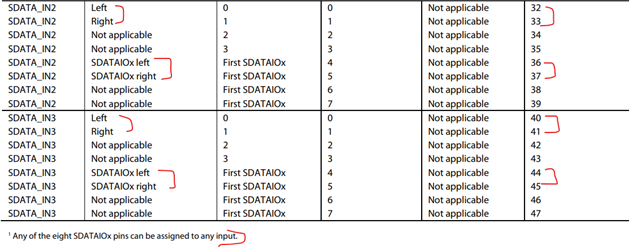
I can quickly answer this one. Serial port 2 uses the locations 32,33,34,35,36,37,38,39 if you were to use up to TDM-8 in the memory map. The serial port hardware will use those memory locations and that you cannot change.
Your screenshot, read below....
bfck said:
This is telling the compiler to send this data to the core output channels 32 and 33. The core has 48 output channels. These are memory locations that the core deposits its data into.
Here is another of your screenshots, read below the picture...
In this screenshot of the routing page you are telling the program to get the data to stuff into the serial port 2 memory location from the memory locations 16 that the core uses to send out the data when it is finished computing. This is all pointers and memory locations.
So with this setup it will not work as you are intending. You are sending data out of the core on channels 32 and 33 and then setting the serial port to take its data from core output 16.
Yes, this is super flexible but can be confusing. I have never had to change the serial port source settings with the exception of using the sampling rate converters between the core and the serial port. If you want the data to go to a different serial port then just change the number in the program not in register settings.
Dave T
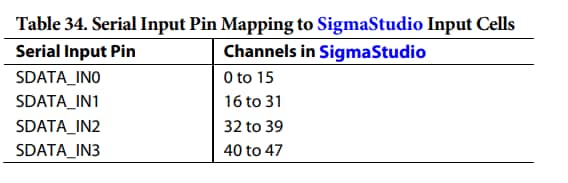
Thank you so much for your response, Dave! “Serial port 2 uses the locations 32,33,34,35,36,37,38,39 if you were to use up to TDM-8 in the memory map. The serial port hardware will use those memory locations and that you cannot change.” - where do i look for this information on all other input and output ports? Any guide/manual/table with these values available?
Hello bfck,
In addition to what Dave answered, I will also try to answer some of your questions.
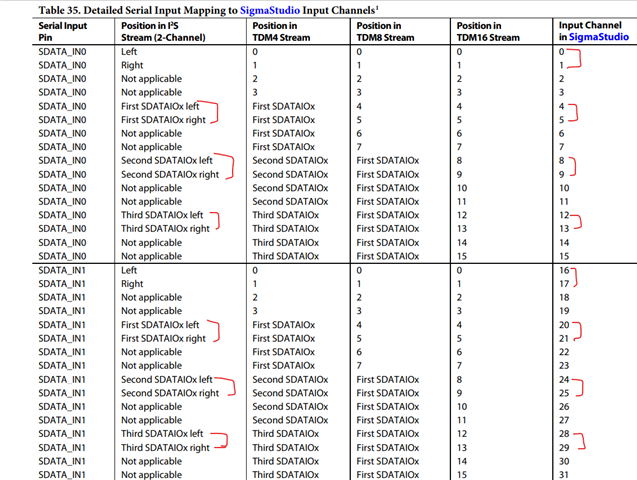
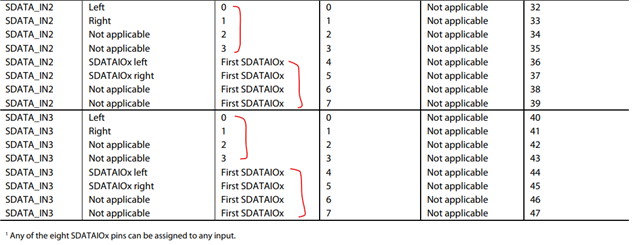
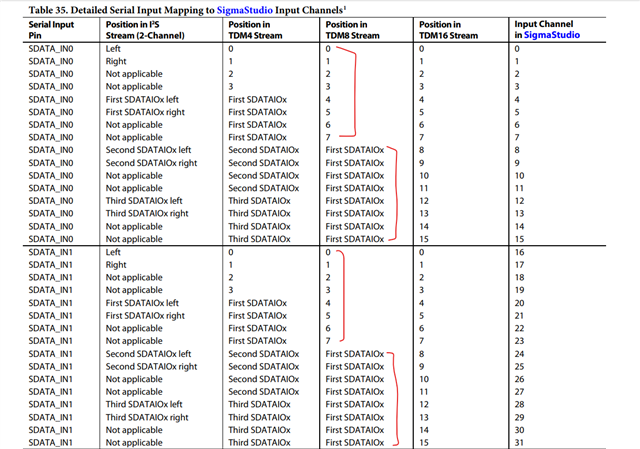
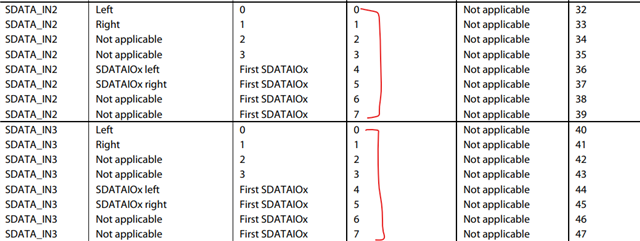
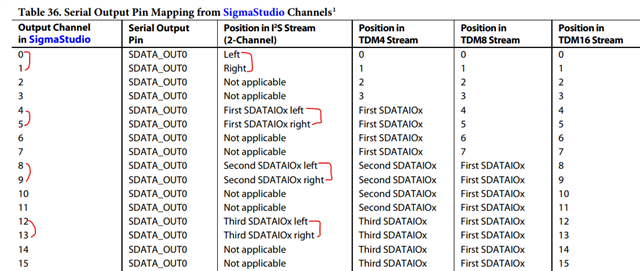
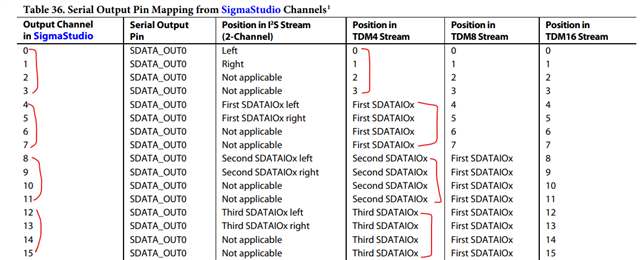
The serial port input and output memory map is given in the datasheet.
The same port number and channel number apply to serial input ports as well.
Now you can see that serial input/output port 0 and 1 can do TDM16/TDM8/TDM4/stereo and serial input/output port 2 and 3 can do TDM8/TDM4/stereo.
If it's 72 pin part like ADAU1452 or ADAU1466,
If stereo, then only 4 stereo input (one stereo for each input port) and 4 stereo output (one stereo for each output port) is possible.
If TDM4, then 4 TDM4 inputs and 4 TDM4 outputs (one TDM4 for each port) can be used. Totally 16 inputs and 16 outputs.
If TDM8, then 4 TDM8 inputs and 4 TDM8 outputs (one TDM8 for each port) can be used. Totally 32 inputs and 32 outputs.
If TDM16, then 2 TDM16 inputs and 2 TDM16 outputs can be used (port 0 and 1).
To utilize all 48 inputs and 48 outputs, we have to set all ports to its maximum.
But in the 88-pin part like ADAU1463/1467, we can utilize more stereo, TDM4 and TDM8 channels.
If stereo,
Serial input port 0 supports three SDATAIO pins to carry stereo, so along with primary data pin (mapped at channel 0 and 1), you can have four stereo inputs in port 0.
Serial input port 1 supports three SDATAIO pins to carry stereo, so along with primary data pin (mapped at channel 16 and 17), you can have four stereo inputs in port 1.
serial input port 2 supports one SDATAIOx pins to carry stereo, so along with primary data pin (mapped at channel 32 and 33), you can have two stereo inputs in port 2.
serial input port 3 supports one SDATAIOx pins to carry stereo, so along with primary data pin (mapped at channel 40 and 41), you can have two stereo inputs in port 3.
*The same port number and channel number mapping for stereo will exactly apply to serial output ports.
If TDM4,
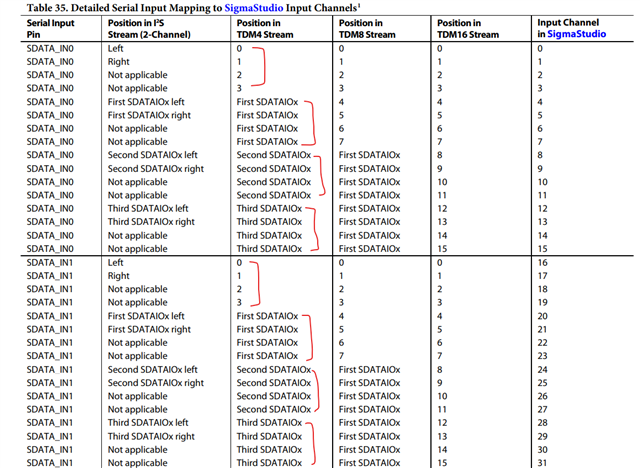
Serial input port 0 supports three SDATAIO pins to carry TDM4, so along with primary data pin (mapped at channel 0,1,2,3), you can have four TDM4 inputs in port 0.
Serial input port 1 supports three SDATAIO pins to carry TDM4, so along with primary data pin (mapped at channel 16,17,18,19), you can have four TDM4 inputs in port 1.
serial input port 2 supports one SDATAIOx pins to carry TDM4, so along with primary data pin (mapped at channel 32,33,34,35), you can have two TDM4 inputs in port 2.
serial input port 3 supports one SDATAIOx pins to carry TDM4, so along with primary data pin (mapped at channel 40,41,42,43), you can have two TDM4 inputs in port 3.
*The same port number and channel number mapping for TDM4 will exactly apply to serial output ports.
For TDM8,
Serial input port 0 has one SDATAIOx pin to carry TDM8, so along with primary pin (mapped at channel 0,1,2,3,4,5,6,7), you can have two TDM8 in port 0.
Serial input port 1 has one SDATAIOx pin to carry TDM8, so along with primary pin (mapped at channel 16,17,18,19,20,21,22,23), you can have two TDM8 in port 1.
Since port 2 and 3 each have only 8 channels in total, they will be utilized by the primary pin.
*The same port number and channel number mapping for TDM4 will exactly apply to serial output ports.
For TDM16,
Port 0 and 1 will use its primary pin for TDM16 and TDM16 is not applicable for port 2 and 3.
The same thing applies to the serial output port.
We will now see how to map these SDATAIOx pins to its respective serial ports.
There are 8 SDATAIOx pins in total which can either be used as an input or output.
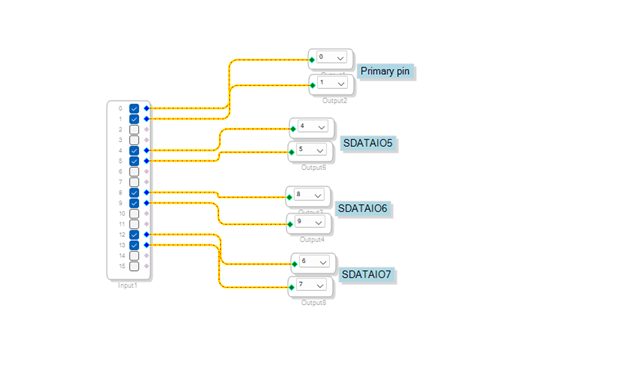
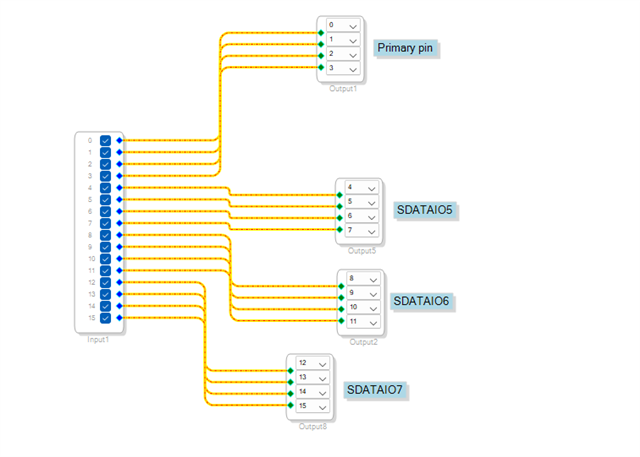
Let's take serial output port 0 for this example. so that this project can be used in the Eval board for 4 stereo outputs.
For stereo,
Set the serial output port in stereo mode.
The primary pin will use channel 0-1.
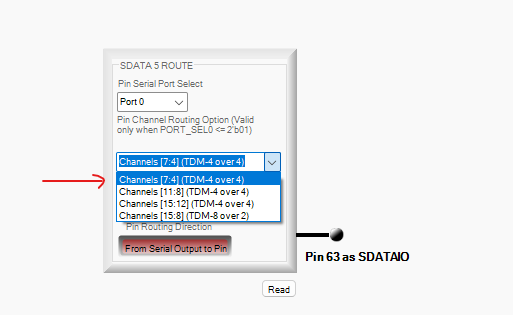
The below setting is for mapping SDATAIO5 pin to channel 4-5
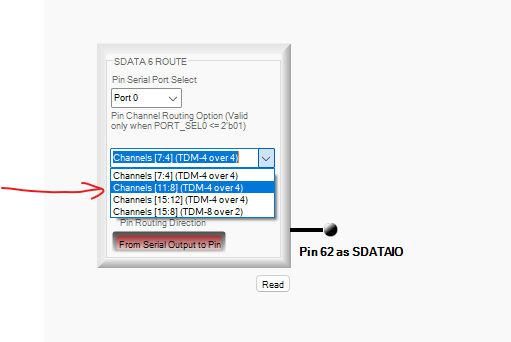
The below setting is for mapping SDATAIO6 pin to channel 8-9
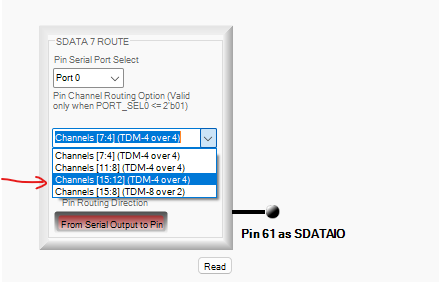
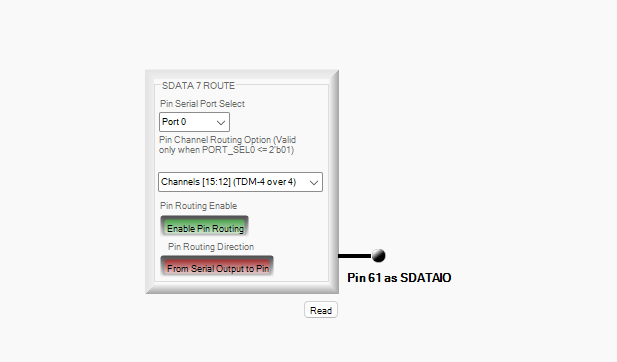
The below setting is for mapping SDATAIO7 pin to channel 12-13
With the picture below you can understand how we mapped.
For TDM4,
Set the serial output port in TDM4 mode.
I can use any of the SDATAIOx pins.
Now refer the below pic,
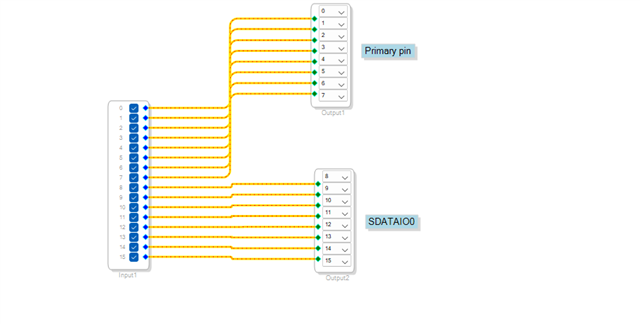
For TDM8,
Set the serial port in TDM8 mode.
I can use any of the SDATAIOx pins. I use SDATAIO0 here.
The same settings and channel mapping will work for serial input port side. You have to make a single change which is configuring the SDATAIO pin as an input. below is the reference.
If it's green in color, then it's input and if it's red in color then it's output.
Let me know if you have any further questions or if you need any examples with TDM and SDATAIOx pins.
I will also attach some of the projects where I have used SDATAIOx pins. It can be run in the Eval board. In Eval board SDATAIO4 is used for ADC input and SDATAIO5, SDATAIO6, SDATAIO7 are used for DAC.
Rest of the SDATAIO pins like SDATAIO0, SDATAIO1, SDATAIO2, SDATAIO3 are available in the Eval board's Mic canvas header. You can use them
There is a small bug in the serial input port side, so you will have to set the input port to be TDM4 for configuring stereo input as well. But the output side is fine.
SDATAIOx config.dspproj
The below project uses 8 I2S input and 8 I2S outputs.
Four primary input data pins of each port and 4 SDATAIO pins are used to get 8 I2S input.
Four primary output data pins of each port and 4 SDATAIO pins are used to get 8 I2S outputs.
1541.4IN and 4OUT I2S with SDATAIOx pins copy.dspproj
Feel free to reach out if you have questions.
Regards,
Harish


Wow, many thanks for such a detailed answer! This helps a lot and makes things clear.
Please log in to reply.