Trying to output sound on headphones from I2S signal
Hello,
I send an I2S signal to the DAC input of the ADAU1761 (through J6 connector on the ADAUX61EBZ board). I checked it with a logic analyzer and I can see it correctly.
I'm using the onboard oscillator to generate the MCLK (S5 on OSC)
Here is the I2C configuration I send: (and I read after the write to make sure it's the correct value in the register)
0x4000, 0x01
0x4002, 0x000000000000
0x40F5, 0x00
0x40F6, 0x00
0x40F2, 0x01
0x40F3, 0x00
0x4015, 0x00
0x4016, 0x00
0x4017, 0x00
0x40F8, 0x00
0x4019, 0x00
0x402A, 0x03
0x402B, 0x00
0x402C, 0x00
0x401C, 0x21
0x401D, 0x00
0x401E, 0x41
0x401F, 0x00
0x4022, 0x01
0x4027, 0xE7
0x4023, 0xE7
0x4024, 0xE7
0x4009, 0x00
0x4029, 0x03
0x4028, 0x00
0x4025, 0x00
0x4026, 0x00
0x4020, 0x00
0x4021, 0x00
I plugged headphone with a wired jack on the connector labeled "CAPLESS HP OUT"
I don't have any sound... I don't understand what I'm missing. Can you please help me?
Audio Signal Processors
hardware
SigmaDSP Audio Processors
adau1761
Hello 4rthur,
Could you please attach the sigma studio project that you used for exporting the system files? if you have a SS project then it would be very easy to have a look at the register settings, otherwise it will take time to look at all register and values in datasheet and compare with your attachments.
and the DSP is I2S slave or master?
which uC are you using?
Do you have sigma studio/USBi? Have you tried programming the part from sigma studio and was it working?
Have you tried analog input to analog output? If that works fine, then we can concentrate on the digital input side.
I have a basic teensy (Arduino based controller) code that I tested with ADAU1761 which works fine. if you want, I will send you the code so that you can try it in your hardware. since you are using the Eval board, you will have access to analog and digital inputs. So, you can test my code.
Regards,
Harish
Hello Harish,
Please find attached the Sigma Studio project. All registers are set exactly like what I send in my first message.
the DSP is I2S slave, I'm sending the I2S audio signal (which is a 1kHz sinus wave) from the NXP's RW612 SoC.
I'm using the EVAL-ADUSB2Z to discuss with the ADAU1761 board which is a USBi if I'm not mistaken. I played around with the codec in sigma studio, changing values in real time but I didn't find the root cause of my issue.
I didn't try analog inputs because I don't have a setup to do so.
Yes, please send me any code you have it may help me to find the root cause, thank you !
7331.ADAU1761.dspproj
Hello 4rthur,
Before making my next reply, I quickly wanted to mention this.
Make sure you connected your I2S signals in the marked side (Blue) of the headers. The red side is ground.
4rthur said:
0x4000, 0x01
The 'system clock source' register is set to "Direct from MCLK", this is not correct. This will mess up the usual clock derivation.
You should always use PLL to utilize the core's full potential and to avail other benefits. So set the register 0x4000 to the value 0xF.
And also, you will have synchronization issues since the DSP runs from its own crystal and incoming I2S from NXP's RW612 SoC runs from different MCLK. There are a few ways to fix this.
Either you can send MCLK to the DSP from the NXP's RW612 SoC or you can set the DSP sample rate to be your serial port sample rate, to do this your I2S clocks must always be stable and present, if the I2S clock goes away then the DSP will stop running. I will explain about it further.
This is what I have quickly noticed, I will share the Arduino code in a while.
Regards,
Harish
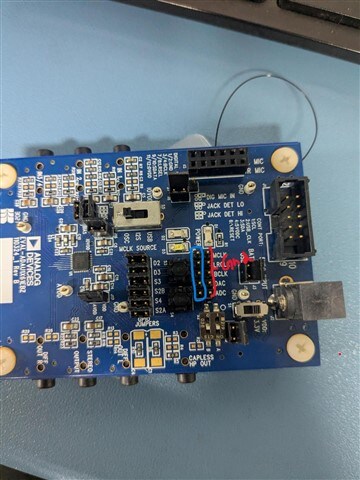
Hello 4rthur,
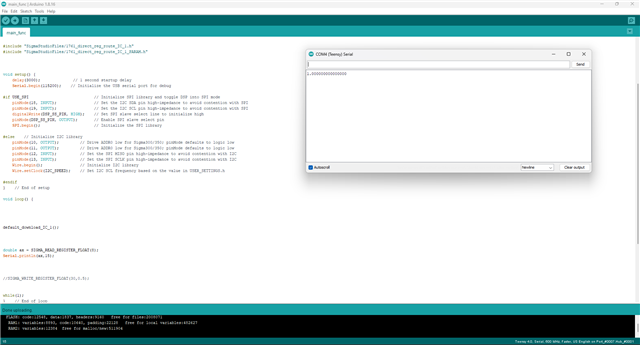
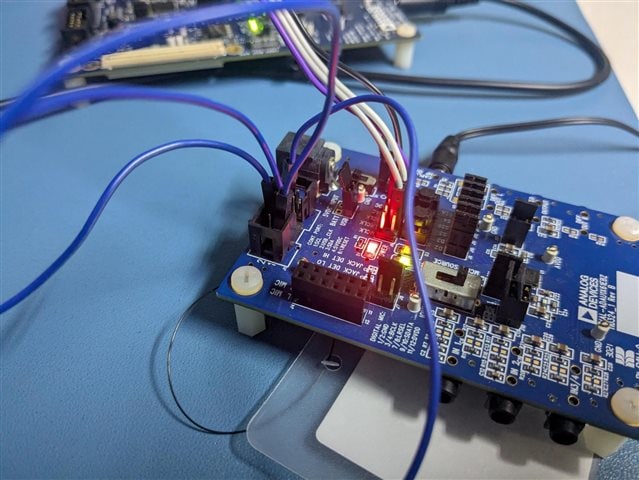
Below are my code and setup.
I have included a DC and readback cell in my sigma studio schematic and I have read the value back from uC to make sure this is working correctly. And the audio pass thru works fine too, Digital input to DAC (via register routing) to HP output.
I have just replicated your project; All I did was adding a DC and readback cell and correcting the PLL settings.
1761mcu1_IC_1.zip
Please give it a try and let me know about how it goes.
Regards,
Harish
Hello Harish,
My I2S signal is connected correctly like in your picture.
I'll try your setup but I'm not sure to understand what is a "DC and readback cell".
On my side, when I try to read what I set in the codec, I just hit "read all" in sigma studio and it reads all data from the codec I wrote with the MCU.
Moreover, I send the I2S signals after the ADAU1761 configuration. From what you said, if we use the serial clock, I must always send the BLCK and LRCLK then do the configuration. Is it right?
I looked into your code, I just need to convert your default_download_IC_1 process into my app right?
Thanks
Hello again,
I copied your scenario and now it's working thanks for the code. I noticed also that I disable the DSP but you enable it.
Anyway, I'll create now my own requirements based on this working example.
Best,
Arthur
I have one last question. Generating MCLK from the RW612 is not supported yet. You said that I should be able to derive the internal clock from the I2S clock. What should I do to reproduce this settings?
I changed S5 to "I2S" but the current code is, as expected, not working.
Hello 4rthur,
I'm glad that it's working now.
4rthur said:
I changed S5 to "I2S" but the current code is, as expected, not working.
What I said was not a hardware change; it's a register change in the software. The register we call as 'start pulse' in our newer DSPs, it's a sample rate clock in general.
SigmaDSPs are stream processors which run the entire schematic once per sample period. So, it needs an interrupt to tell the DSP to start processing the next sample. which will effectively be the sample rate of the DSP. This sample rate clock will be derived from the internal clock (from PLL) most of the time.
Now, the system clock (49.152MHz) of the DSP and sample rate clock (48KHz) is derived from the PLL (crystal), but since your I2S clocks are from different MCLK domain, there are chances where the DSP starts processing before the sample arrives in the serial port, this happens because the serial port is clocked by an external clock and sample rate clock is internal, so there may be drifts between these two clocks which may lead to some distortion (if the sign bit is lost etc.)
To avoid this, we will set the DSP sample rate to be serial input rate (external), now the DSP will run once the sample is arrived.
But, since the serial input port clock is now the sample rate clock, it has to be present all the time, if the clock goes away, then the DSP stops running. Also, there will be small changes in the total MIPS count, since the system clock and DSP sample rate are not in sync but this won't be a problem unless you use 99% of the DSP resources.
So, please put the switch S5 to OSC, as it was before.
Below is where you will have to change the register, change it in SS and link compile download the project and export the files (with changes).
Please let me know how it goes and feel free to reach out if you need anything.
Regards,
Harish

Hello Harish,
Thanks for the details. In other words, I must provide a clock on the MCLK pin. Am I right?
I'm asking because today I'm testing on the EVK and I can use the embedded crystal for the MCLK pin but very soon I'll have my new board where only my MCU (RW612) is connected to the ADAU1761's MCLK pin and right now, I cannot generate the clock for MCLK.
Is there any solution for which the core clock is derived from something else than the MCLK pin?
Thanks
Hello 4rthur,
I will chime in for Harish.
Yes, you must have some clock on the MCLK pin. The part is just a brick without it. Either a crystal or a clock generator must be applied.
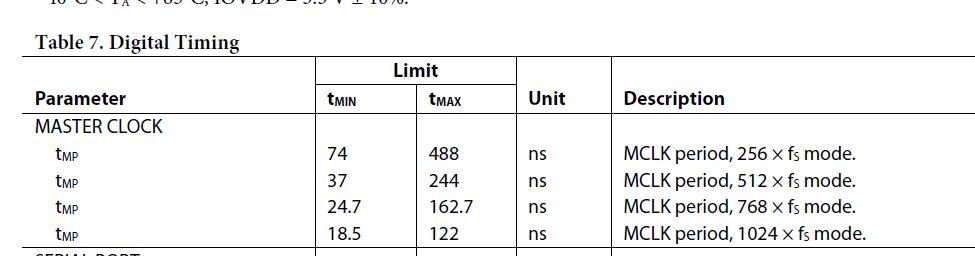
You do have some control on what the frequency is. You can run the PLL on a slower clock and let the PLL multiply the frequency up to what it needs to be. This is listed in the datasheet:
As you can see the settings are multiples based on the sample rate you will be using. So it can be as slow as 256 times fs. You do not want to stray too far from these frequencies because you might lose some instruction cycles as Harish pointed out or the PLL might have trouble locking to the incoming clock. The table I inserted details the min and max for each mode.
Dave T
Hello Dave,
Thanks for your feedback, that's clear for me.
Arthur
Please log in to reply.