Upload a project without having to open the schematic
Up to now I have always opened the schematic of the project before to upload it into the board.
The board is designed around ADAU1701.
I am using the ICP5 programmer from Sure Electronic, and I use IIC to communicate with the ADAU1701.
I have exported the system files in a folder, .h .xml .hex .param .dat
Is there a way to upload the E2PROM without the need to start from the schematic, compile and upload into the EEPROM?
I don't want to share the schematic but I have to allow the end user to upload the files into a virgin EEPROM.
Mario
Thread Notes
revenac - Moved from SigmaStudio for SHARC to SigmaDSP Processors & SigmaStudio Dev. Tool. Post date updated from Saturday, November 1, 2025 8:29 PM UTC to Sunday, November 2, 2025 7:18 AM UTC to reflect the move.
revenac - Moved from SigmaStudio for SHARC to SigmaDSP Processors & SigmaStudio Dev. Tool. Post date updated from Sunday, November 2, 2025 7:18 AM UTC to Sunday, November 2, 2025 7:18 AM UTC to reflect the move.
Audio Signal Processors
software
sigmaStudio 4.7
system files
schematic bypass
sigmastudio
SigmaDSP Audio Processors
firmware upload
adau1701
Show More
Hello Mario,
This is easy with the ADAU1701 because the comms port that the EEPROM is connected to the DSP is the same comms port that the controller will use to "talk" to the DSP. So the controller can address the EEPROM directly! You can store the hex file and have it program the EEPROM. But this only needs to be done once presumably in the factory or some field update routine. Generally, you program the EEPROM in the factory and then the DSP selfboots and once it is complete then the controller can communicate with the DSP and the EEPROM is out of the way.
I do not know if the ICP5 has any utilities to allow you to address and program the EEPROM directly. I doubt it.
So you still will have to open up SigmaStudio and the schematic but you do not have to compile it if nothing has changed. You can just right click on the EEPROM and select the Read/Write window and upload the hex file from there.
I have used an Aardvark in the past which has the same pinout as the USBi and you can write directly to the EEPROM and upload the file without opening up SigmaStudio or a project file.
So reding your post again, I think you will have to write the routine to grab the newest file and write it to the EEPROM. The address is 0xA0 if I recall correctly.
Dave T
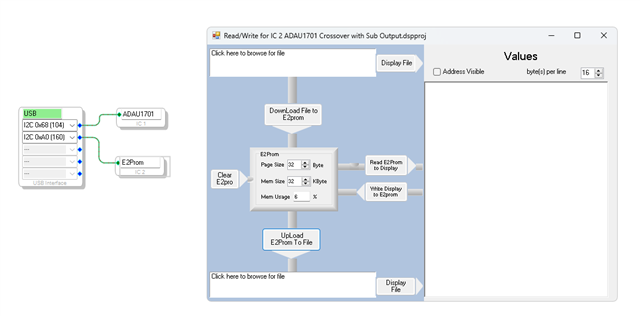
Very clear. Found immediately the function. Works.
Ciao. M
Please log in to reply.