Help with Measuring Input Volume and Setting that Volume as Output
Hello all,
I recently bought an ADAU1467 Eval Board and, as a newbie to this kind of thing, am trying to get familiar with this tech and the SigmaStudio software. I am trying to make a schematic in SigmaStudio that takes the input into my board (which is a piezo) and output through a speaker at the exact volume that is measured to be entering the piezo. Can anyone provide me any guidance, or a simple schematic of how one would do this?
Thank you so much!
Audio Signal Processors
sigma_studio
input
software
ADAU1467 SigmaStudio SigmaDSP
i2s input
microphone
adau1467
EVAL-ADAU1467Z
output
sigmastudio
SigmaDSP Audio Processors
evaluationboard
Show More
Hello esarabia,
Welcome to SigmaDSP and sigma studio community.
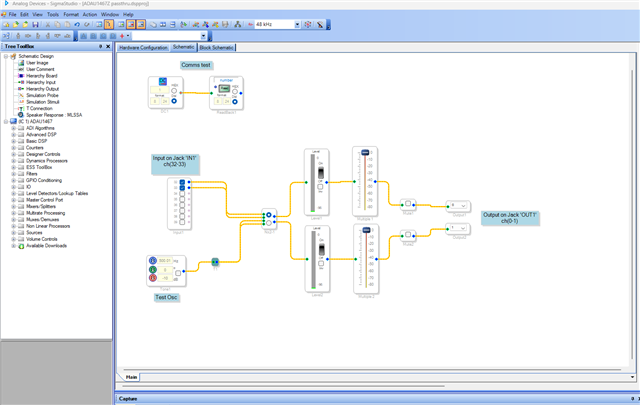
I will attach a basic pass thru schematic for ADAU1467 Eval board.
Note that the inputs of ADAU1467Z is line level, you have to use pre-amp for low level signals.
It would be great if you can explain your application a bit.
Are you trying to measure the input vibration level using a piezo sensor and then control the output volume accordingly. If that’s the case, note that piezo sensors produce very low-level signals, so you will need a preamplifier before interfacing it with the ADAU1467 evaluation board.
Below is the schematic.
Since it's a passthru project, the incoming signal level is directly sent out to the outputs without any gain reduction and level indicator is included in the schematic which is very handy to see the level of the signals.
ADAU1467Z passthru.dspproj
Please refer Dave's troubleshooting and other starter videos reg this part on YouTube, which helps you a lot working with SigmaDSP/Sigmastudio going forward.
https://www.youtube.com/channel/UCHFzVRIj3YoH1Vdt866BZHw
Regards,
Harish
Please log in to reply.