Locating an object in a large schematic
I have a rather complicated project using nearly 1100 uniquely-named schematic objects on roughly 50 hierarchical boards.
For my own troubleshooting purposes, is there a way to navigate to the GUI location of one of the objects using its name?
For example, I have inserted DSP readbacks in numerous locations for troubleshooting, but now I would like to find them and selectively remove them to save resources. Visually examining 50 boards, some of them rather huge, is very time consuming! It's a bit like finding a needle in a haystack.
Any thoughts?
Thanks in advance!
David Reaves
Edit Notes
readouts to readbacks
[edited by: DavidReaves at 9:46 AM (GMT -5) on 17 Nov 2025]
Audio Signal Processors
software
gui
4.7 and earlier
sigmastudio
SigmaDSP Audio Processors
adau1466
Show More
Hello David,
I am really sorry to report that you have discovered a weakness in the old version of SigmaStudio. In the early DSPs it was not as big of a deal but after we developed the Sigma300/350 parts you can really create some large complicated schematics!! We noticed the same issues but the underlying structure of the graphics utilities that were used to create SigmaStudio just did not make it possible to do what you are asking for.
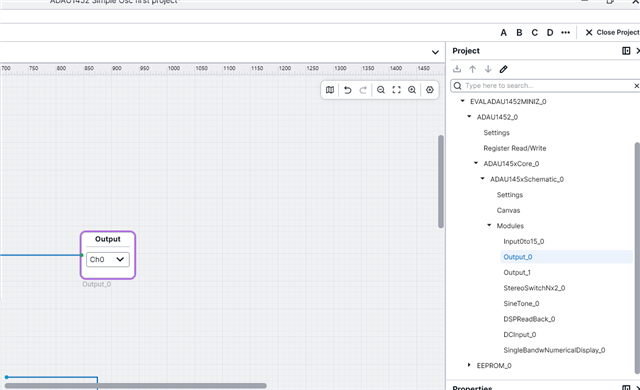
This will not help you but we did add this feature to the new SigmaStudio+
You can see a list of modules. in the project window and when you click on it the module highlights and comes into view on the screen.
At the moment there is no utility for importing SigmaStudio Rev 4.7 schematics over to SigmaStudio+ schematic files. (in case you were thinking of asking)
Dave T
Thanks, Dave, for the quick reply.
When I look at the (SigmaStudio 4.7) Compiler output, it lists all of the elements by unique identifier name, apparently in order of complexity/cycles used. Is there a way to get a similar list but with the "address" of each part; i.e., "board_name.part_name"? I know there are aspects of the interface that use this type of address, but wonder, is there a means existing where the list can be generated in this format?
Also… Is SigmaStudio+ only for paying customers? And is its functionality a complete superset of the earlier SigmaStudio software editions, or are parts/aspects lacking? IOW, what are the complications of starting over with the newer software, since it looks like the old SigmaStudio is being deprecated?
Thanks again!
Hello David R,
I did some experiments and then looked at the resulting files and there is a way to get a rough address. The only problem is that I have not found a way to read the location of the cursor or a block while using SigmaStudio. But, you do get an idea even though there are no rulers on the edge of the window to guide you.
I made a test project where I placed a DC cell in the upper left of the screen.
Then I placed one in the lower left of the screen to give me an idea of what the coordinate system is and where is location 0X,0Y.
Then I created three boards and placed DC cells in those boards with the name DC-H1 DC-H2, and DC-H3 corresponding to the board names.
Look at the system files output and you will find an XML file. It has _NetList appended to the name of the project.
In that file you will find the details of the objects including the locations.
You can see that DC1 is located X=72, Y=-138
So 72 is near the left edge but the workspace expands so it went past Y=0 and started to go negative.
DC2 I had in the bottom left corner, well, I went way down, again the workspace expands to fit.
So DC2 is located at X=72, Y=1561 so way down low.
Then You can see the DC cells I put in the blocks are labeled with the block name and the location inside the block.
I think this should help you find the blocks a little easier.
Moving over to SigmaStudio+ would be a huge task. Especially since it seems like your project is huge!!
SS+ is free and it supports the Sigma300/350 parts. If you ever want to use our A2B network parts then you will have to use SS+.
However, it does not support our older Sigma100 cores and not all the sigma200 cores.
We are not exactly sunsetting the old SigmaStudio rev 4.7 because not all the parts are ported over.
I still prefer the old version but the new one is getting better. The newest revision 2.4 allows you to change the display to be a light theme not the dark theme that anyone over the age of 30 has difficulty with! So I was happy about that!!
Dave T


Just a quick note to say the XML file helped immensely. I created an Excel spreadsheet with all the data, which will allow me to do a quick location of all the objects.
Thanks again for your time and help, Dave!
David
Please log in to reply.