best practice to start new SigmaStudio project today
Hello!
I have been using SigmaStudio for almost 10 years. I am doing DSP projects from time to time. The last big one was at the end of 2017.
I am trying to continue it, but, but lot of questions. I have tried version 4.7. The function "Export system files" was not working on it.
I have tried to create a new project from scratch on 4.6. But the project does not save settings for the multipurpose pins ...
It is not possible to use all the cycles that are available for the particular sampling rate. Hard to debug why.
It is not possible to see the “Compilation Report” in the latest versions ...
What is a suggested reliable way to work on DSP projects today?
Audio Signal Processors
adau1452
software
nice to understand
sigmastudio
SigmaDSP Audio Processors
Show More
Hello Raimonds,
SigmaStudio Rev 4.7 is rather mature. The Export system files is fully functional and many many people use it daily.
The multipurpose pins settings has NEVER been a problem for anyone.
It is possible to see the compilation report. It is right on the screen.
Using all of the available cycles is usually not a good idea because of a few routines you might be using could have variable amount of instructions per frame so when you get close you risk running out of instructions. When you run out of instructions with this core you end up not reaching the end of your program. What happens is that when the start pulse for the next frame comes in, the program execution is halted and the instruction pointer is updated to the start of the program. This means some instructions at the end of the program are never reached. This is usually outputs that are assigned a new value so the output stops working. This may be related to why you think the MP-Pins are not working.
There is a newer utility to see the instruction usage in real time but it also uses a few instructions to do this so you might not have enough room to do it.
This monitor actually gives you the exact instructions used and you can see over time if it did overrun. This post explains how to use the overrun monitor that gives you some information.
I am guessing there are a few little details that you are missing that is giving difficulties. I do not have enough info to help at the moment. For instance, until you do a link/compile/download, the export system files have nothing to export so it will not work.
Here is a post talking about a bug with the system files export and a solution:
(+) Sigma Studio v4.7 Export System Files Not Working - Q&A - SigmaDSP Processors & SigmaStudio Dev. Tool - EngineerZone
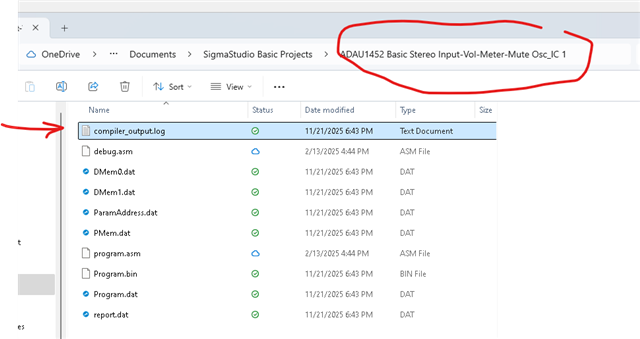
For the compiler output report.
In your project folder you will see a new folder for IC_1 assuming the ADAU1452 is IC_1 in your design, you will find the report in the folder.
This should get you working a bit more.
Have you found my YouTube channel?
I do not have videos with some of the things you mentioned but they are great ideas for new videos.
Dave T
Thank you for the overrun monitor!
And my quick results.
When the Compiler Output shows 1439 cycles necessary, the monitor shows 1416 used and 1655 free
When the Compiler Output shows 1564 cycles necessary, the monitor shows 4 used and 3067 free
Looks like there is a problem with the clocking?
I used the respective 3500 and 4000 taps FIRs in the mentioned tests. Am I incorrect in FIR use?
Thanks for solving issue with 1500 cycle limit in "150" version of ADAU1452!
But, maybe a stupid question about storing/saving Register Controls with the project file in SigamaStudio.
What should I take into account to have Register Controls saved in the project`s file?
Sometimes they are lost, and I missed why.
Thanks,
Raimonds
Please log in to reply.