ADAU1452 – No TDM8 Output on Serial Port 0 (Clock Slave to AD2428)
Hello,
I am having trouble getting the ADAU1452 to output TDM8 data on Serial Port 0.
Hardware setup:
I am using the EVAL-AD2428WD1BZ, which includes an onboard ADAU1452. For testing, I want to generate a simple tone inside the ADAU1452 DSP and transmit it as TDM8 on Serial Port 0 toward the A2B main node.
Since this code runs on a sub-node, the ADAU1452 operates as a clock slave to the AD2428.
Clocking seems to be correct because:
I can successfully loop S/PDIF In → S/PDIF Out
I can receive TDM8 on Serial Port In 0
I can route a TDM8 input channel to S/PDIF Out (verified on the MCHStreamer)
This confirms that S/PDIF, TDM8 input, and the DSP core signal flow all work properly.
However, Serial Port Out 0 never outputs anything—there is no activity at all. I have been debugging this for days and cannot find the root cause.
I am attaching the DSP code and the relevant SigmaStudio configuration.
8168.ADAU1452.dspproj
Clock Wiring on the EVAL-AD2428WD1BZ
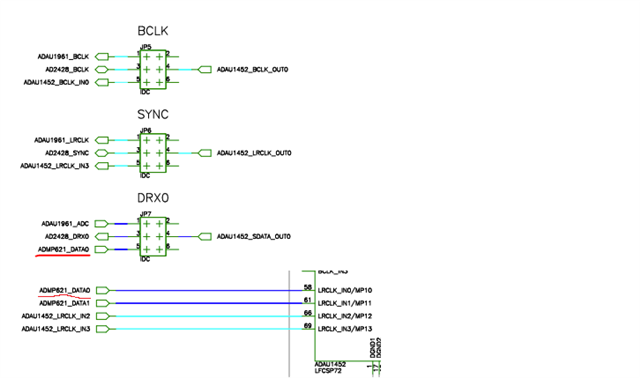
The AD2428 BCLK and SYNC signals are connected to:
ADAU_BCLK_IN0
ADAU_LRCLK_IN0
On this evaluation board, LRCLK_IN0 is shared with the ADMP621_DATA0 pin.
This configuration is the only wiring in which I can make the ADAU1452 accept the TDM clocks correctly.
I’ve attached a schematic screenshot showing these connections.
Full Signal Path for Context
MCHStreamer (clock master)
<— TDM8 —>
A2B Main Node (EVAL-AD2428WD1BZ)
<— A2B bus —>
A2B Sub Node (EVAL-AD2428WD1BZ)
<— TDM8 —>
Onboard ADAU1452 (clock slave to AD2428)
On the A2B Sub Node - I have another MCHStreamer attached via S/PDIF In/Out.
S/PDIF In/Out works
TDM8 In works
TDM8 Out does NOT work
What I am trying to do
Generate a fixed tone inside the DSP.
Route it to Serial Output Port 0, channels 0–7 (TDM8).
Verify that the A2B node transmits the stream upstream.
Current Problem
Serial Output Port 0 (i've also tried Serial Output Port 1) remains completely silent—no toggling, no data, nothing on the scope or the MCHStreamer input.
The DSP graph correctly routes the tone to the serial output channels, but the hardware output appears dead.
If anyone has suggestions on what might prevent Serial Port 0 from outputting data I would greatly appreciate the help.
Thank you!
Audio Signal Processors
adau1452
a2b
software
eval-ad2428wd1bz
Interface Transceivers & Isolators
SigmaDSP Audio Processors
Show More
Hello ClaudiuP,
Thanks for a detailed post, we really appreciate it.
It seems, the MCHStreamer is the A2B host and you have two EVAL-AD2428WD1BZ boards, one is the A2B main node and another one is sub node 0 where the ADAU1452 is transmitting TDM8 (internally generated tone) at its output port 0 to upstream (A2B main), Is my understanding correct?
ClaudiuP said:
The AD2428 BCLK and SYNC signals are connected to:
ADAU_BCLK_IN0
ADAU_LRCLK_IN0
So, the ADAU1452 gets its input port 0 clocks from A2B's AD2428_BCLK and AD2428_SYNC (which means you have put jumpers on these BCLK and LRCLK from the A2B to the ADAU1452's BCLK_IN0 and LRCLK_IN0) which is fine, so that you can receive TDM8 at the input port 0 successfully.
But I believe, the serial output port 0 is not getting any clocks from anywhere, it's set as clock slave to domain 0, so you have to physically connect BCLK and LRCLK to the serial output port 0 clocks (BCLK_OUT0 and LRCLK_OUT0), so that it will output the data on SDATA_OUT0.
You have configured clocks correctly at the input side, but you have to share the same clocks with the serial output port 0 too.
In simple terms, you have to share the AD2428_BCLK with BCLK_IN0 & BCLK_OUT0 and AD2428_SYNC with LRCLK_IN0 & LRCLK_OUT0. I believe you just shorted A2B clock with input port 0 clocks (by using jumpers) and you left the serial output port 0 clocks unconnected?
This is just an assumption, since I don't know about the current jumper position on your board, I can't say how the clocks are connected.
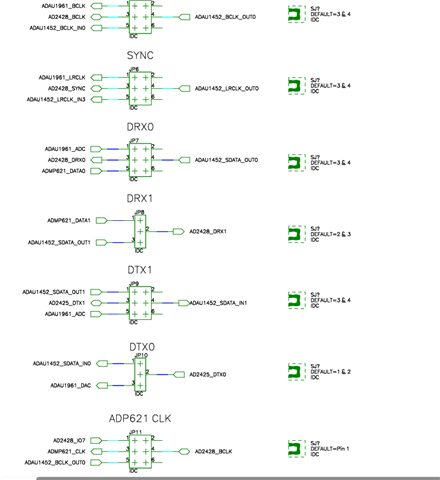
Let me know if you have shared the A2B clocks with input and output port, if not then please share the clocks and try again, it will mostly work. If you have shared the clocks and tried, then please let me know about the jumper position below.
I believe it's just a clocking issue, hopefully it will be resolved soon.
Regards,
Harish
Harishgowtham,
Your assumption was exactly right.
Initially, I only had the AD2428 BCLK and SYNC connected to BCLK_IN0 and LRCLK_IN0, which allowed the ADAU1452 to receive TDM8 correctly.
But I did not have those same clocks shared with BCLK_OUT0 and LRCLK_OUT0 on Serial Port 0.
I had previously attempted that wiring, but for some reason it didn’t work at the time, and I incorrectly assumed that LRCLK_OUT0 was output-only and could not accept the external clock. That misunderstanding led me down the wrong path for a while.
I revisited the wiring and reconnected the AD2428 clocks so that:
AD2428_BCLK → BCLK_IN0 & BCLK_OUT0
AD2428_SYNC → LRCLK_IN0 & LRCLK_OUT0
After doing this, Serial Port 0 immediately came alive — I can now transmit my TDM8 tone upstream without any issue.
So yes, the serial output port simply had no clock source, and sharing the clocks resolved everything.
Thank you very much for pointing me in the right direction — you absolutely made my day!
Please log in to reply.