Programming ADAU1452 via I2C in SigmaStudio+
Subscribe
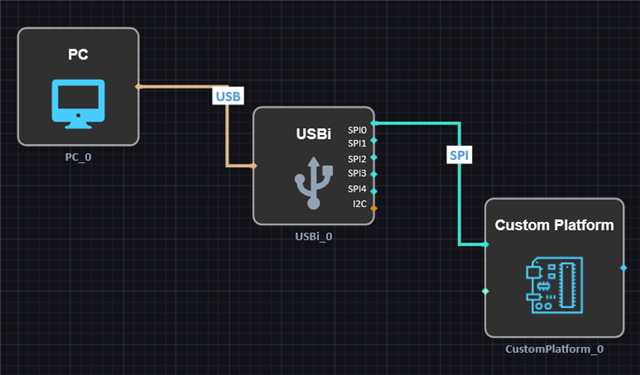
I have used SigmaStudio 4.7 for programming ADAU1452 via I2C, using a "custom" USBi. However, I can't seem to do that in the new SigmaStudio+. Using a custom platform block, there isn't a way to connect I2C from USBi to the ADAU1452, only SPI. Am I missing something?
Audio Signal Processors
adau1452
software
usbi
Sigmastudio+
SigmaDSP Audio Processors
3.3.0
Show More
Hello
Double-click the Custom Platform block.
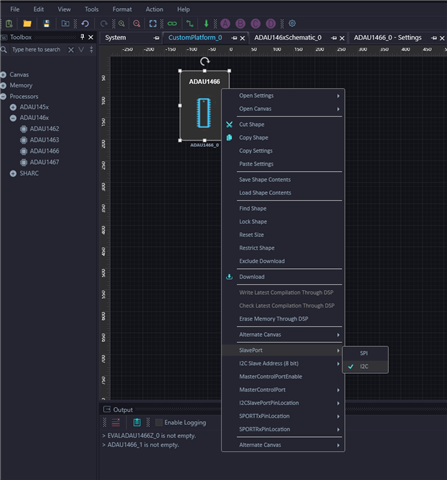
Then, right-click the Processor block and, from the Slave Port options, select I²C.
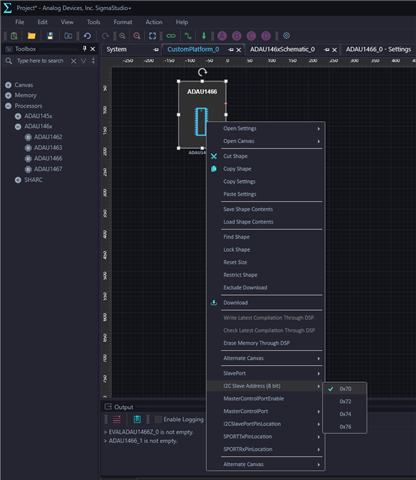
Next, under the Slave Port I²C Slave Address field, choose the appropriate I²C address.
Regards
Harish
Thank you! That worked.
Please log in to reply.