How to set Sequence File for Control Port IO?
I have a Custom Platform (for ADAU1463) with multiple Control Port IO modules (for A2B chips, ADC and DAC), but I cannot find out how to specify the Sequence File in the Settings.
I can click on Settings in the Control Port IO module to see the Master Control Port settings, and I can click on Sequence File, but I cannot type or right-click or otherwise set the Sequence File. I have created one Sequence in the Project, but that file does not show up in Settings, so far as I can tell, even those the Sequence.xml file is in the same folder as the Project.
I have a few related questions:
I have 4 peripheral chips connected to the ADAU1463 on the SCL2_M and SDA2_M pins, each with a different I2C address. Since each Master Control Port has Protocol (SPI | I2C), Bitrate: (400 kHz), Subaddress Bytes: (1), and Device Address, would I need to add four Control Port IO modules?
I see that a Sequence also contains Protocol, Device ID, Mode, Address Length, Address, Data Length, Data, and Word Length. This implies that I could put a single Startup Boot - Master Control Port IO - Sequence that writes to all four peripherals in a specific order. Would I use one Sequence or four for my design?
Audio Signal Processors
software
SigmaDSP Audio Processors
SigmaStudio+ 2.4.0
2.4.0
Hello Brian,
SoundConsulting said:
I can click on Settings in the Control Port IO module to see the Master Control Port settings, and I can click on Sequence File, but I cannot type or right-click or otherwise set the Sequence File. I have created one Sequence in the Project, but that file does not show up in Settings, so far as I can tell, even those the Sequence.xml file is in the same folder as the Project.
Reg the sequence file selection in the master control port window, my sincere apologies for the inconvenience. It seems like a bug in the latest version of SS+. But SS+ 2.3.0 has an option to upload our sequence file.
I will report about this option not there in the latest version of SS+ to the development team.
SoundConsulting said:
I have 4 peripheral chips connected to the ADAU1463 on the SCL2_M and SDA2_M pins, each with a different I2C address. Since each Master Control Port has Protocol (SPI | I2C), Bitrate: (400 kHz), Subaddress Bytes: (1), and Device Address, would I need to add four Control Port IO modules?
Yes, you do have to add four master control port instances for configuring four different peripherals since each module/instance will have a unique sequence file for the respective peripheral.
These instances happen in an order, if you are using startup boot, you can see a number on the module, the execution happens in that order.
General master control ports with trigger block also happens in the order (if more than one), the order is based on which one you drag and dropped first.
SoundConsulting said:
I see that a Sequence also contains Protocol, Device ID, Mode, Address Length, Address, Data Length, Data, and Word Length. This implies that I could put a single Startup Boot - Master Control Port IO - Sequence that writes to all four peripherals in a specific order. Would I use one Sequence or four for my design?
No, you must have four instances of master control port if you want to program four peripherals.
I don't think sigma studio takes the device address and other settings from the XML file, rather it takes it from the master control port's config window.
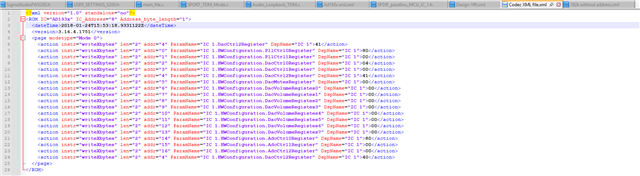
To prove this, I have an XML file to program the on-board codec of the ADAU1467Z eval board to 192KHz.
First, I uploaded the file 'as is' (with device address, sub address mentioned in the XML file) and programmed the codec, it works fine which is obvious and expected. Below is the usual file that we use.
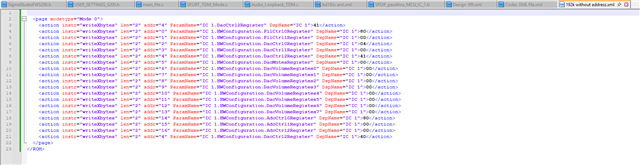
Below is the one that I removed the header kind of part, i.e. device address, sub address thing and uploaded. When I compiled, the codec is programmed fine and works fine too.
So, what we configure in the master control port config window is important for the I2C/SPI part to function correctly, hence you have to have four instances to config four peripherals with different address for each peripheral to make them work correctly.
Regards,
Harish
.
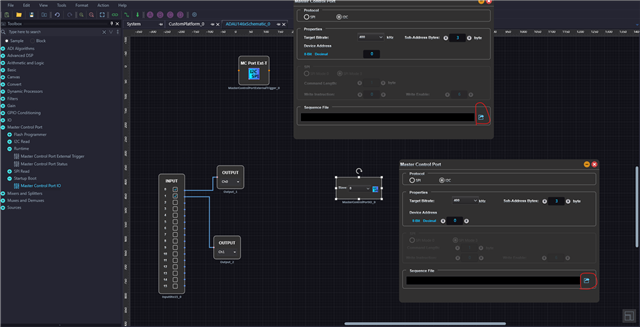
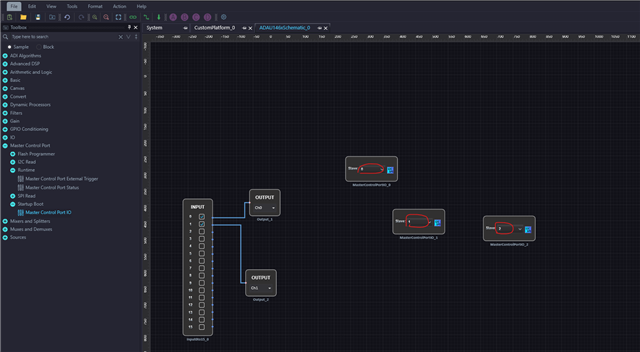
I have also tried SigmaStudio 4.7, and it is very difficult to select a Sequence file. Using the browse button to select a file in a relative path and then close the settings window, SS immediate complains that it cannot find the Sequence file. If I go back and remove the directories, leaving just the file name, SS seems to be able to find the file (but then other problems occur). I cannot seem to use the fully-qualified path in the dialog, either.
Are there known issues in SigmaStudio 4.7 with the Master Control Port module for startup? Are there specific limitations to the path that I need to work around?
Please log in to reply.