Less Inst(cycles) in SS+ than in SS
My question is related to these two threads:
- ez.analog.com/.../how-to-set-sample-rate-in-ss-like-done-in-4-7
- ez.analog.com/.../setting-sample-rate
Preambule:
I migrated a project from SSv4.7 to SS+v3.3. I couldn't find a function to set the sample rate for the project. I searched the forums. I found the two threads listed above and found where this function is located in SS+. I also discovered that the sample rate is now set for each element separately, although some algorithms are locked to 48 kHz.
The question:
After compiling the project, I discovered that the Inst(cycles) fill percentage was significantly lower than the same project in SS: 35% < 93%.
As far as I understand, some algorithms simply don't require fs multiplication and operate from the base sample rate (please correct me if I'm wrong). The question is, is this an optimization in the new version of the program? Will the DSP output signal differ in a project compiled in SS+ from a project compiled in SS? Or is this simply a cool optimization, and I can now use many more algorithms in my project? Maybe I don't understand something…
Thread Notes
Richardmy - Moved from Precision Microcontrollers to SigmaDSP Processors & SigmaStudio Dev. Tool. Post date updated from Tuesday, April 14, 2026 11:44 AM UTC to Wednesday, April 15, 2026 12:59 PM UTC to reflect the move.
Richardmy - Moved from Precision Microcontrollers to SigmaDSP Processors & SigmaStudio Dev. Tool. Post date updated from Wednesday, April 15, 2026 12:59 PM UTC to Wednesday, April 15, 2026 12:59 PM UTC to reflect the move.
software
sample rate
sigmaStudio 4.7
adau1467
processors and dsp
Sigmastudio+
sigmastudio
Processors and Microcontrollers
fs
SigmaStudio 3.3.0
Show More


Hello Richardmy,
The DSP core is the DSP core and nothing has changed. The code developed might be a little bit more efficient when compiled into assembly instructions but I suspect other reasons.
Can you please send over the two projects so I can look into it?
You can send them to me in a PM if you do not want it out in public.
Just make sure to also request friendship so I can respond in a PM.
Thanks,
Dave T
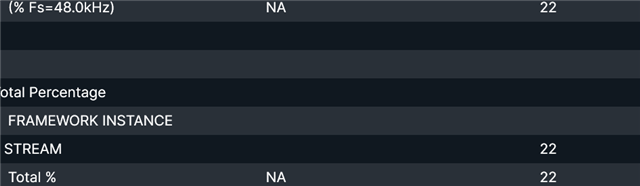
So, I reimported the SS project into SS+, then manually corrected the import warnings and restarted SS+. After that, every block shows up as running at 192 kHz. Okay. I went to the memory tab, and all the usage values were showing at 48 kHz, even after restarting the application. I went back to the forums and found this thread: Sigma Studio+ Memory Calculation Error
So, I added a sine wave generator block and set its file system to 48 kHz, then compile downloaded it
Now there appeared usage for 192kHz and 48kHz.
I removed the sine wave generator, and now everything is calculating correctly.
But after restarting the app and compiling memory tab shows usage for 48kHz again:
I guess it's a bug? Now, I need to use a work around everytime to see proper memory values.


Please log in to reply.