export system file issue avec sigmastudio v4.7
I'm using the EVAL-ADAU1467z evaluation board with SigmaStudio v4.7.
I programmed a new project using the example "7737.Example IO Project - EVAL-ADAU1467Z". I compiled and uploaded it to the board following procedure UG-1134. Everything works correctly.
I now want to export the system files to obtain the .hex file, but it's not working. The .hex file is always empty. The compilation completes successfully, but the exported files are empty (0 bytes), whether with my personal project or the example.
I'm not using a virtual machine. It's running Windows by default.
Here are the steps I followed:
1- Compilation and upload.
2- Adding a user interface setting to the IPAT and selecting the "Enable reading" option.
3- After step 1, compiling and exporting the schematic files.
I tried uninstalling and reinstalling SigmaStudio 4.7, but it didn't work.
I also tried with version 4.6.
software
4.7
export system file
adau1467
processors and dsp
V4.7
sigmastudio
Processors and Microcontrollers
Show More
Hello Nicolou,
Could you please attach your project file?
Regards,
Harish
7737.Example IO Project - EVAL-ADAU1467Z.zip
projet.zip
1072.projet.zip
4645.Example IO Project - EVAL-ADAU1467Z.zip
Hello Nicolou,
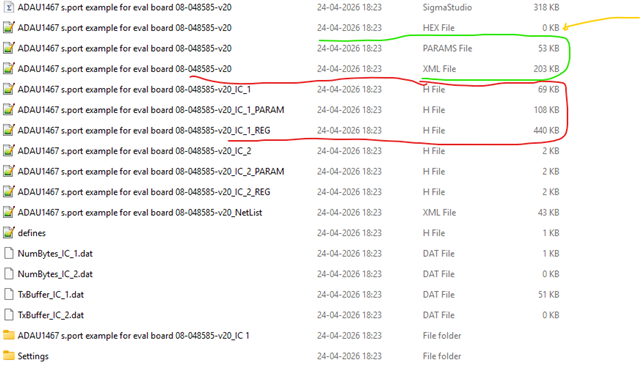
The files needed for uC interfacing (.h files) are exported correctly and the xml file with all registers and memory of the project is also exported correctly. I don't think any other file would help you with anything.
The files marked in red are used for uC interfacing.
The files marked in green are used for XML version of DSP registers and memory, it's used when you want to program one sigmaDSP from the master control port of another sigmaDSP (the master control port only allows xml format)
I think you are worrying about the file marked in yellow which shows (0Kbytes), but I have never used that file.
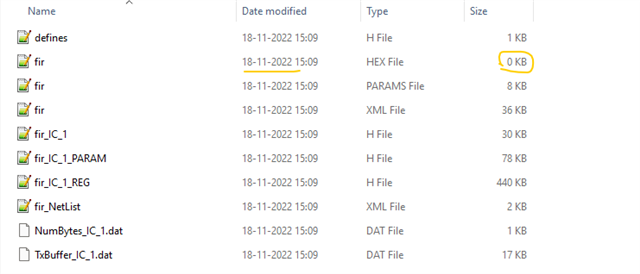
I can see that not only in your project, almost all exported files that I randomly checked have this hex file 0KB. so, it occurs for all of us. You can my 4-year-old exported folder has the same thing.
If you are trying to interface SigmaDSP with uC then the files marked in red is all you need. So, why do you want that HEX file? if you can tell us what you are trying to do with that, then I will see if I can help.
Regards,
Harish
Hello HARISH,
I want to retrieve the self-boot file that needs to be put in the EEPROM to directly program EEPROMs during the production of my boards, without having to compile and download it with Sigma Studio.
I don't want to give the project file to my subcontractor.
So when using "WinE2PromLoader", what file format do we need to download into the EEPROM?
Regards,
Nicolou
Hello Nicolou,
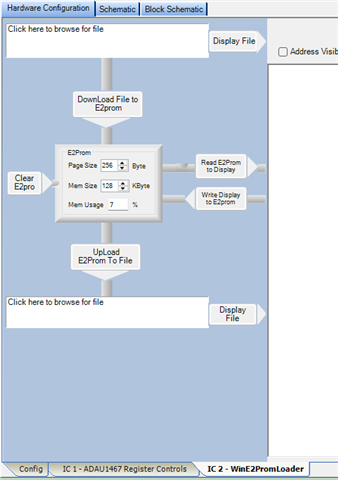
If you want the EEPROM image, then it will be available in the project folder for EEPROM after compilation and written to EEPROM procedure. The EEPROM folder will appear once you programmed the EEPROM by "write latest compilation thru DSP".
This IC_2 indicates EEPROM.
Inside this you will find the EEPROM Hex file.
Regards,
Harish

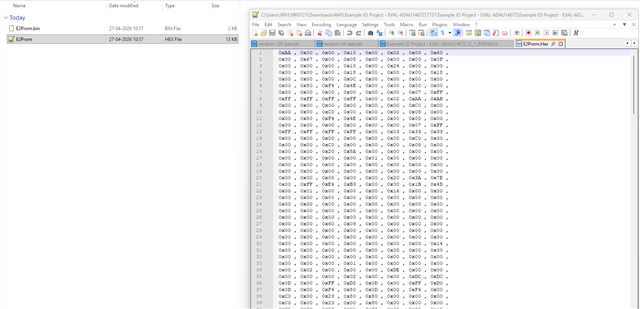
thanks you
Please log in to reply.