LowPass Filter coefficient calculation
Hi all,
I am checking the Low Pass Filter coefficient to use on my micro-controller,
I have researched some topic, like https://ez.analog.com/message/21166?commentID=21166#comment-21166
and the wiki: https://wiki.analog.com/resources/tools-software/sigmastudio/toolbox/filters/general2ndorder
I use the excel to verify my formula is correct or not (check with the SigmaStudio compiler window).
I can not get the correct A1 and A2 value but I can get the correct B0, B1 and B2, so I don't know where is wrong.
like this example:
excel:
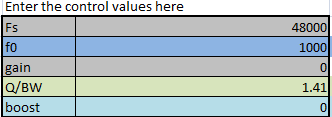
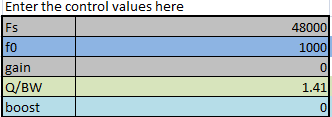
Fs: 48000
f0: 1000Hz
Gain: 0
Q: 1.41
boost: 0
and the
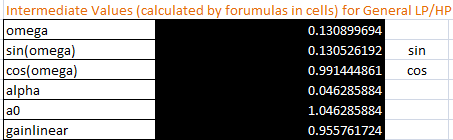
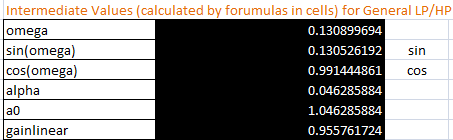
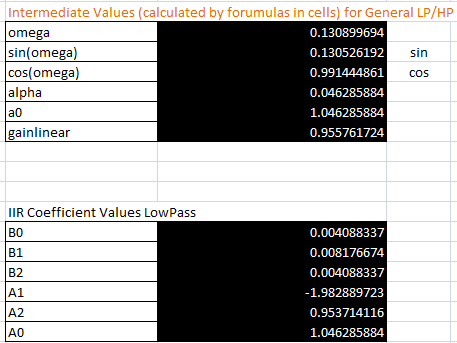
omega(w0): (2 * Pi() * f0 ) / Fs = 0.130899694
sin(w0): 0.130526192
cos(w0): 0.991444861
alpha( this is from the SigmaStudio Filter Wiki):
alpha = sin(w0) / (2 * Q) = 0.046285884
like below pic:
from the above calculation,
I can get the similar B0/B1/B2:
SigmaStudio:
from mine excel:
but to check the A1 and A2, the value is not correct, I follow the Wiki formula and the reference topic,
so I am not sure which is the correct answer. I don't know my formula is wrong or not.
Here is mine A1 and A2 formula:
A1 = -2 * cos(w0) = -1.982889723
A2 = 1 - alpha = 0.953714116
from the SigmaStudio compiler window A1 and A2 value:
A1= 1.8951700925827
A2 = -0.911523461341858
from the above I can sure is completely different.
Please help me on this.
Thanks you all !
Regards,
Alvis
filter parameter
filter coefficient
sigmastudio
dsp filter
formula


Here's a python script that produces the correct coefficients for a few flavors of biquad:
#!/usr/bin/python3
from math import pi, cos, sin
fS = 48000
f0 = 1000 / fS # normalized frequency
Q = 1.41 # quality factor
ζ = 1/(2*Q) # damping ratio
x = cos(2*pi*f0)
y = sin(2*pi*f0)
def transform(L, C, H):
L *= 1 - x
C *= ζ * y
H *= 1 + x
c0 = (L + H)/2 + C
c1 = L - H
c2 = (L + H)/2 - C
return (c0, c1, c2)
(b0, b1, b2) = transform(1, 0, 0) # low-pass
# (0, 1, 0) # band-pass
# (0, 0, 1) # high-pass
# (1, 0, 1) # notch
# (1,-1, 1) # all-pass
(a0, a1, a2) = transform(1, 1, 1)
# normalize a0 coefficient
(b0, b1, b2) = (b0/a0, b1/a0, b2/a0)
(a0, a1, a2) = (a0/a0, a1/a0, a2/a0)
# print dsp coefficients
print("b2 =", b2)
print("b1 =", b1)
print("b0 =", b0)
print("a2 =", -a2)
print("a1 =", -a1)
Alvis,
You need to normalize all your coefficients. To do this, divide each of a1, a2, b0, b1, and b2 by a0 -- see lines 34 and 35 of matthijs 's Python script. I've neglected this myself, it's a common mistake. Interestingly, in your example it makes the coefficients merely 5% too large -- yet results in an enormous response error.
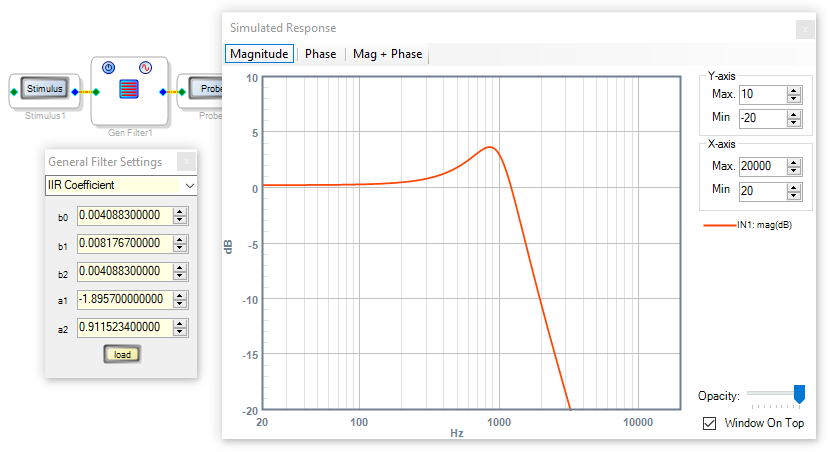
Perhaps the easiest way to test your coefficients is to type them into the IIR Coefficient version of the General 2nd Order Filter, as shown below:
If you prefer to use a spreadsheet, I attached one with various filter types. I just added the Lowpass filter so you'll find it at the far right of the sheet. When you program your microcontroller, remember to flip the signs of the a1 and a2 coefficients before safeloading them.
Best regards,
Bob
Hi Bob and Matthijs,
Thanks for your reply!
I have tested the normalize, it works!
Thank you!
Best regards,
Alvis
Please log in to reply.