Migrating ADAU1452 to ADAU1466
Hello,
I would like to replace ADAU1452 with ADAU1466 in an existing project. Hardware seems to be no problem (I built a prototype with ADAU1466 and it works with the old software) since these two are pin compatible. That's great!
Is there an easy way to exchange ADAU1452 with ADAU1466 in SigmaStudio? When I try to delete ADAU1452 from the config I get the message "The selected IC is being used by one or more algorithms ..." which is understandable. But I'm wondering if there is a way to migrate my design to the new 1466 without completly re-drawing everything.
Any helpful tips or ideas are greatly welcome.
Thank you!
Bernd
Audio Signal Processors
adau1452
migration
sigmastudio
SigmaDSP Audio Processors
adau1466
Show More
Hello Bernd,
You can continue to use the old DLL if you like but if you need to use the added memory or other features of the 1466 then you will have to change over.
Now a trick I use and have tested for simple projects is this:
On the Hardware Config page you pull in a new processor, the ADAU1466, and drop it into the project. Connect it up to the USBi. At that point it will be called either IC2 or IC3. Note the name.
Then go back to the schematic and "select all" from the edit pull-down menu or type CTRL-A.
Then somewhere on the blank part of the schematic window you right-click. There you will see an option to "Change IC". So you change it to IC3 (or IC2) which ever is the new DSP IC name.
You will see an error message saying that one or more cells are not compatible. This is usually only the input and output cells.
So next you drop in new input and output cells using the ADAU1466 section of the tree-toolbox. There is a section for each IC. Then delete the old ones and connect up the new ones. You will see the wires are a different color.
Then you go back to the Hardware Config and delete the 1452.
There may be a cell that is different that may not work. I have not tested every cell for this procedure. So far it has worked fine. Make sure to save safety copies before going through all this.
Dave T
Thank you very much, Dave. I'll give this a try :-)
Bernd
Hello Dave,
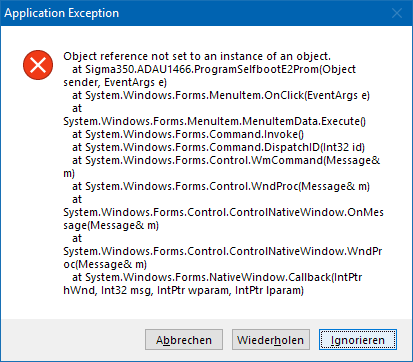
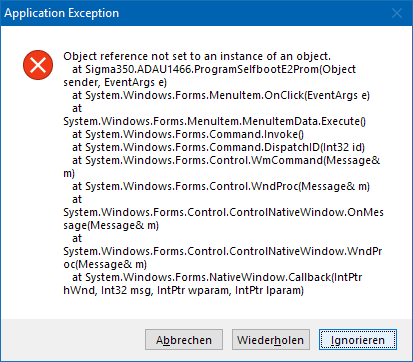
I modified my project using your trick. So far it worked and I could link-compile-download it to my board. One thing that now does not work anymore is: "Self-boot Memory -> Write Latest Compilation USB" When doing so I get the following error message:
Do you have any idea what causes this and how to get rid of it?
Writing the E2Prom through DSP is working.
With my "old" ADAU1452 project I could write directly to E2Prom. Hardware has not changed so I suppose it is a software issue.
Another thing I noticed. When I Select all and click on Change IC I still get the messge "one or more cells are not compatible" Is there a way to find out which cells are ment to be not compatible? The old ADAU1452 is deleted as you suggested in your trick. So I suppose all cells are released. Could it be that this incompatibility issue could be the cause for the errore discribed above?
Best
Bernd
Hello Bernd,
Do you actually have a EEPROM on your project config page? One of the IC's?
The "write latest compilation through USB" should not work on any Sigma300 or Sigma350 part. Because the USBi is not connected to the same I2C/SPI bus. It is connected to the slave port and the EEPROM is connected to the master port. So it should not work. That selection in the menu is for directly programming the EEPROM from the USBi which in this case is not connected to the USBi. So you have to program it through the DSP.
Now I do not know how this worked on your old project. Does your hardware have a way to connect the EERPOM to the slave port communication bus?
Now if you do not have a EEPROM in your SigmaStudo project then it will go looking for it but it will not be there and hence the errors that there is no instance of an EEPROM in the project. I think this is what is going on.
At this point you should not need to change the IC. It is interesting that you are getting that message. We do need to work out some more details with the multi-IC utilities.
Dave T
Hello Dave,
thank you very much for your fast and kind assistance!
Yes, for shure I do have a E2Prom (as IC2) on my Config-Page :-)
On my hardware, master and slave I2C-ports of the DSP are connected together. That forms my bordwide I2C bus on that my Codec AD1937, AES Transmitter CS8406, and others. The selfboot I2C-Eeprom is also connected to this bus. Via a pinheader I can connect USBi to this bus too. Furtheron when I connect USBi to this pinheader the selfboot pin of DSP and Write protect of E2Prom are pulled low. So I was able to download the programm into the DSP, then modify parameters in realtime and also write to the E2Prom directly over USBi. That worked well (with ADAU1452 - just tested it again for to be shure) until now that I use ADAU1466.
Surprisingly if I take the way over WinE2PromLoader I can flash the hex-file directly to the E2Prom.
When I use "Write E2Prom throug DSP" it works. So the hex-file is generated and this is all together not a real problem. (we need the hex file later in case that we will have to update DSP Selfboot-firmware in the field)
Another question I have concernig indirect parameter acces:
I do have two switches that I'd like to control via a connected microcontroller (also integrated to the I2C bus).
When I generate indirect adresses for these two switches the parameter address that I see in the Indirect Parameter Access Table is not the same that I see in the Capture Window when I rock these switches:
For Example:
- switch the switch in schematic -> "Capture" Address = 11921
- right click on this switch: Add Parameter to indirect ... -> Parameter Address = 32401 (and it shows format 8.24 although the switch is 32.0 ?!)
Shouldn't these two addresses be the same?
(Indirect Address is 24586)
When I then switch the switch using the indirect address the things that happen are not the same as when I switch it directly in schematic.
Do you have any idea?
Bernd
Hello Bernd,
Thanks for the details about your hardware setup. I will look into this. I am wondering if the programmer assumed there would never be a setup like this and disabled the direct write to the EEPROM. I will test some and see what is happening.
Regarding the indirect parameter access table.
The format you see is only for the numbers you manually write into the GUI. If you want to write a "1" in 32.0 format then you need to pull down the box. It is not smart enough to understand the format differences of the parameters inside an object. This is just a tool to allow you to use the feature in SigmaStudio, this data format selection is not in the actual code on the DSP anywhere.
Now when looking at the capture window it is difficult to see what is actually happening. When you use the box in the window to change the parameter in the switch, it is a two step process. First you place the new parameter value in the table memory, so you enter the value and you select the proper format and you will see the write to the place where the parameter is stored in the table. (not the actual parameter location, just the table) But you can see that write in the capture window. Then when you click on "Write" in the table window, you see in the capture window the start address being loaded and the number of parameters being written to the table object code in the DSP. What you do not see in the capture window is the DSP then taking the value you stuffed into the table, taking the address that was just sent which tells the DSP where in the table it will find the actual address of the parameter and then it write the new value in to the address of the actual parameter. The DSP code for the table knows the number of elements in the table. So the DSP will take the 24586 address and add the number of elements to the address so it will now point to the storage location of the address oif the parameter. This is a table of pointers that is located right after the table of values to be written into the DSP object. All this happens inside the DSP so there is nothing to capture in the capture window. The capture window only can capture the communication between SigmaStudio and the DSP program. What happens in the program is invisible.
So the capture window will show you what your controller code needs to send to the Table object in the DSP.
I assume the actual control is working?
Do keep in mind that the table needs to be current. If you change the SigmaStudio schematic then you need to recompile so if any of the object addresses changed, then the table will reflect it. Of course, you would need to recompile anyway if you added or removed something in the schematic so this is not a big deal. The only time you need to remember to recompile is when you make changes in the table.
I hope this helps, it is a little difficult to describe.
Dave T
This question has been assumed as answered either offline via email or with a multi-part answer. This question has now been closed out. If you have an inquiry related to this topic please post a new question in the applicable product forum.
Thank you,
EZ Admin
Please log in to reply.