ADAU1701 AUX controlled "graphic EQ" possible?
Is it possible to design an eq with fix frequency and Q and make the cut/boost variable with an external potentiometer?
I want to use the four aux analog inputs to controll some fixed frequencies live but without a pc.
Audio Signal Processors
gpio pins
aux_adc
sigmastudio
SigmaDSP Audio Processors
adau1701
eq
Show More
Hello,
It would be possible to do this if you structured your filters as crossovers, then used the AUX ADCs to control the volume of each frequency band -- something like this would do the job:
Externally controlling filters on the 1701 is actually trickier than it would seem, due to the way that filter coefficients are computed. There was an interesting thread with a similar question recently, you can check it out here: Potentiometer controlled Hi Shelving Filter
Regards,
Tyler
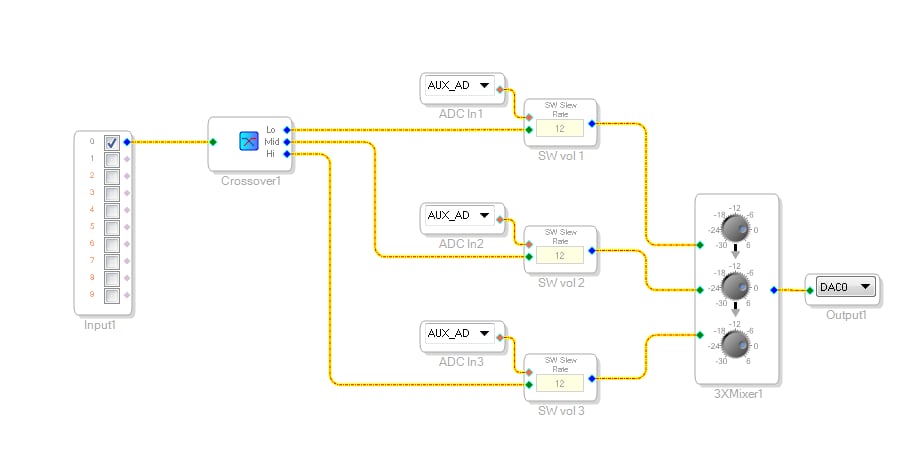
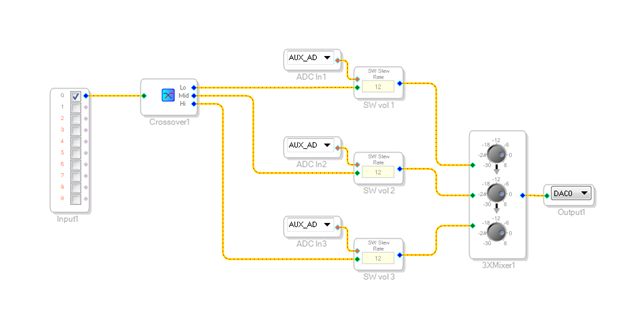
Hallo,
thanks for your answer.
Crossovers won't really do the job because i need eqs on specific frequencies with specific Q.
Maybe it is the better option then to use lookup filters instead, it isn't infinitely variable but with enough steps per eq (i need a range from -10dB to 10dB, so maybe 1dB or 0.5dB steps) it should be fine.
Hopefully the 1701 has got enough memory to store the coefficients for four eqs with 40 steps each.
Would you consider the newly added High Order Shelving filters. I believe they were made for the 144x family and the 145x family but unfortunately not for the 1701 I'm afraid. Those filters were design with Graphic EQ in mind.
Please comment.
Miguel
Hello,
I'm not shure what is meant with "newly added High Order Shelving filters", I cannot find something matching in the filtersection. I need a peaking filter, not a shelving one.
Hello IPv6,
You can do this using index selectable filters. These are great because they slew between one setting and the next. You will have to create a curve for every setting but I think you will find that 11 to 15 curves will probably be enough. I am not sure when you might run out of resources on the part. I put together this example of how to do it. Here are some details of this project:
1) I used the 1701 mini eval board that only has one aux ADC pot so one of the filters is using this pot, the rest are using a DC cell. I named the DC cells "ADC In x" to make it obvious that these would be the other AUX ADC inputs. You will have to go into the register settings to enable the other ADC inputs. To test the bands with the DC cell just input a value between 0 and 0.999 and it will simulate the data from the ADC.
2) I did not do it exactly like a graphic. The top and bottom bands are shelving and the other three are peaking. I think this is more useful but it can easily be changed.
3) I used a double precision filter for the Low band and single precision for the rest of the filters.
4) I have five bands in the filter cells. Two cut, two boost and one that is flat. So you always want to have an odd number of filters so one can be flat. If you add more filters you will have to add values to the lookup table and adjust the multiplier so the aux ADC will reach all the values. Since this is using the integer portion of the fixed point 5.23 number you will only be able to have 15 curves using this exact way to do this. Should you want more curves then instead of multiplying you will have to divide the ADC (multiply by a number less than 1) to bring it down to an integer number instead of a fixed point number. Then you change the input of the table to be an integer format. This is a bit tricky so these details should be on a different post.
5) I made the lookup tables to have one extra value. This is to prevent a problem should the ADC ever get to 1.0. Then the table will overrun and cause unpredictable output. So I set the 6th value to be the same as the fifth value simply as a precaution. The ADC should never reach 1.0 but it is an easy thing to protect against and it does not use up too much code resources.
Dave T
Hello Dave,
this is exactly what i am looking for. Thank you a lot for your answer!
Thanks also for your hint with the lookup tables.
I made my own one with 2nd order lookup filters and will try it first without the tables.
For me, 5 options per eq is to less, i added 19, so with a boost/cut of 10dB i got more or less 1dB steps.
Hopefully there is enough space to store all the filter coefficients.
You find my version attached.
Hello IPv6,
It looks like that will work fine. If you are able to compile and run it using SigmaStudio then there is enough room to store the program and coefficients.
If you do not use the tables then you must make sure the input will never overrun the number of filters. This also applies to the Slew Mux with the exception of the ones that use limit testing. I see you did scale the output of the ADC properly but I am saying this to others who might read this.
This filter external input is an integer number not a 5.23 number. The AUX ADC outputs a 5.23 number so you must either scale it properly or use a lookup table set to translate from a fixed point input to an integer output. Sending data that is out of range will cause the program to write data using an invalid address offset. So data will be written to and read from memory that is being used for other functions in the program. This is why the output is undetermined. I have seen outputs that go unstable to just mute or go really loud. You must avoid this and a table is a good way to do this.
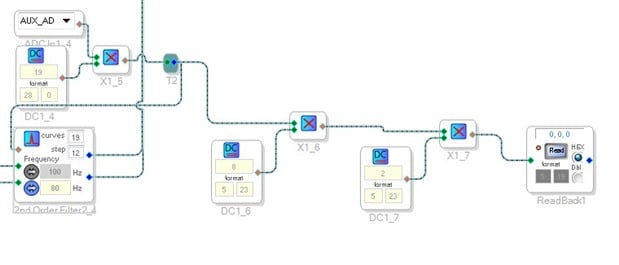
So to check what you are sending to the filter you can use a readback cell. The issue with the readback cell in the ADAU1701 is that it is only 24 bits not 28 bits. So the bottom four bits are missing in the readback display. For fixed point numbers this is fine but for integer number this means that the first 16 numbers will not show up. Well, 0-15 then a 16 will show up as a 1. So you have to go through a little math to make this work. You must multiply by 16. However, since the multiply block is setup with a 5.23 input you cannot enter a 16. Only 15.9999. So you must do it in two steps to get it to multiply by 16. I did this in your project and saw that you were sending integers from 0-12 which translates to 0-18 in decimal. So this will work.
Here is a screenshot of what I did:
Of course, you want to delete all this mess to save memory once you verified the operation.
So since the AUX ADC will never reach 1 you will be safe with not using a table.
Thanks,
Dave T

hey good evening sorry for asking so many questions but i need a 7 band eq me gpio pins potentiometer and with 4 adc potentiometers that would be possible thank you and merry christmas
Hello Lorenzo4711,
The 1701 Graphic EQ example I suppled above in my earlier post uses 472 instructions. It only has four bands of EQ and each EQ has only two levels of boost and two levels of cut. Clearly not enough for most applications. So if you increase the number of levels in each EQ and add three more bands then that will probably exceed the MIPS available. Then you will have to incorporate a GPIO switch along with sample and hold blocks to switch banks for your AUX ADC pots. This will use more instructions again and you have not done hardly anything else like compression or bypass logic etc. So unless you plan on using more than one ADAU1701 I think you need to go to the ADAU1467 devices that have 88 pins and have 8 AUX ADC pots.
Then you can use the Holter's EQ that it is available in that part that allows easy interfacing and building of a graphic EQ. If you use the ADAU1452 then you only have six AUX ADC inputs so you would have to use the bank system again but you have many more MIPS and more GPIO so it is not an issue, just a detail.
If you want to go this route then start a new thread asking about the Holter's EQ and I will post it there. It is not very relevant to this thread.
Dave T
Please log in to reply.