ADAU1452 Filter control/parameters
I'm using a general 2nd order filter (with automaticcalculated coefficients) block on Sigmastudio 3.13. On this block I'm able to select the filter type. Among filter types of interest for my project I have Parametric, since I want to build a parametric EQ controled via software UI updating the required parameters (Q, frequency, gain, etc.) . I have following questions /comments/ bugs reports.
It is not quite clear which filter types are accepted into the filter block "General 2nd Order with Coefficient Calculation". According to this Wiki link, only LowPass/Highpass/BandPass/BandStop filters are accepted, but according to this other one, all possible types of general 2nd order filter are accepted (Parametric, Shelving, General High-Pass, General Low-Pass, General Band-Pass, General Band-Stop, Butterworth Low-Pass / High-Pass, Bessel Low-Pass / High-Pass, All-pass, Peaking and Notch)
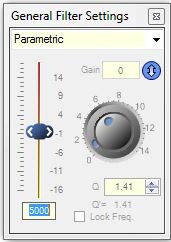
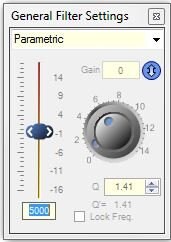
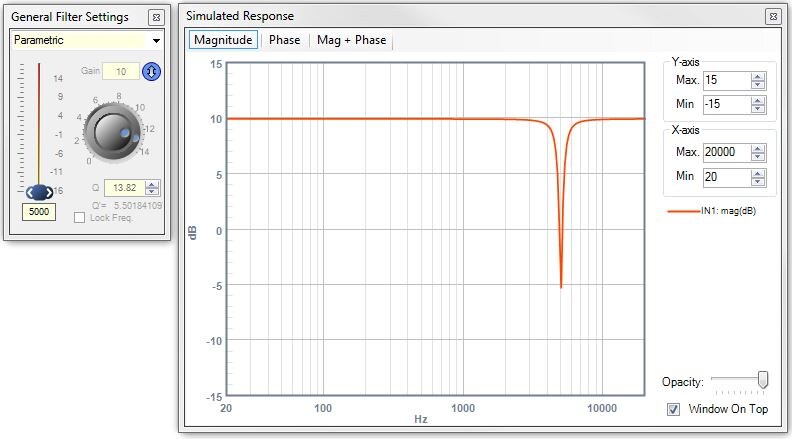
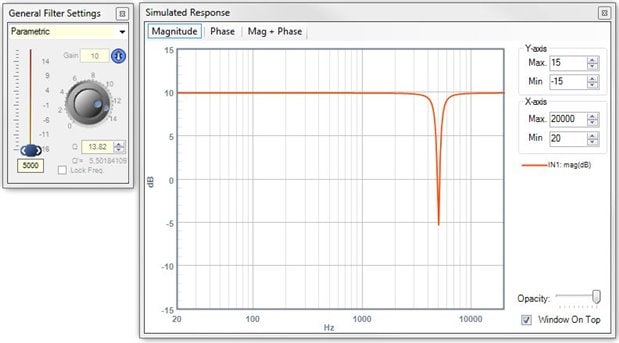
Compiling and downloading the project to the DSP is successfully done, nevertheless the module does not seems to work properly, since changes on gain does not update gain on the filter. Considering the parameters window of the 2nd order filter, which are also common to General 2nd Order with Coefficient Calculation block:
Behavior on 2nd order filter is following:
- left slider controls filter gain
- left input box controls center frequency of the filter
- dial controls Q factor, as well as under-right input box
- so called "Gain" input box on the uppder right side controls the boost of the filter
Well, using the General 2nd Order with Coefficient Calculation block and taking a look at the output in capture window I see following registers are updated/controlled:
FREQ_DSP_CALC1__
Q_DSP_CALC1__
GAIN_DSP_CALC1__
ONE_BY_FS_DSP_CALC1__
FILTER_TYPE1__
INVERT1__
MEM_SELECTION_DSP_CALC1__
ADDRESS_DSP_CALC1__
Behavior of General 2nd Order with Coefficient Calculation block UI controls are following:
- left slider does nothing, all register remain with same values
- left input box controls center frequency of the filter via FREQ_DSP_CALC1__ register
- dial controls Q factor, as well as under-right input box via Q_DSP_CALC1__
- so called "Gain" input box on the uppder right side controls the boost of the filter via GAIN_DSP_CALC1__.
Seems like some naming and concepts were mixed up on the implementation of the UI and the register algorithms. There not seems to be a boost register value and with the current implementation it is not possible to control filter gain at all. Is there any way to control it?
Stimuli/Probe Simulation are not working using them on a General 2nd Order with Coefficient Calculation block.
Exporting the project, the generated register names on file *_IC_1_PARAM.h for the General 2nd Oder with Coefficient Calculation block have the same name, and not the proper names displayed on the output console window, which makes it quite inconvenient for including the file on the software (uC) controlling the DSPs.
/* Module Master EQ1 - General (2nd order)*/
#define MOD_MASTEREQ1_COUNT 8
#define MOD_MASTEREQ1_DEVICE "IC1"
#define MOD_MASTEREQ1_ALG0_INCREMENT_ADDR 19705
#define MOD_MASTEREQ1_ALG0_INCREMENT_FIXPT 0x00000040
#define MOD_MASTEREQ1_ALG0_INCREMENT_VALUE SIGMASTUDIOTYPE_INTEGER_CONVERT(64)
#define MOD_MASTEREQ1_ALG0_INCREMENT_TYPE SIGMASTUDIOTYPE_INTEGER
#define MOD_MASTEREQ1_ALG0_ON_ADDR 19706
#define MOD_MASTEREQ1_ALG0_ON_VALUE SIGMASTUDIOTYPE_8_24_CONVERT(1)
#define MOD_MASTEREQ1_ALG0_ON_TYPE SIGMASTUDIOTYPE_8_24
#define MOD_MASTEREQ1_ALG0_ON_ADDR 19707
#define MOD_MASTEREQ1_ALG0_ON_VALUE SIGMASTUDIOTYPE_8_24_CONVERT(0)
#define MOD_MASTEREQ1_ALG0_ON_TYPE SIGMASTUDIOTYPE_8_24
#define MOD_MASTEREQ1_ALG0_ON_ADDR 19708
#define MOD_MASTEREQ1_ALG0_ON_FIXPT 0x00004B42
#define MOD_MASTEREQ1_ALG0_ON_VALUE SIGMASTUDIOTYPE_INTEGER_CONVERT(19266)
#define MOD_MASTEREQ1_ALG0_ON_TYPE SIGMASTUDIOTYPE_INTEGER
#define MOD_MASTEREQ1_ALG0_ON_ADDR 19709
#define MOD_MASTEREQ1_ALG0_ON_VALUE SIGMASTUDIOTYPE_8_24_CONVERT(2.08333333333333E-05)
#define MOD_MASTEREQ1_ALG0_ON_TYPE SIGMASTUDIOTYPE_8_24
#define MOD_MASTEREQ1_ALG0_ON_ADDR 19710
#define MOD_MASTEREQ1_ALG0_ON_FIXPT 0x00000001
#define MOD_MASTEREQ1_ALG0_ON_VALUE SIGMASTUDIOTYPE_INTEGER_CONVERT(1)
#define MOD_MASTEREQ1_ALG0_ON_TYPE SIGMASTUDIOTYPE_INTEGER
#define MOD_MASTEREQ1_ALG0_ON_ADDR 19761
#define MOD_MASTEREQ1_ALG0_ON_FIXPT 0x00000000
#define MOD_MASTEREQ1_ALG0_ON_VALUE SIGMASTUDIOTYPE_INTEGER_CONVERT(0)
#define MOD_MASTEREQ1_ALG0_ON_TYPE SIGMASTUDIOTYPE_INTEGER
#define MOD_MASTEREQ1_ALG0_ON_ADDR 19762
#define MOD_MASTEREQ1_ALG0_ON_FIXPT 0x00000000
#define MOD_MASTEREQ1_ALG0_ON_VALUE SIGMASTUDIOTYPE_INTEGER_CONVERT(0)
#define MOD_MASTEREQ1_ALG0_ON_TYPE SIGMASTUDIOTYPE_INTEGER
I hope this was some useful information and please let me know if there is something I'm not using properly.
Greetings,
Adrian
Audio Signal Processors
adau1452
coefficients
filter
SigmaDSP Audio Processors
iir-filter
sigma studio output file
Show More
Hi.
If you are going to implement a uC mastered equalizer, here are a few hints:
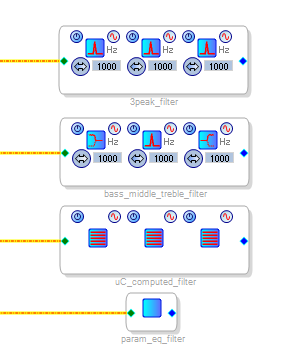
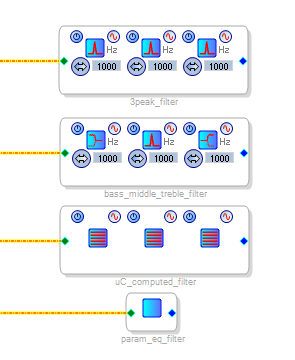
Your equalizer will probably consist of a serie of biquad filters. Or directly a laptop controlled filter like the last.
You have to decide which one will do coefficient calculations. The DSP or the uC. If you choose the first, it may not be the best choice:
- DSP computed filters may be still in development, and may be only available for the ADAU145X
- It is easy to compute 2nd order biquad coefficients
Since you will surely use double precision floating point calculations (even if you have a 8bit uC) in the uC code, think that the coefficient calculation function written in C for a biquad peak filter is only about 14 line long! There are only 5 coefficients to compute: b2,b1,b0,a2,a1. (cause coeff a0=1).
The most challenging part is safeload. If you don't use safeload, then non-linear noise is likely to appear when you update the filter values into the DSP.
Here are my generated files. You can see that the name of each filter appear. You can also see that the different filters sections are called "stages". So the best method is to use the hierarchy blocks on the schematic if you have a big project, and give good names. So when you use the exported code, you see the name and you know which block it is from, and which thing it is!
/* Module 3peak_filter - General Eq (2nd order)*/
#define MOD_3PEAK_FILTER_ALG0_STAGE0_B2_ADDR 31
...
#define MOD_3PEAK_FILTER_ALG0_STAGE0_A1_TYPE SIGMASTUDIOTYPE_8_24
#define MOD_3PEAK_FILTER_ALG0_STAGE1_B2_ADDR 36
#define MOD_3PEAK_FILTER_ALG0_STAGE1_B2_VALUE SIGMASTUDIOTYPE_8_24_CONVERT(-0.044389720605842)
...
/* Module bass_middle_treble_filter - General Eq (2nd order)*/
#define MOD_BASS_MIDDLE_TREBLE_FILTER_ALG0_STAGE0_B2_VALUE SIGMASTUDIOTYPE_8_24_CONVERT(0.831005589346758)
#define MOD_BASS_MIDDLE_TREBLE_FILTER_ALG0_STAGE0_B2_TYPE SIGMASTUDIOTYPE_8_24
...
It is quite difficult to maintain a project because you will have two separate things with different names and concepts: DSP and uC.
At this point it would be a good idea to program the DSP from the uC. So if you add a filter in your project, you will have to:
- edit the DSP schematic
- export the DSP files
- adapt your uC code
- compile, program the uC which will then program the DSP
It will require a bit of an effort to have both uC and DSP communicate. I suggest that you start with that before anything else! Once it is working, it will probably answer a lot of your questions.
Best regards,
Simon
Hi Adrian,
Please find the my reply below
1. We have fixed it now . Both the links point to the same module now.
3. The stimulus option will be added in the upcoming releases.
I will get back to you on Point 2 and 4 after verifying it.
Thanks,
Mazher
Thanks Z0mb13 for the answer,
we use only ADAU1452, so the exclusive availability to this DSP family wouldn't be an issue for me. I thought letting the DSP calculate the coefficients would lead to a more reliable solution, since we avoid to load any filter parameter that might not be allowed or even the problem you point with non-linear noise.
I guess you are right, and implementing the filter coefficients calculations on the uC would be a once easy task, so I think I'll target your suggestion.
Greetings,
Adrian
Please log in to reply.