Compile Error in Project with Different DSP types
I tried to create a project using an ADAU1452 and multiple ADAU1761 however I get a compile error.
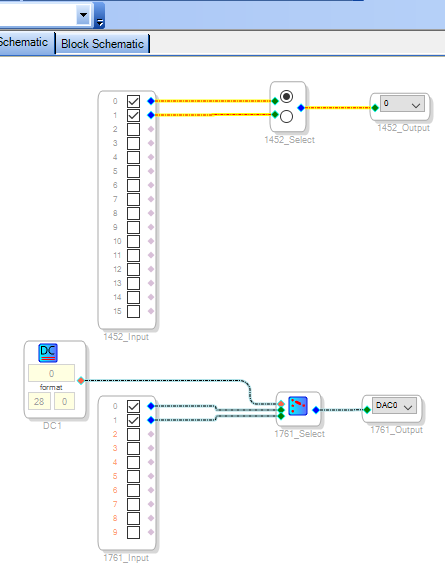
The error seems to be around a Mono Switch Nx1 block assigned to the ADAU1761 though there may be others.
I'm guessing its been implemented in 1542 code and the compiled with the 1761 compiler.
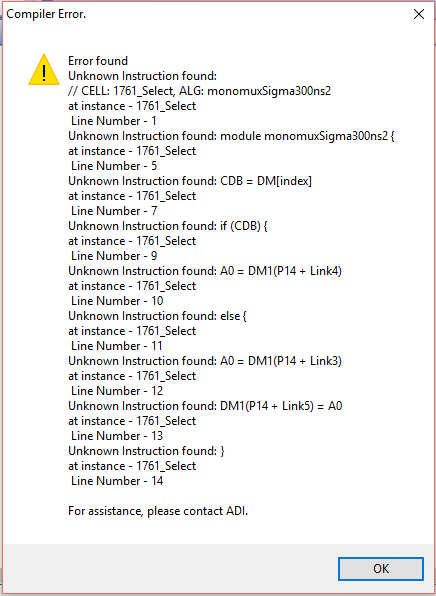
AN example error is (which annoyingly I cant copy and paste from the dialogue box)
"Unknown instruction found:
// CELL:1761_Select, ALG;monomuxSigma300ns2 at instance - 1761_select
line number -1"
See the attached simplified project file.
I have split the DSP types across two project files as a work around.
Audio Signal Processors
adau1452
SigmaDSP Audio Processors
adau1761
Hello,
I got the same error message:
The most reliable way to get a screen image into Engineer Zone is to:
Make a screenshot (PrtScr)
Paste it into MSPaint or a similar graphics program
Edit as desired
Save it as a .png (preferred) or .jpg file
Place it in your post with the EngineerZone Insert Image command.
Another workaround is to substitute an index-mux for one of the switch-muxes (I tried it for the ADAU1761). You can switch its input with the DC Source. Since this compiles, it could be that GUI-switched muxes for different processors in the same project is confusing the compilers (but I'm just guessing).
Best regards,
Bob
Thanks Bob,
So Its not a case of SigmaStudio picking on me.
Hi there,
I deleted and replaced the Nx1 switch from the 1761, and the program compiled with no errors. Attached is the working project. However, I'm not positive why this would have given an error in the first place (when I first compiled your project, I got the same error). So, I'll check in with our software team!
Regards,
Tyler !
The first time it happened I had assigned the switch to the 1452 then when doing the 1761 circuit I copy and pasted the switch.
When this failed I tried pulling a new switch from the toolbox; this also failed.
In the example project I pulled both switches from the toolbox and they were only ever assigned to their relevant DSP types.
BTW Just realised I reverted back to Sigma studio 3.12 build 3 a few weeks ago due to a problem that wasn't with SigmaStudio and have not yet put 3.13 back yet
I have just changed to V3.13
The existing example project made in V3.12 still gives an error.
If I re draw the example project from scratch in V3.13 it compiles.
Thanks Bob and TylerK, Problem Solved!
Please log in to reply.