Spikes on MPIO outputs
I designed and built a board using the ADAU1446. I have done several other projects with I2S, but this is my first time with a DSP. The ADAU1446 is connected via I2C to a Raspberry Pi. The DSP responds to commands on the I2C bus. I have software on the Pi to read the export file from SigmaStudio and download to the DSP. I have also verified the download by reading back various registers and RAM locations.
I have configured GPIO_8 as an Output driven from the Control Port, and I can turn it on or off by writing to location 0x1248. So far so good.
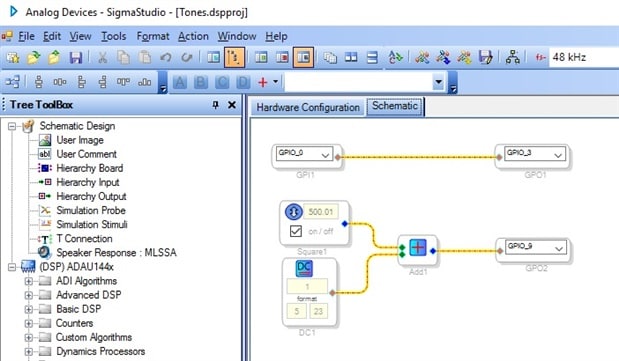
I have a very simple schematic in SigmaStudio as follows (see attached snapshot):
GPIO_0 is configured as in Input; GPIO_3 is configured as Output driven by core with pullup. I can read the value of GPIO_0 and see that it is 0x00800000 (logic 1), and if I jumper to ground I see that the value goes to zero (logic 0). The output on GPIO_3 should just follow the input, and it sorta does, but looking on the oscilloscope, there are numerous extraneous spikes on the output. When the input is high, the output is high (3.3V); but when the input is low, the output is a steady stream of spikes (it almost looks like a data stream, but I can't get a good lock on the scope).
The second part of the schematic is supposed to put a 500 Hz square wave on GPIO_9. This is taken directly from AN-951. GPIO_9 is also configured as Output driven by core with pullup. On GPIO_9 i see a steady high signal (3.3v) with no changes at all.
So, I'd really like to get the simple stuff working before I dive into the I2S inputs and outputs. If you have any advice on what registers to check or configure, I'd appreciate it.
Thanks,
Jake
Audio Signal Processors
adau1446
mp pins
SigmaDSP Audio Processors
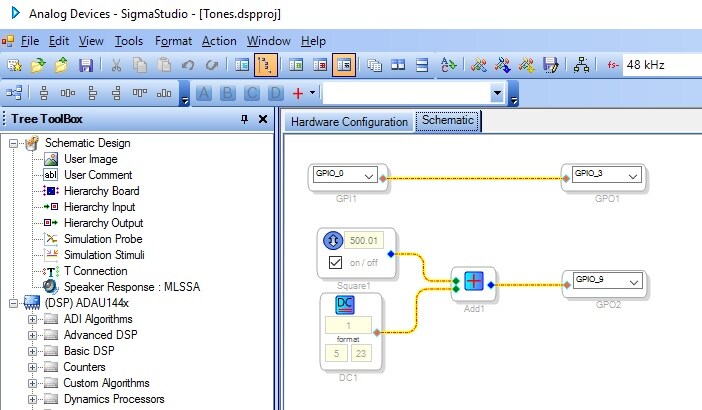
I found that if I loaded a very short program (<240 bytes of data), then everything works as expected.
So, for now I think the problem is in my code that downloads the program. That changes my question to this:
Does anyone have examples of downloading the Program RAM, where the data has to be split into chunks < 255 bytes per I2C transaction?
Thanks,
Jake
It turns out that the problem was unrelated to the program loading function.
I had incorrectly set the PLL jumper inputs as 000 instead of 010; this caused numerous problems (such as the WDT sticky going on) when I tried to run the core. The key that I learned was to check the output of the PLL_FILT pin: it should be a DC level of about 1 and a half volts. Mine was zero, so that's when I checked the clock and PLL inputs.
Now that I have that corrected, the LED blinks at whatever rate I set in the Square wave block.
Hello Jake,
That was very good troubleshooting. You are correct that the PLL_FILT pin is a great window into what is going on with the PLL. If it is locked it will be around the 1.5V depending on the exact frequency used. If it has a ramp signal riding on the DC then it is constantly losing lock, hunting and then relocking. If it is at 0V or 3.3V then it is trying to lock to a signal that is way out of range of the PLL which was the case for you. The signal was out of range of the PLL setting.
Regarding the GPIO. Keep in mind that the if the input to the GPIO is 0 then it will output a zero. (if set to not invert). Then if the input is anything but zero it will output a 1. So if you happen to send it something that does not sit steady on the zero value then you may see spikes. I know this was not the issue in your case but it is something to keep in mind when creating your program.
Regarding the program size. On most of our SigmaDSPs it is important to write to the PLL registers in one burst but then that is a small number of bytes. After that you can break it up into any size you like to write the rest of the program. Just keep the DSP stopped so it is not trying to run the program until it is all loaded.
Once the program is running then the only detail you need to look out for is writing filter coefficients. Those need to be done at one time to keep the filter stable. This is what the safeload feature is there for. Again. we are not talking about a huge number of bytes.
I wish you well on your project!
Dave T
Please log in to reply.