Can I use the "Capture" feature of SigmaStudio without an eval board?
Reading a PDF of instructions for how to use the sequencer window, it seems that running link-compile-download should populate the Capture window with commands from the programming process. When I perform this step without an eval board, nothing appears in the Capture window. Is an eval board really required to use this software feature?
sigmastudio
Hello,
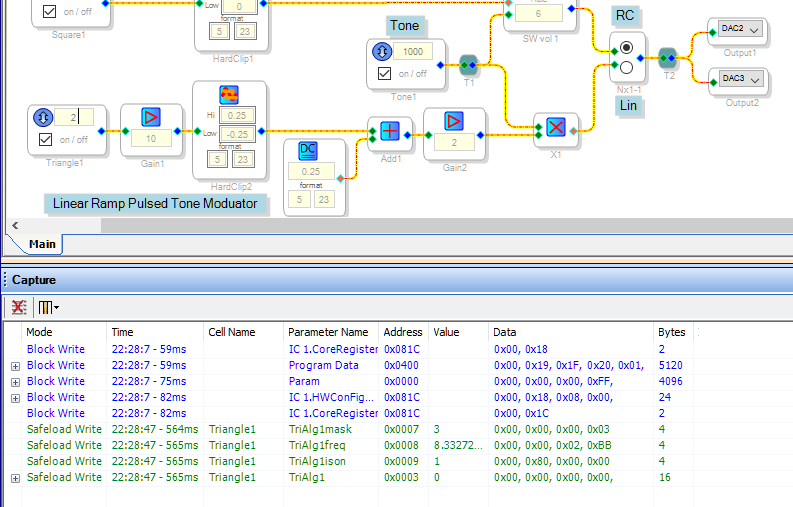
I tried this with a project for the -1701 and it worked. The blue lines showing in the Capture Window below represent the initial program load. The green lines appeared when I changed the Triangle Wave frequency.
You can get a hex code listing by choosing Export System Files right after Link-Compile-Download. Then open the export file TxBuffer_IC1.dat with Notepad.
I believe this also works with other SigmaDSPs, however the program load sequence is more complex.
Best regards,
Bob
It's sometimes flaky, but it usually works. Often it throws an error the first time, complaining about communication, but after that it works pretty reliably.
Thanks! The key was that I had to add the USBi element to the hardware configuration section as if I had a USB dongle, then the link-compile-download shows a USB connection error but also the events.
This question has been assumed as answered either offline via email or with a multi-part answer. This question has now been closed out. If you have an inquiry related to this topic please post a new question in the applicable product forum.
Thank you,
EZ Admin
Please log in to reply.