ADAU1761 mic input settings
Hello all,
I am trying to give audio input through the microphone input ports (IN1 and IN2) of the EVAL-ADAU1X61EBZ board, but I am not able capture any signal from the output.
Anyone please tell me the settings/configuration needs to be done in order to give input through the microphone and to capture the output.
Thanks in advance,
Regards,
Vidhya
Audio Signal Processors
SigmaDSP Audio Processors
adau1761
Hello Vidhya,
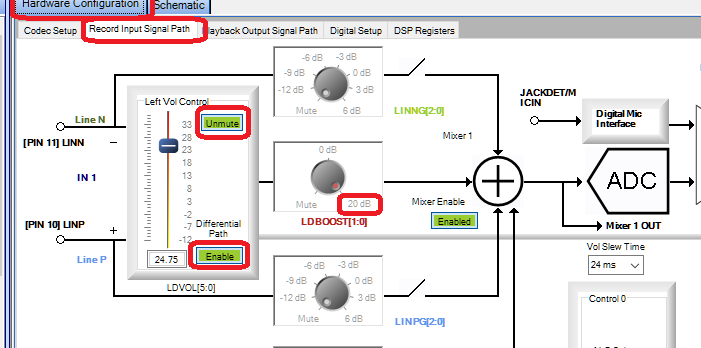
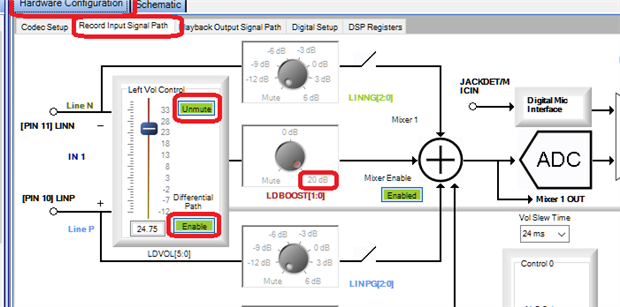
Try the settings shown below:
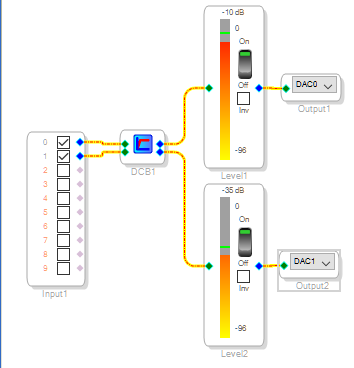
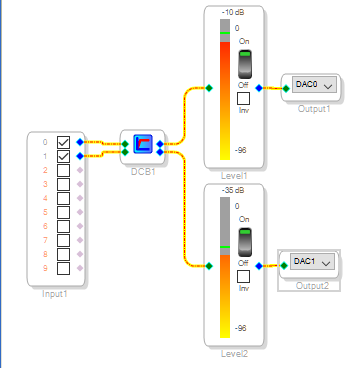
I had no microphones handy so I plugged headphones into Inputs 1 and 2. I was able to get sound picked up by these "mics" into the ADC and onto the Level Meters as shown below:
Best regards,
Bob
Hello Bob,
Thank you for the reponse.
I tried the exact settings as yours, but did not get any satisfying result. Level Meters are just showing some white noise. Are there any Jumper settings in the eval board ?
Regards,
Vidhya
Hello,
Sorry it's still not working for you. I did not change any jumpers to get my board working as above, but perhaps your board's jumpers have been disturbed. Please check the following:
Jumpers described on Page 3 of the EVAL-ADAU1761Z manual.
If using electret condenser mic elements*, jumpers J15 and J18 need to be in place. You also need to enable the MIC Bias (lower right corner of the Record Input Signal Path config screen).
* Note: "Packaged" condenser mics (enclosed and ready to go on-stage) need "phantom power", usually a much higher DC voltage than the eval board provides. These cannot be directly connected to the eval board.
Does the eval board work with other inputs (such as a stereo input from a iPod or similar source to the IN 1 jack? It's a good idea to review the eval board's schematic diagram, comparing it to the ADAU1761 data sheet, to see how things should connect. For example, a single-ended mic needs to be connected "hot" to the ring (not the tip) of the stereo input jack IN1 or IN2.
Best regards,
Bob
Hello Bob,
Thank you so much for the help.
It worked
Regards,
Vidhya
Please log in to reply.