Problems with ADAU1772
Hello,
I have finally received prototype PCBs for a new design using ADA1772 and ADAU1446. The DSP chip is acting as the master and providing the MCLK for the CODEC. In attempting to setup the signal routing using the USBi programmer and SigmaStudio, I am continually receiving a compile error. I have gone through and checked all connections to the ADAU1772 and confirmed that the clock is present on pin 39 (XTALI/MCLKIN). I have DVDD connected directly to REG_OUT as per the datasheet and strangely I see no voltage on DVDD or REG_OUT. I have triple checked that there is an electrical connection between REG_OUT and DVDD and there are no shorts to GND or adjacent pins. I would appreciate if anyone has any suggestions as I am sitting under a looming deadline. I know that both SigmaStudio and my USBi programmer are working correctly as I have no issue programming the ADAU1446 on the same PCB.
Thanks!
ACW
Audio Signal Processors
adau1446
adau1772
Integrated/Special Purpose A/D Converters
SigmaDSP Audio Processors
Audio CODECs
Show More
Hi Andrew:
Are you getting a compile error or a communication error. If you are getting a compile error, this error would be present when using the evaluation board. If you prefer, we can start an email thread to discuss these errors in detail with the correct people being involved.
Miguel
Hi Miguel,
It's a communication error that I am getting: Compiled, Comms failed. This is my own PCB design, and I have MCLK and data input and output lines from the ADAU1446, but basically I have followed the datasheet and EVM schematics. Is there an error somewhere on the EVM that I might have copied? I find it very strange that I see nothing on DVDD. I tried a second PCB thinking that there might be an issue with the chip installation (even though everything looked OK on the first one). On that second PCB I decided to try connecting a crystal directly to the CODEC for the clock and removed all connections to the DSP chip...and I am having the same issues: nothing on REG_OUT/DVDD and code will not load from SigmaStudio. Did I miss something and not see that DVDD needs an external power source, because the datasheet clearly shows to connect directly to REG_OUT to power it from the internal regulator. Frustrating!
ACW
Is the LDO enabled in Sigma studio?
The LDO is enabled at 1.2V after reset but you may be overwriting it.
Click the hardware configuration tab then the ADAU1772 Register Control to find the Regulator control enable/ disable button.
Hi pbthesp,
I have not changed the LDO setting from the default which is 1.1V. Regardless, I am unable to change anything with the comm error that I am getting. Is REG_OUT not active be default, even when SigmaStudio has never been connected to the chip? I would think that all power supplies should just come up by default. And I expect that without anything on DVDD that I2C and hence loading code from the USBi will never work. It would be great if someone from AD would pop in here and help out.
The data sheet says that the Regulator control register defaults to 0 at reset which is the ON state, page 56, so I would expect it to be active at power up before you try to write to it.
Another thing you could check is if the pin is shorted to ground, the DGND pin is next to DVDD, Another possibility is that you have shorted pins to the ground pad under the chip (I've done that before)
A bit more information:
I am able to read and blank the eeprom connected to the ADAU1772 with no issue, which suggests that the issue lies with the ADAU1772 and not the USBi or SigmaStudio.
I am using a computer running Windows Vista and have tried both SigmaStudio 3.9 and 3.11.
I see audio passing from IN2 to OUT0 and IN3 to OUT1. Nothing is passing from IN0 or IN1. I am not sure if this is because my first attempt at loading code worked (it originally said Active:Loaded and then quickly changed to the Comm error) or if this is some initial state pass thru for the chip. If the load did work initially, I am not sure why the chip would continue in this state as nothing was loaded to the eeprom. The ADAU1772 is set to selfboot. ADDR0 and ADDR1 are connected to ground. I have 2k pullups on SDA and SCL. When I attempt loading from USBi I can see a low initialization on SDA but SCL does not go from low to high and begin clocking data. It looks as if the ADAU1772 is not responding to the init on SDA.
I noticed that the EVM takes the BRD_RESET from the USBi and uses this to momentarily turn off the regulator. I have no such "reset" provision on my PCB, but I would think a power on/off cycle would work in the same manner.
My design is taking three analog, single-ended inputs (mono on IN0 and a stereo signal on IN2 and IN3) as inputs to the ADAU1772, sending those signals (ADC_SDATA0 and ADC_SDATA1) as digital data to an ADAU1446, performing some DSP processing, and then sending a stereo digital data signal back to ADAU1772 DAC_SDATA and to OUT0 and OUT1. I am strictly using the ADAU1772 as a CODEC, nothing else.
I have an earlier version of this design that is working perfectly with AD1938. The only reason for the change was to reduce cost and complexity. The ADAU1772 was suggested by a couple of people here in a previous thread.
Thanks,
ACW
More information (kinda feels like I am talking to myself):
If I initially try link, compile, download I will see Active: loaded for about 5 seconds before I get the Compiled, comms failed error. If I manually "reset" the ADAU1772 by pulling PD low it will go through the same cycle of load/fail again. If I don't reset any further attempt to load code just continues to show the comms error.
I also discovered (from SigmaStudio 3.11) that if I try to load the eeprom that it will start downloading and then hang. This all must be I2C related and that is likely related to REG_OUT/DVDD showing no supply voltage. I would really not prefer having to blow $200 for the EVM to likely find the same issue. Does anyone know the "must" startup conditions? My clock for the ADAU1772 generated from the DSP takes a second or so to initialize.
Thanks,
ACW
Hello Andrew,
DVDD must be supplied externally. The REGOUT is there to provide a place for decoupling the internal core voltage if either 1.1V or 1.2V but this voltage is derived from the DVDD input.
You can look at the user guide for the evaluation board and that should help you with the implementation. There are schematics in the guide.
http://www.analog.com/media/en/technical-documentation/user-guides/UG-477.pdf
If you are strictly using the part as a codec then you should be using the ADAU1372 and save yourself even more cost. It is the same pinout and same register mapping for functions that are in both devices. The specifications are the same as well. So you can save a bit more once your design is ready. You can continue to use the ADAU1772 for development.
Dave T
Hi pbthesp,
Thanks for the note from the datasheet, I missed it completely. I had the same thought as you regarding a short to ground, but all pins have been checked for shorts and correct continuity to their respective circuit elements, so that is unfortunately not the issue.
Thanks,
ACW
Hi Dave,
I had the same thought, but what you are suggesting directly contradicts the example block diagram shown on page 28 of the ADAU1772 datasheet where it shows REG_OUT connected directly to DVDD. Thanks for the tip regarding ADAU1372!
Thanks,
Andrew
I think Dave is incorrect, REG_OUT is a power supply for DVDD. I am going to take a guess that somehow you have programmed the -1772 at an earlier time to disable REG_OUT. Perhaps if your board does not hold SELFBOOT low when the USBi is connected, then your -1772 will load the bad program from the EEPROM and shut down its own REG_OUT?
Make sure SELFBOOT is low, connect the USBi, and check DVDD. Then load a program (with REG_OUT enabled) to the EEPROM with its WP low. I link SELFBOOT and WP on my board and have those shorted to ground via my custom connecting cable to the USBi, such that when the USBi is attached then the -1772 doesn't self-boot and I can write to the EEPROM.
Then remove the USBi, set SELFBOOT high, and see if your program comes up with DVDD at 1.2V.
Hello Jon and Andrew,
You guys are correct. I was confusing this with another part. Multitasking too much.
I would follow Jon's direction to see if you can get DVDD to come up. The part does default to the regulator on so it should power up as soon as AVDD and IOVDD are applied.
I think it may be good for us to talk on the phone. I will send a message to you.
Dave T
Hi jon71,
I did try this an still no luck. There is no way to change the state of REG_OUT if the USBi comms is not working.
Thanks,
ACW
Hi Dave,
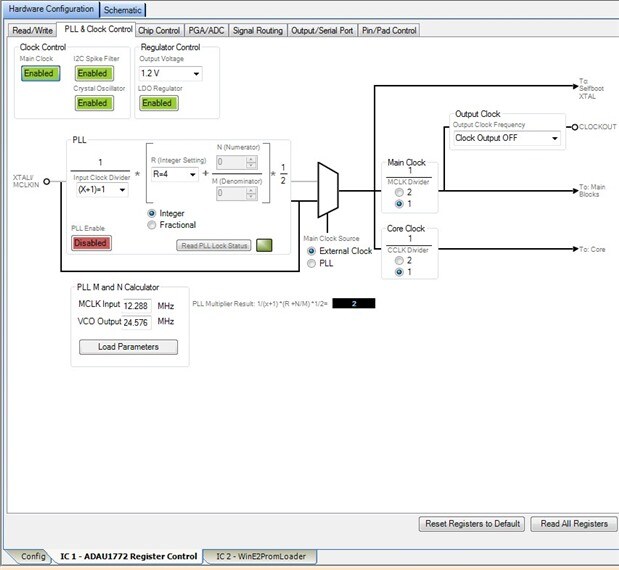
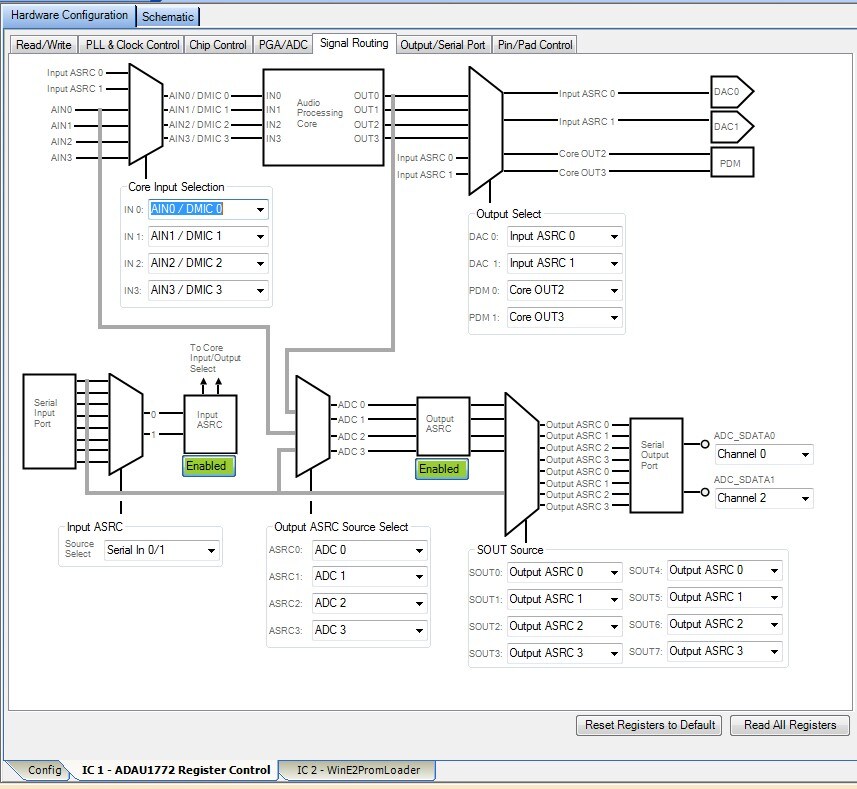
Thanks for your message. I'll take you up on your offer for a call if my next attempts don't work. After you confirmed that the regulator should come up by default, I tried another couple of board samples. These had the ADAU1772 mounted by our assembly house, so we populated the related power supply section of the ADAU1772 and the first one still showed nothing on DVDD. The next one, however, had DVDD come up at 1.2V as expected! This is after painstakingly checking each and every pin for correct continuity and for shorts to adjacent pins and to the ground plane. I am thinking that the assembly house may have damaged some of the chips during installation. My next steps are to populate the ADAU1446 and its related parts (it provides MCLK of 12.288MHz for the CODEC) and try programming. I do have two questions though...can someone confirm that I have the PLL & Clock Control tab configured correctly for an external clock? Also, I am wondering what type of schematic is required if all of the signal routing is going to be via the input and output ASRCs?
Many thanks for everyone's help so far!
ACW

Hello Andrew,
You have the correct settings for bypassing the PLL. You are planning to feed it 12.288MHz which is correct. You have the dividers set to 1 which is correct. Should you use the PLL then it will output 24.576MHz so that is why the dividers are there to divide the PLL output by two. This also allows for a direct MCLK in of 24.576MHz. So for your design you will not need to divide the MCLK.
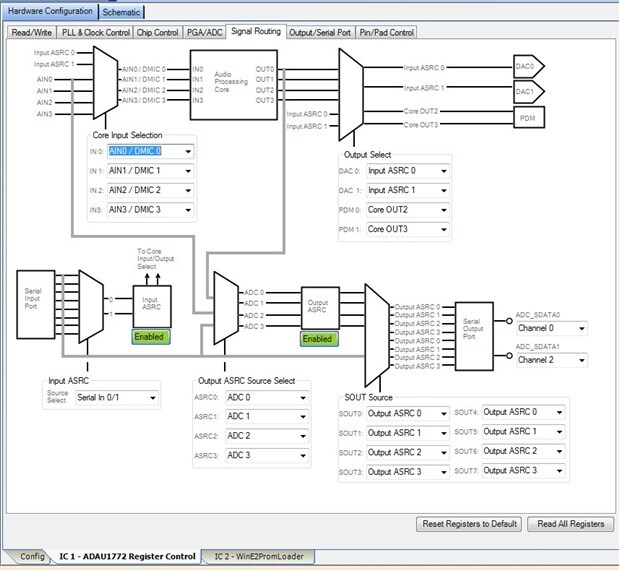
The routing is correct for just using the part as a codec. When you change to the ADAU1372 for the final design you can actually use this DLL in SigmaStudio if you like. Or, you can use the ADAU1372 DLL. I am not sure if that DLL made it into the current release of SigmaStudio so I can supply it for you. It will also work with the 1772 since the register map is the same. The irrelevant registers will be ignored. For now continue as you are but once it is up and running if you want to make the change let me know.
Now for your question about the schematic. If I remember right, SigmaStudio might complain about having a blank schematic. If that happens then just insert and input block, and output block and a mute block. Then route the signal through the mute to the output and it will be happy with that. It will not know that there will be no signal there. When I am testing that is what I usually do, a very simple pass-thru signal flow with a mute so I can verify that the signal is going through the DSP.
That is strange that your assembly house would damage parts that often. Are they soldering it by hand? I find it difficult to damage parts here in the lab. But, I do frequently have issues with the socket on the eval board not making good contact with all the pins. You do get strange intermittent issues. If they are hand soldering then they need to be using infrared heat from the bottom and then additional heat from the top. This way you are sure the solder will flow under the part without super heating the part from above. If they are using an oven then the entire PCB will be heated so that is fine.
Dave T.
Hi Dave,
Thank you for confirming my clock configuration and my signal routing. You are correct about my question regarding the schematic...SigmaStudio will refuse to compile and download a project with an empty schematic. Thanks for the suggestion to route a basic IN-MUTE-OUT to make the software happy. I am pretty sure our assembly vendor is using an oven for our prototype samples, but I will be speaking to them about the issues I have been having with this chip before we run any production PCBs. Now, I have finally made some progress with getting my system up and running, but I have a couple of questions I am hoping you or someone else reading might be able to answer for me before I describe what I am seeing:
If anyone has the ADAU1772 eval board, could you try and write a program to the IC with SELFBOOT set high?
If I have my I2C slave address set to something other than 0x3C (ADDR0 and ADDR1 pulled low), do I need to change something in the USBi block in SigmaStudio, or should the USBi always be able to communicate with the ADAU1772 regardless of what the address is set to?
Thanks everyone,
ACW
Hello Andrew,
Have a look at app note AN-1006, It describes on page 4-5 how to set the USBi up to talk to multiple ICs.
http://www.analog.com/media/en/technical-documentation/application-notes/AN-1006.pdf
Regarding programming the part when selfboot is high. Yes, you can. You must wait for the part to finish selfbooting before trying to "talk" to the part. Once it selfboots it goes back to being a slave on the bus and will take commands for parameter changes etc., or an entire new program.
Dave T
Hi Dave,
I am not trying to have multiple ICs on the same bus, I have jumpers on my PCB to allow connection of SCL and SDA to either the ADAU1772 or the ADAU1446. Each IC has its own eeprom. I had asked the questions above because I discovered something in my schematic that I think could be causing a problem. I have SELFBOOT, ADDR0 and ADDR1 all connected together and then to IOVDD through a 10k resistor. In this configuration SigmaStudio still gives me a comm error when trying to load code to the ADAU1772. As an experiment I tied SELFBOOT to GND, which also ties ADDR0 and ADDR1 to GND, changing the I2C address for the IC. This allows me to now load code with no issue, and also write to the eeprom. I have confirmed that I have signal passing from the ADCs to the DSP and back to the DACs. However, after powering off my PCB and changing SELFBOOT/ADDR0/ADDR1 back to "high" in order to enable selfboot, nothing happens, i.e. the program is not loading. Could this be due to the fact that the epprom was written with code when ADDR0 and ADDR1 were "low", and on selfboot the address has now changed? I notice that there is a pulldown menu on the USBi block that allows different I2C addresses to be selected. Would this have to be changed from the default of 0x78 if I have ADDR0 and ADDR1 set "high"?
Thanks,
Andrew
Hello Andrew,
When you have the USBi trying to talk to the ADAU1772 you will need to have the address pins set to agree with the address that is set on the USBi GUI in SigmaStudio. That is why it worked when you changed it to be address "00". So the address pins are important when trying to address the part when it is a slave.
During Selfboot the communications port is acting as a master on the buss and going out and addressing the EEPROM directly. So in that case the address of the ADAU1772 is not important. What is important is the address of the I2C EEPROM. It must be at address 0x50 because that is where the ADAU1772 is looking for it.
So there is no address information for the ADAU1772 in the EEPROM for when it is a slave. The address of the ADAU1772 will always follow the address pins and is independent of the compiled program.
I hope this helps.
Dave T
Hi Dave,
Thank you for providing more helpful information! I finally feel like I am close to having this system working correctly. I suspected that the fact that my I2C address for the ADAU1772 being set to a different value was causing my load issue. When I changed the USBi address for the ADAU1772 to I2C 0x7E (126), I was able to program the IC with ADDR0/ADDR1/SELFBOOT set high. I have no issues erasing or programming the eeprom (USBi address set to the default I2C 0xA0 (160)), but the ADAU1772 does not selfboot. I am using a 24AA256 Microchip eeprom with A0/A1/A2/WP tied to GND(Vss). I tried both power cycling the system and a reset by momentarily pulling PD low, and nothing is loading from the eeprom in either case. The same type of eeprom and configuration works correctly with the ADAU1446. Any ideas?
Thanks,
ACW
Hello Andrew,
Are you using serial communication to the part? The 1772? Then if the answer is yes, then are the I2S clocks remaining on? In the lab I sometimes run into the problem where the power draw on this part is so small that the I2S clocks provide enough power to keep the part alive and not properly reset. So that is something to look into but may not be the problem. This includes the master clock.
So are you using a scope to look at the I2C and see no activity?
One other detail, do you have valid master clock on the input of the ADAU1772 when you are trying to get it to boot? This is required for it to generate the serial clock.
Thanks,
Dave T
Hi Dave,
Yes, there is serial communication between the ADAU1772 and the ADAU1446. Your point about the clocks being active during reset would be true when I am pulling PD low with the system still powered, but I would not think that would be an issue when the entire system is powered off and on again after programming.
I see no activity on SDA/SCL of the eeprom/1772 when I power up the system, so it does not look like the 1772 is communicating with the eeprom. I have absolutely confirmed that the SELFBOOT pin on the 1772 is high. I know that the eeprom is being loaded successfully as I am able to erase, program, and then read back the data in SigmaStudio.
The master clock is generated by the 1446 and comes up immediately on power up.
Thanks,
ACW
Hello Andrew,
Well, you have me scratching my head over this one...
You are right that the clocks staying on and keeping the part alive is only for the times when you do not fully power down the board. This often happens on an eval board so that is why I run across it from time to time.
I have a hunch, try tying the Selfboot pin directly to IOVDD and not through a 10K resistor.
If this does not work then I will send you an email to discuss this further.
Dave T
Hi Dave,
I tried tying selfboot directly to IOVDD, no change.
Thanks,
Andrew
Pouring over the ADAU1772 datasheet...again...for the 10th time in the last few days, I noticed something in the selfboot section. Under boot time it says that the selfboot operation starts after 16,568 clock cycles are seen on the XTALI/MCLKIN pin after PD goes high. That corresponds to a 1.35ms wait time after power up with a 12.288 MHz clock. However, the ADAU1446 datasheet suggests a wait time of 10.667ms for initialization to complete. I am wondering if the ADAU1772 is really waiting for the required MCLK cycles to appear, or is it somehow possible that the 1446 is not providing MCLK to the 1772 fast enough for it to selfboot?
Hello Andrew,
I was thinking about the same thing yesterday but did not have the time to investigate the details. So this morning I did some experiments on an evaluation board. What I did was to look at the selfboot timing on an scope. For normal bootup from powerup, with MCLK always present, I saw that it took just over 10ms for the program to start loading.
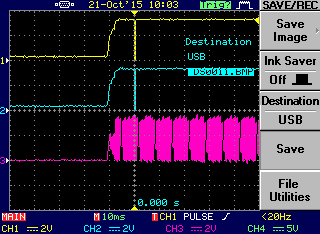
So then I shut off the MCLK source and powered up. The part did not boot, so after about 10 seconds I turned on the MCLK and it booted. The booting did start a little more than 1ms after the MCLK appeared. So it looks like it will wait for the MCLK to show up so the delay from the 1446 MCLK is not the issue.
I took a screenshot of the timing. This trace began about 10 seconds after powerup. The top trace is serial clock, the blue trace is data and the violet trace is the MCLK. The scope was set on 10ms per division. I verified that the program was indeed working. I will call you in a little while.


Hi Dave,
Good to know that the MCLK from the 1446 is not the issue. I had a closer look at the scope timing myself this morning, and I am now seeing that there is a very short burst of activity on the I2C on power up that was so fast I was not seeing it before. I have attached a view at 10ms/div similar to yours and also an expanded view at 100us/div showing that there is some initial activity on the I2C lines. The program is not being loaded to the 1772, however.
Thanks,
Andrew

This question has been assumed as answered either offline via email or with a multi-part answer. This question has now been closed out. If you have an inquiry related to this topic please post a new question in the applicable product forum.
Thank you,
EZ Admin
Please log in to reply.