Error reading a graph from a file Sigma Studio
Hi guys,
A project I did using sigma studio is now impossible to open. It appears an Error related to a Font type. Does anyone else have experienced this problem?
Any ideas about how can to solve it?
Thank you very much,
Marti
font
reading
graph
support
problem
file
sigmastudio
error
Show More
Hi Marti:
Can you please tell us what version of SigmaStudio is this problem happening in?
Also, can you share your schematic?
Thank you
Miguel
Hi Miguel,
I was using SigmaStudio 3.11 x64. I tryed to use also the latest version, the Beta 3.12, but the problem keepk appearing.
I can not show you the schematic because I can't open it, but I was using a module called Lookup Table and text modules. Maybe the problem with the comes from here, but it's strange as I was able to open the doc while I was working on it.
Thank you,
Marti
Hello Marti,
What Miguel means is to go ahead and attach your unreadable project (.dspproj) file -- first select Use advanced editor. This way, he can attempt to open it for you. Miguel and those working with him are expert with the nuts and bolts of SigmaStudio. If you don't feel like posting your project file on a public forum, ask Miguel here and he can start a private discussion with you.
If all recovery efforts fail, take courage -- once I lost a huge project and ended up rebuilding it from scratch. It took a day, but the final result was much more organized than the original scrambled-wired mess I was living with. See, for example, https://ez.analog.com/message/63999#63999
Best regards,
Bob
Hi Miguel and Bob,
I'm attaching a project that Bob sent me some time ago (a volume controller), which has a table that causes me the same error.
Thank you very much.
Marti
Hi Marti,
I was able to open the project you attached without any issues. Looks like this could be an issue with the font on your machine. You can verify if "Century Gothic Regular" is supported by your machine. You can do that by following this on your windows machine.
Open Fonts by clicking the Start button , clicking Control Panel, clicking Appearance and Personalization, and then clicking Fonts. You should be able to find Century Gothic font there and when you select Century Gothic, you should be able to see all supported styles (Bold, Bold Italic, Italic and Regular). If the font and style is not present here then you have to install this font to open the schematic issue-free.
Thank you,
Naveen
Hi Marti,
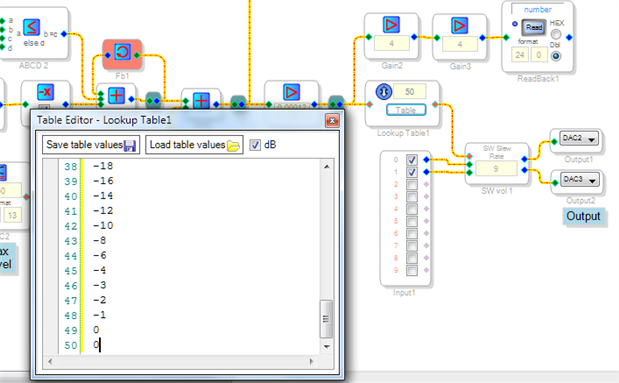
I was able to open both the project and its lookup table without error:
Perhaps re-installing the latest available version of SigmaStudio may help with the issue you're experiencing.
Another possibility is that something happened to the Century Gothic font on your PC. Try typing with this font in your word processor and see if it works there. A Google search on font errors shows that such a problem can happen, and it can hopefully be fixed,
Best regards,
Bob

I am getting the same error. I cannot open any dsp project files. They were built and saved on the same PC that is not working now.
The same .dspproj file will open on another Windows 7 PC with Sigmastudio 3.11, but not on my laptop with the exact same SigmaStudio build. I can't open the file in 3.8 either, so something happened to the Windows 7 professional, 64 bit version PC that seems to have caused this.
Both PC's show the Century Graphic font, but neither has a 'Regular' version. Both PC's are Windows 7.
Any help would be appreciated. This is wasting a lot of time for me and I would think others are having similar issues.
Ah, computers. Can't live without them and can't live with them.
Perhaps there's something wrong with the SigmaStudio installation, or even with Windows itself, on the affected PC. SigmaStudio depends on Microsoft Dot Net 3.5 SP1 and perhaps other stuff contained in a myriad of files --
see, https://ez.analog.com/message/55724#55724
Uninstalling SigmaStudio and reinstalling a freshly downloaded copy may fix it, although I suspect you already tried this. I could never get SigmaStudio to run correctly on my work-issued Win 7 PC, so (ironically) I do my AD work on my own laptop This came with Win 7 but has recently upgraded to Win 10, while AD still says that SigmaStudio won't run on Win 8!. So, go figure. Hope you get it working -- but if not, cut your losses and use the other PC.
I figured out how to fix this. Start your Windows Word, and goto the home button, down to Word Options, look for Windows Office Resources, Run Windows diagnostics. It should find some problems and fix them.
Viola!!! SigmaStudio works again!
Same Problem Here,
Cannot Be Solve with the Windows Office Diagnostics.
I had this a few times on various projects, I'm on Windows 7 with Sigma 3.12
I was working on my project and suddently a big error message appeared when I clicked the "Compile & Link" button.
Until this big error message appears, I know my file project is screwed up, and all my hours of work are erased
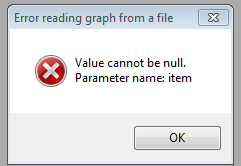
Because from this event, I cannot open my project file anymore, it gives me the following error.
Thanks in advance for your help, if anybody can help me...
PS : Just tried on another PC with sigma 3.12 installed and this gaves me the exact same error !
HI clemrdh:
Can you send us your schematic, (email if you prefer) we'll try to recover it for you.
Sorry about the frustration. Were you using a schematic posted on the forum?
Regards
Miguel
Hi
Thanks for your very quick reply !
Here is the defective file,
Regards,
did you managed to debug that file ? or even open it ?
Best,,
Hi clemrdh
I am able to recover the file. I have attached the recovered file.
Thanks,
Venky
Hi clemrdh
There is a bug with the GPIO Input cell. Sometimes, If no GPIO is selected when saving the schematic, the schematic can not be reopened. We will fix this bug in the upcoming release.
Thanks,


Hello
Thank you so much for your help !
It is all working now !
May I know how you managed to recover it ? Or what was the problem ?.
Thank you so much again,
, I realized this finally only happens when I manually edit 1 letter of the GPIO name without using the select list, but manually entering it on the keyboard.
If I carefully only use the Select dropdown it never does this problem again
Thanks
clemrdh. Thanks for reporting. We will fix this bug as well.
I experienced this same problem with the missing Century Gothic Regular font type error. I attempted to open up a project that was maybe 4 months old and received the error, although that project had run fine when originally constructed. I browsed to my /fonts directory, but the Century Gothic Regular was not there. (Bold, Italic, and Bold Italic were there.) After much research to no avail, I went to another computer and found that the Regular font was present. I simply copied it to the offending directory on the other computer and the project now opened up fine!
I think my problem was related to some text boxes that I added to the project, which apparently use the Century Gothic Regular font. (It's a very nice font, BTW.) I'm sure that if you/ADI chose some other font instead of the CGR, then the problem would simply resurface for the new font.
I don't know why that particular font disappeared from my computer. I did note that it's a licensed font, so perhaps Microsoft didn't want to ante up for the license and just deleted it in one of their many "updates". Just guessing.
Please log in to reply.