Inverting ADAU1451 GPIO output Pin
We recently upgraded our design from an ADAU1701 to a ADAU1451. We are using GPIO output pins MP6 and MP7 to indicate audio signal presence, using the signal detect block.
In the ADAU1701 I could invert the polarity of MP6 and MP7 in the register settings so that the output is High when a signal is present.
In the ADAU1451 I can find no easy way to invert the MP6 and MP7 output pins and instead have an active low signal presence flag.
Is there any way to easily invert the sense of the GPIO MP6 and MP7 output pins?
-david BTW
Audio Signal Processors
adau1451
SigmaDSP Audio Processors
adau1701
Hello David,
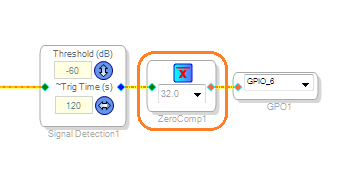
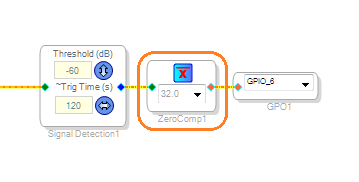
It may be as simple as inverting the audio-missing flag before the GP output, by using a Zero Comparator as shown.
Best regards,
Bob
Thanks, I'll give that a try. Of course, it is not a zero-overhead solution like I could do in the ADAU1702. Believe it or not that matters in my design. Still it may fit OK.
-david BTW
This does seem to work OK. The zero compare blocks added 5 instructions and that coupled with a couple of high pass filters to block DC from the signal detector blocks got me to 1525 instructions which gets us to 100% at 192kHZ, but it seems to still make good audio.
Thanks,
-david BTW
This question has been assumed as answered either offline via email or with a multi-part answer. This question has now been closed out. If you have an inquiry related to this topic please post a new question in the applicable product forum.
Thank you,
EZ Admin
Please log in to reply.