ADAU 1761 control output volume by input
Hi, I am hoping someone can point me in the right direction. Firstly my application is in the audio band obviously, but for a non audio application. I have my demo board up and running. I am using the 1761 to output a freq sweep, I want to use the Mic input(s) to adjust the output sweep to real-time control the amplitude (constant amplitude over freq). I have played with and got working the Automatic level control via the DSP, but can't see how to tie this to the output when using a DSP generated frequency sweep?
any idea would be appreciated
Kevin
Audio Signal Processors
control gain
SigmaDSP Audio Processors
adau1761
volume control
Hello Kevin,
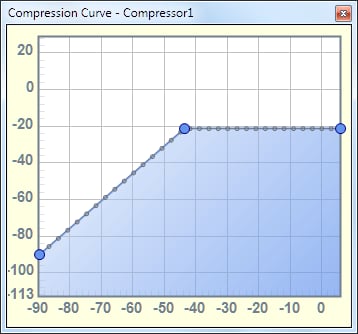
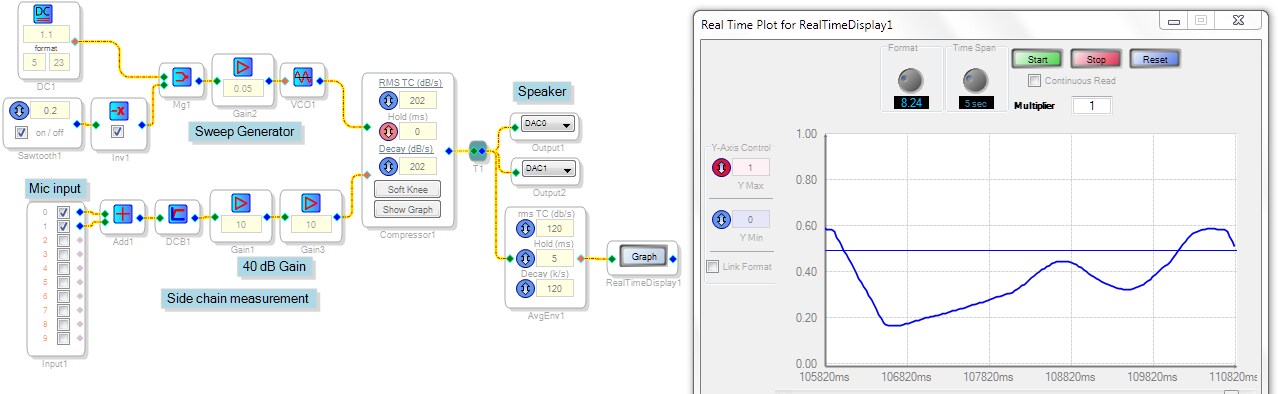
If I understand your application, you wish to regulate your sweep generator's level via feedback from a microphone. You can do this with any of the External Detector Input compressors in what's called a side-chain arrangement. Set up the compressor's graph for a constant output level over a wide input range, as shown. Audio from the sweep generator goes into the compressor's green input pin. The compressor's output drives your sound system. Your mic picks up the resulting sound, and this signal runs back into the compressor's detector input (red pin). The compressor varies its gain to maintain a constant level at its detector input, thus closing the feedback loop on your output level.
I used a headphone as a mic at the ADC input, and another headphone at the DAC output. Pressing the ear-cups together closes the loop. The "mic" needed a 40 dB gain to provide sufficient feedback -- the needed gain will of course vary with your setup.
The Real-Time Display graph shows how the acoustic gain of my speaker-mic combination varies with frequency, forcing an inverse output from the compressor.
Best regards,
Bob

Many thanks Bob, I will give this a try first thing Monday morning!
With thanks
Kevin
This question has been assumed as answered either offline via email or with a multi-part answer. This question has now been closed out. If you have an inquiry related to this topic please post a new question in the applicable product forum.
Thank you,
EZ Admin
Please log in to reply.