ADAU1772 Noise with parametric EQ + dB Volume slider
Hi
I tested below signal flow with ADAU1772 but somehow pink noise like sound outputs from ear-phone.
If I remove "dB Volume Slider" and recompile it, noise is also disappear.
Is there a limitation of combination of library?
I'm using the latest SigmaStudio 3.11.
Regards, Satoshi
adau1772
Integrated/Special Purpose A/D Converters
sigmastudio
parametric filter
Audio CODECs
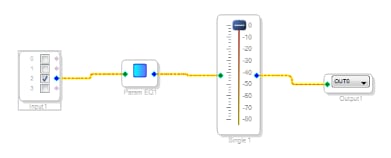
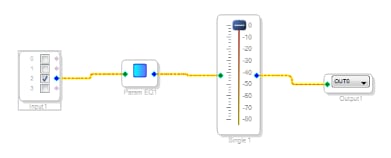
Does anyone tried to test the schematic and give me any advice?
Hi Satoshi,
I suggest checking out the response from this thread about the ADC rate and core sample rates matching. ADAU1772 core_fs bits
Once the sample rates are confirmed to be correct, make sure that the sample rate in the signal flow that includes your filter is correct. Right click on the input cell in your project and select "Set Sampling Rate". Change this value to either 96 kHz or 192 kHz (whichever you are using). Any filters in the signal flow will use this information to create its filter coefficients. The sampling rate in this cell will automatically be set to the system sampling rate when the cell is first put in the project. The cell in your project is currently set to 48 kHz since this was the system sample rate setting when you first put it in the project.
Regards,
-BillJ
Please log in to reply.