WATCHDOG ADAU1761
Hello,
I'd like to know how to use the internal watchdog funtion of ADAU1761.
My question is: if I enable the watchdog, have I to refresh a watchdog register in order to avoid the device reset?
I'd like to introduce the watchdog because in some cases the codec freeze and I need to check and reset the codec if this condiction happen.
Audio Signal Processors
SigmaDSP Audio Processors
adau1761
An electrostatic discharge sometime put the component in an hang status.I'd like to intercept a status where the program hang.
What I'd like to do is to intercept a faulty condiction and reinitialize the component.
In the datasheet of ADAU1761 I saw a Watchdog register but is not absolotely clear how this watchdog works.
I don't understand if the watchdog is managed inside the chip by the SigmaDSP.
Hi Inventis:
I'm curious about how you are getting the code to freeze or what do you mean by that. The SigmaDSP and the library are designed to never get into any luck state.
You must be carefull in using the Watchdog since it doesn't behave well when using many I2C readback transactions.
Please comment.
Miguel
I don't use SigmaStudio, I drive the ADAU1761 using the microcontroller I2C.
I already set the watchdog enable register and check one time per second the wachdog status register.
After a while I read the ERROR event.
In the datasheet is not clear how watchdog works. Have I to refresh the watchdog register or the watchdog is refreshed by the internal program?
Hello Stefano,
The way to use the watchdog is the following:
1) Download your SigmaStudio project to the DSP (Click Download Compile button).
2) Go to HW configuration section, select the Register Window, and go to "DSP Registers" section
3) On the Watchdog section, click "Enable/Disable" button and keep it enabled
4) To verify the status, click the "Read" button, and the "Error/No Error" indicator will give you the status.
Unfortunately, you may want to press the Read button every time you want to check on its status, as we do not make a poll.
Hope this answers your question.
Wilfrido.
any comment?
In your answer you don't tell me to my question.
Do you know how the watchdog works?
I already know how to enable it and check the error status.
I need to know in witch cases the watchdog are engaged.
I suppose that I don't need to access to any register in order to refresh the watchdog timer.
Please comment
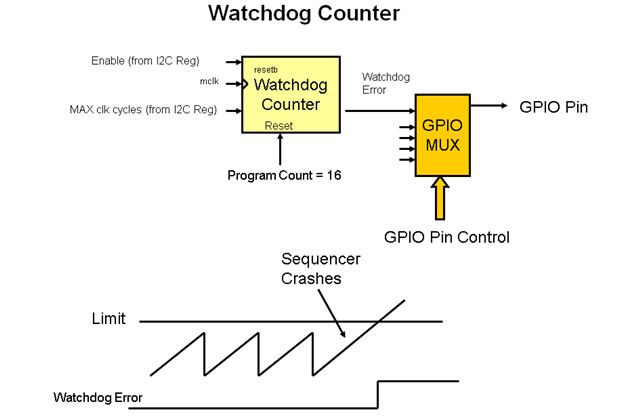
According to the below diagram, the watchdog works like this:
In short, the limit is the value of the maximum program instructions from the DSP. When the watchdog register is enabled, then it will start counting. If the counter passes the limit, an error bit will flag the event. The way to reset this error bit is by setting the enable bit to zero. For more information, please refer to this link: http://www.analog.com/static/imported-files/data_sheets/ADAU1761.pdf page 82.
Wilfrido.

Hi Wilfrido,
So if I understand, the DSP by itself reset the watchdog counter. The only thing I need to do is to check the Error register . Is it corerct?
HI:
I think I can explain this in a more concise way. If for some reason, the watchdog is enabled AND the program executes more instructions than allowed (by going into big loops or getting stuck in a subroutine for some reason), then the watchdog bit will go high. In other words, program overflows and specifically, this bit is sticky and can only be reset by the user.
The design premise (and what we neede to protect) was that if the DSP cleared the bit automatically, that would be dangerous for the application since the DSP wouldn't know if the user was notified of the MIPS overflow.
Hope this helps
Miguel
This question has been assumed as answered either offline via email or with a multi-part answer. This question has now been closed out. If you have an inquiry related to this topic please post a new question in the applicable product forum.
Thank you,
EZ Admin
Please log in to reply.