Problem with self-booting in ADAU1701
Hi!
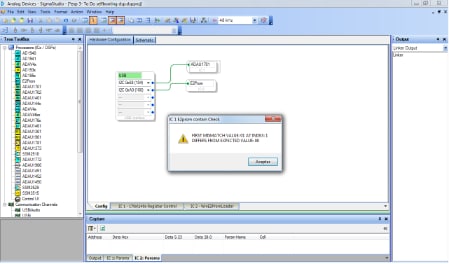
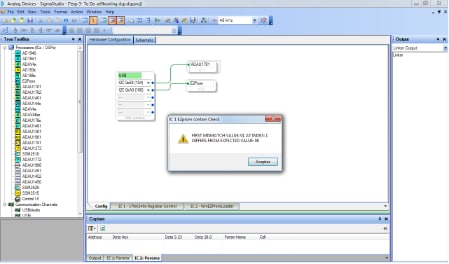
I'm trying to configure my system like a self-boot. I have the evaluation board of ADAU1701. I put the switch S5 in mode SelfBoot and clicked in "write the latest compilation to E2PROM". But when i resetting the system, it doesn't work. And if i make click in "check the last compilation vs E2PROM" the program shows me this:
What can i do?
Audio Signal Processors
sigmastudio
SigmaDSP Audio Processors
evaluationboard
SigmaDSP
selfboot
adau1701
self-boot
Show More
Are you guys removing the USBi from the system before rebooting? I was stumped for a couple of hours the other week when my project wouldn't run in standalone and it was because i had the usbi connected to the computer at the same time as restarting the project. As soon as i removed the USBi connection it self booted correctly
Hello Anguita,
"funny".... I also have problems with the self boot ("on the fly" config write is ok).. Just checked the compare EEPROM thing and it shows me exact the same like yours...
But I uise adau 1442....
Hope to get a hint soon ;-)
cheers
Ron
Hello,
me again! So...after checking all hardware connections from protoype board; even changing the EEPROM to a new one there was still no change. Then I found a old test file from which I remembered that it worked properly. Flashing that one...it works and the EEPROM check is also fine with it and says "Read/write sucessfull".
Honestly I have no clue at all why this happens or what is wrong there. If you want I can upload you this old file and you take it as basis. I am doing that now. This is not really a solution but a workaround that helps me for the moment.
Nevertheless would be interesting to know where is our mistake!
cheers
Ron
Hi,
yes I did. But I found out (for adau1442) that also self boot works if USBI is connected AND connected to the PC. If USBI is connected to the IC but not to the PC it does not boot.
However; flashing problem should not evolve from a connected PC anyway...
Cheers
Ron
Thank you very much guys!
Ok, I put in practice the trick of gr4eme and now i have my own conclusions:
First, I have removed the jumper J3 and supply the evaluation board with the power supply (5V). With these change, the behaviour is the same.
Second, I thought "Could be my proyect bigger than the memory's capacity?", and i have made a simple new proyect with an input and an output.
After that, I tried to program the E2PROM and pressed reset and voilà! The system is self-booting!
Finally, I had a little bit problem with USBi, because the selfbooting will not happen if you only remove the usb-connector, is necessary that you remove the DIL-Connector J8.
After all, i´m a little bit sad because i have supposed that all my proyect will be stored in the evaluation board's e2prom. And for next experiments I will remember to disconnect the DIL-Conn and power it with the power supply.
But now I have a doubt, How I can know the size of my proyect in order to know if it fits in memory?
I have some answers for you but Im at work right now so I can't take too much time to type. Ill try my best at posting a better walk-though later today.
short:
When you make a project in SigmaStudio (3.9) and you want to know how big the project is.
1) Design your project, making sure the hardware config and schematic will compile. Do this by pressing the 'Link - Compile - Connect' icon. If there were any errors a pop-up would inform you.
2) Save your project with the File -> Save or File -> Save As (I like to save a project in its own folder because lots of files are generates depending on your save method)
3) Navigate to folder you just saved your project in and locate the IC_1_xx folder. Inside that folder you will find another folder named 'net_list_out2" .. or something like that. In that folder is a text file called compiler_output.txt .. open this file and you can see the size of your program.
*If you don't see the IC_1_xx folder, 'Link - Compile - Connect' again then File -> Save again, it should be there this time.
Thank you twidget for your response.
I have followed your instructions step by step and i recognise that i was wrong. The problem wasn't in the size of proyect, cause i checked the E2Prom.Hex and is smaller than 256K (the e2prom's size). Sorry for this mistake.
But now, I don´t know which was the explanation for the problem of the other proyect. So, I learnt that i must to follow the programming sequence in order to get a succesful compilation.
Just to elaborate a bit... Often an overlooked step in programming the EVAL-ADAU1701's EEPROM is switching the SELFBOOT/WP (S5) switch in the proper position.
Switch S5 toggles the control of the EEPROM's WP pin between either ground or ADAU1701 (SELFBOOT) mode. When S5 is switched to WP, the WP pin on the EEPROM is grounded. With a logic low on that pin Write Protect is disabled and a new program can be loaded onto the EEPROM.
When S5 is switched to the SELFBOOT position, the ADAU1701 DSP assumes control of the WP pin on the EEPROM. The circuit is pulled up which normally enables Write Protect. This is an important feature of an EEPROM because it protects its registers from data corruption. Often static or a power surge can do funny things to a non-protected EEPROM. When the ADAU1701 wants to preform a Write Back, ie save data to the EEPROM the WP pin of the EEPROM needs to be pulled low. The ASDAU1701 will take care of this.
So, if you try to program your ADAU1701 when switch S5 is in the SELFBOOT position, your not going to actually write anything to the EEPROM (Because the circuit is pulled high = WP Enabled). Additionally, if you leave the switch S5 in the WP position, you risk data corruption. If the WP pin is left floating on the EEPROM, an internal pull-down holds the EEPROM in an unprotected state.
Hello All,
I just ran across this post and thought I would chime in. What can cause an issue is if you have readback cells set to continuous reads or have meters in the project turned on. This will cause SigmaStudio to be constantly trying to send messages to the DSP which will cause an issue when the DSP is reset and starts to try to boot up. Neither the USBi nor the DSP can operate in a multi-master environment.
In SigmaStudio there is an easy way to disable all of these. In the "Action" pull down menu at the top of SigmaStudio, you will find "Disable All Level Detectors" and "Disable All Continuous ReadBack Controls". Select both of these and then reset the part and it should boot without the USBi getting in the way.
Dave T
Please log in to reply.