ADAU1761 serial port doesn't work.
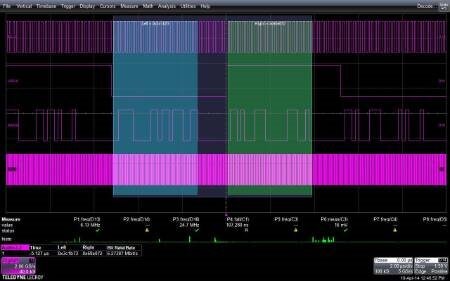
I'm implementing simple design based on ADAU1761. The source for ADAU is ASRC. MCLK is 24.576MHz for ASRC and for ADAU. Output serial port of ASRC also clocked from MCLK, i.e. it is synchronous with ADAU. It is connected via I2S interface (Stereo, 96k, LJ, 24bits). I checked signals on input - ok (see attached oscillogram). When I'm generating test signal internally - I see analog signal on DAC outputs. When I'm trying to get the signal from serial port - no result. Also I hope I did all necesary settings in the project (attached). As you know, "Input" block has 2 analog and 8 digital lines. I cannot understand what pins from "Input" block must be connected to another processing blocks to get the result. There is no detailed description about it in documentation. 8 digital source lines are understandable - if I use TDM8 mode. But what lines are for Stereo mode?
Audio Signal Processors
SigmaDSP Audio Processors
adau1761

Hello,
The digital input and output configuration on the ADAU1761 can be a bit tricky.
This Wiki page describes the input signal routing in different serial port modes:
In two channel (stereo) mode, the Left channel coming from the serial port is available on pin 2 of the input cell, and the Right channel coming from the serial port is available on pin 3 of the input cell.
The outputs behave similarly. This Wiki page describes the output signal routing in different serial port modes:
https://wiki.analog.com/resources/tools-software/sigmastudio/toolbox/io/output#adau1761
In stereo mode, select DIG0 for the left output channel and DIG1 for the right output channel.
You will also have to configure several registers in order to use sample rates other than the default 48 kHz. This FAQ describes the method for configuring the DSP, converters, and serial port to operate at non-standard sample rates: FAQ: How do I change the sample rate of my SigmaStudio system?
Thank you Yagami, it works.
Very strange, that it is not in datasheet/appnote/Sigmastudio help, but it is in wiki, which is uknown for many customers...
Hi Electrovoicer,
I think the goal is to have the Wiki be the primary documentation source, but it hasn't gotten fully to that point yet.
One tip - if you add a cell to your SigmaStudio project and want to get information about that cell, highlight it and press F1. This should bring you directly to the wiki page for that algorithm, assuming the page exists.
Please log in to reply.