ADAU145x missing in Tree ToolBox - SigmaStudio
First Half hour into SigmaStudio trying to get a ADAU1452MINIZ alive.. So I am a newbie.
Got SigmaStudio v3.9 Build2, Rev 1246 installed plus the USBi connected - no problem.
When starting a new project the ADAU145x is not shown under Processors in the Tree Toolbox. I am able to locate the ADAU145X.dll in C:\Program Files\Analog Devices\SigmaStudio 3.9.
Do I have a failed install or do I need to install something extra to get support for ADAU1452 in SigmaStudio?
Thanks in advance,
Thomas
Audio Signal Processors
adau1452
sigmastudio
adau145x
SigmaDSP Audio Processors
Hi Thomas,
The ADAU1452 is quite new -- so just as you found out, SigmaStudio 3.9 doesn't support it (the ADAU145x.dll notwithstanding). Please install Version 3.10.3 Beta from
http://www.analog.com/en/dsp-software/ss_sigst_02/sw.html
Even this version has fewer blocks for the -1452 than for some other SigmaDSPs -- this will only improve with time.
Best regards,
Bob
Thanks, Bob!
Thomas, please check the SigmaStudio software download page often for updates. As Bob mentioned, we are expanding the ADAU1452 library all the time.
Regards,
Coleman
Hi Robert and Coleman,
Thanks for quick reply.
Installed the suggested Beta and have my first thing going on the eval board - A Stereo Image expander..
I understand new building blocks are coming in shortly - I have no overview of the different blocks yet. At some point i need to implement volume dependant EQ curves for fletcher-mundorf (Bass treble management) do/will the SigmaStudio in time have this as building blocks? I See some of these SuperPhat and Midnight mode listed in help (ADI Algorithms) but only find Reverb in the ADI Algo for ADAU1452. I have 6 months complete my project and more building blocks would help a lot - should I try evaluate a older AD part? What part do you suggest? I need to do user adjustable Stereo enhancement, EQ curves dependant on user set volume, I need mono woofer and support for 4 pcs sattelite drivers.
Best regards,
Thomas
Hi Thomas,
A DSP's algorithm development depends on its capability as well as how long it's been around. At this time, the ADAU144x ("Sigma 200") series has the largest assortment of blocks, including for loudness comp. However, the ADAU1452 ("Sigma 300") is capable of even more -- sometime in the future it may overtake the -144x.
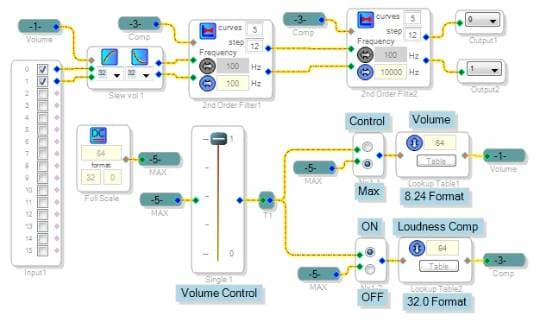
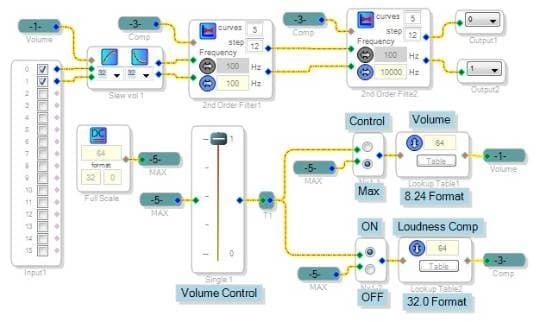
Although the -1452 presently has no "official" loudness algorithm, you can cobble together your own with blocks already available. It might look like this:
The user volume control adjusts an integer from 0 to 64 (32.0 format on the -1452) which drives two lookup tables. The top lookup commands the volume control block in dB steps. The Loudness Comp lookup outputs an integer from 1 to 5 in descending order, which in turn chooses one of five filter sets in the Second-Order Filter Lookup blocks. These boost bass and treble in increasing amounts. I didn't attempt to match any published loudness curves, just put something in to make sure it works. Same for the two switch muxes shown, which enable control of gain and filters separately -- with both active I couldn't hear the compensation's boost as volume is decreased (come to think of it, that's the whole idea....).
So, the decision to stay with the -1452 vs. the -144x ultimately depends on what you can presently do with either, compared to the increasing capability of the -1452 in the future.
Best regards,
Bob
Great help thanks - I already feel very optimistic about this and think I will stick with the ADAU1452 in the promise of what is to come in the future.
This leads me to the next question, how do I control the Volume Control from logic control outside the ADAU1452 part. I found some toggle up and down, but if I need to set a value for volume level directly - then how do I do? I'm thinking 3-wire type chipselect, clock and data to keep down pin count. Can I do a register structure with several adresses? One interface to do all my settings.
Best regards,
Thomas
Hello Thomas,
Good you're thinking beyond SigmaStudio and your eval board to your system implementation. This your latest question actually deserves a thread of its own. Booting the ADAU1452 from a microcontroller and subsequently adjusting your project's controls (volume, filters, etc.) has yet to be directly addressed here in the forum! Generally I'd suspect the process is similar to that of other SigmaDSPs, but already I'm seeing some differences. My digital interfacing experience so far is limited to the ADAU1701 ("Sigma 100").
Looking at the -1452 data sheet, you'll see all sorts of registers -- but perhaps surprisingly, no specific register attached to controls in your signal flow. That's because SigmaStudio allocates memory to these upon compilation. Previous SigmaDSPs had a dedicated parameter memory to store such parameters, but it appears that the ADAU1452 has one large memory pool for these parameters along with audio data (delays and such). As with other SigmaDSPs, the data sheet describes a safeload method to write to the parameters in your signal flow without causing audible clicks and pops.
A tutorial on how to boot and control SigmaDSPs from a microcontroller is available:
https://ez.analog.com/docs/DOC-1806
Again I suggest you start this worthy topic in a new thread as it's too big and important for the bottom of this one.
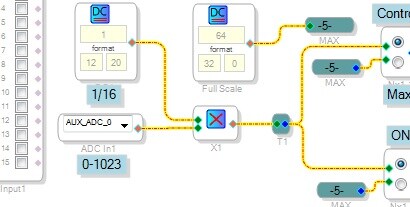
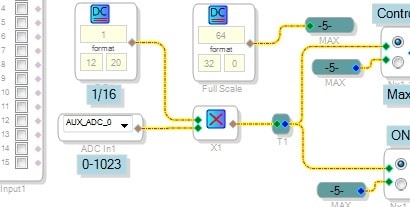
Finally, there's an easy way out if you don't need to have your microcontroller heavily involved with your audio processing -- or for that matter, no microcontroller at all. Have your -1452 self-boot from a EEPROM, then use its six Auxiliary ADCs (zero to 3.3V DC input) to control adjustable functions from user pots or even ADC outputs from your microcontroller -- it sounds hokey, but it works, For example, you can control the loudness setting of the project shown above by substituting an Aux ADC for the GUI volume control as shown:
Best regards,
Bob
It is important to remember that the ADAU1452 can selfboot from an EEPROM, alleviating the need for a micro on the board. It has the capability also of acting as a boot 'agent' for other parts on the board, reading program info out of the EEPROM and feeding it to other devices. To be honest, I am not the best expert for this part, and if this process is not detailed well in the datasheet, we will write an apps note.
Regards,
Coleman
Hi Coleman,
The "boot agent" ability is interesting, as it would allow codecs and such to be actively configured instead of remaining in standalone mode.
Bob
Thanks, Bob. We have a more fully featured version EVAL-ADAU1452Z in development; it would allow the user to use the SPI master port to control the ADCs and DACs on the board. I hope that we can release it in the next few months!
Regards,
Coleman
Hi Coleman,
The full-feature -1452 board is good news. Hopefully it will feature one or two Aux ADCs wired to pots, with the rest brought out to a header or test points. The mini board has only tiny pads which makes testing a pain.
Bob
Please log in to reply.