Using the AD193x Component in Sigma Studio
Hi,
I have purchased the ADAU1446 Evaluation board and am trying to use the AD193x module to control the clock signals for external ADC's / DAC's. The problem is I am not able to communicate with the AD193x at all. I tried different SPI and I2C settings, but I found nothing would work. Any help would be appreciated.
Thanks.
-Justin
Audio Signal Processors
adau1446
SigmaDSP Audio Processors
Hi Justin,
It looks like nobody picked up this question, so I'll hop in and give it a shot.
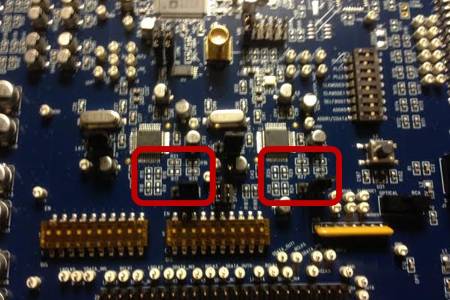
Unfortunately, if you take a close look at the schematic of the ADAU1446 evaluation board and then look at the board itself, you will eventually discover that the AD1938s are not electrically connected to the control (I2C/SPI) header. They have been disconnected and set up to run in standalone mode.
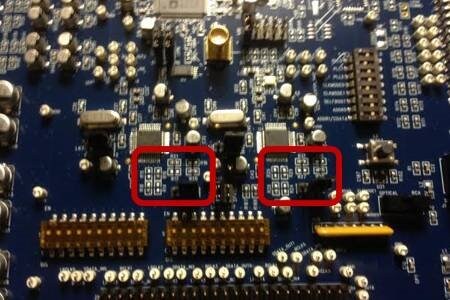
Take a close look at the board near the AD1938s. You will see a collection or resistors. Some are populated, and some are not. Those resistors set the state of the SPI pins on the AD1938s. As you can see, they're set up now for standalone mode (see the AD1938 datasheet for more details).
Here's a photo for reference:
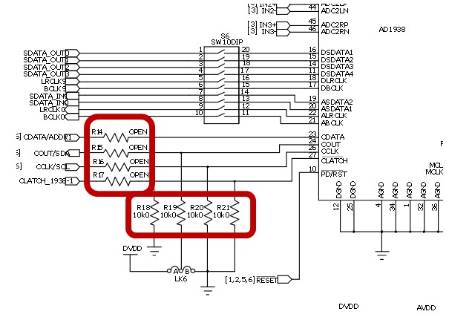
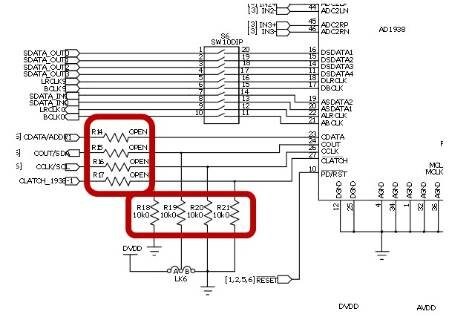
The evaluation board guide confirms this:
It looks like the board was designed to simply work out-of-the-box with the AD1938s in standalone mode. However, the option is there for the intrepid hacker to go in and move some resistors around and change the operation. To control the AD1938s via SPI, you need to remove those 4 10k resistors and then short the open resistors that I highlighted above.
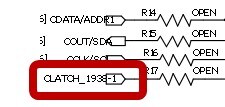
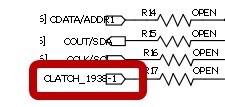
Also, be aware that the AD1938s each have independent, unique slave select (i.e. CLATCH) signals, as you can see here:
Those aren't connected to the USBi programming header at all!
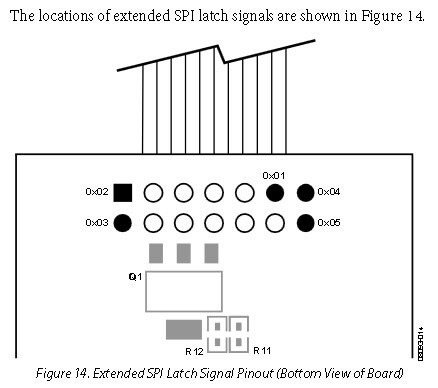
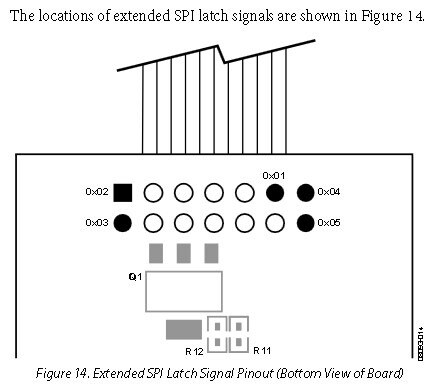
To use them, you need to fly-wire them to the USBi's additional slave select (CLATCH) pins.
For details, turn to the USBi user guide: http://www.analog.com/static/imported-files/application_notes/AN-1006.pdf
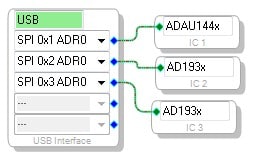
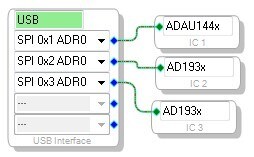
You'll need to use the extended SPI latch signals as shown here:
You'll then have to configure SigmaStudio to use independent latch signals for each of the three devices, according to how you connected the fly-wires.
So, it's possible to get this working, but it will take a solder iron and some patience!
Yagami
Hello Justin,
I want to add one little detail to Yagami's detailed response. You will want to have a pull-up resistor on the CLATCH line. A 10K would be enough. This will help to prevent the AD1938 from going into standalone mode when you do not want it to. The best way to do this is to make sure CLATCH is high when you are not actively talking to the part. When using SigmaStudio you should not have any issues with this but when it comes time to program your own controller you will want to keep this in mind.
Dave T
Hallo!
I have a similar problem like Justin, but an additional question. When this structure works, how can I include the selfboot-EEPROM (it only works in I2C...)?
For this issue, on my custom board I should use the AD1937 (which registers can be set over I2C)?
Best regards,
Fabio
Hello Fabio,
This structure of using the SPI ports will work when using SigmaStudio to program and control both parts. However, you are correct that if you plan to selfboot the ADAU1446 then you will need to use the I2C mode for the ADAU1446. Yes, the AD1937 would be the CODEC to use so they can all be on the same I2C bus.
If you are planning on using the CODEC in a mode other than standalone mode for the finished board, then you will need to have a system controller to setup the CODEC. I also should point out that the AD1938 has single ended outputs where the AD1937 has differential outputs and therefore is in a larger package. Otherwise, they are the same.
Thanks,
Dave T
Thank you very much for the reply, Dave!
It would be so easy with such a clear answer I just have a prototype with the AD1939 and I've tried every possible connection with the USBi, ADAU1446 and EEPROM... Now the board is broken, I think On this prototype, the AD1939 worked in standalone mode and with a differential to single ended output stage, so it will be easier to take AD1937 and reroute only the I2C interface.
Best regards,
Fabio
Hello Fabio,
With electronics getting so small and complicated, what is "easy" to do is not always so simple to do on an actual board! I can relate. It is probably something simple that is keeping your prototype board from working but it is difficult for me to help you since I am not there. Your plan of substituting the AD1937 is a really good plan. Having all the parts using the same type of bus will simplify things.
I hope that goes well. Let us know if you need further help.
Thanks,
Dave T
Hi Dave T,
I have a small addition/correction to make to one of your earlier posts.
The ADAU144x executes its self-boot function using the I2C port. So, it is indeed true that the ADAU144x needs to be in I2C mode when executing self-boot after power-on. Luckily, the ADAU144x defaults to I2C at power-up.
However, it is still actually possible to change the device to SPI mode after the self-boot is complete. So, you could implement a system where the ADAU144x and AD193x devices (as well as any other devices in the system) are accessed by their SPI ports. The trick is that you have to follow this sequence:
Power up the system with the ADAU144x's SELFBOOT pin pulled high.
Wait an adequate time to allow the self-boot operation to complete. Do not interrupt the I2C bus between the ADAU144x and EEPROM at this time.
After the self-boot is complete, have your host microcontroller disable the I2C connection between the ADAU144x and EEPROM. You could do this, for example, using some kind of I2C repeater IC with an enable pin. When that device is disabled, its outputs should be high impedance.
At this point, the ADAU144x is effectively cut-off from the I2C bus. You can now have the microcontroller toggle its CLATCH pin 3 times to put it into SPI mode.
Now the ADAU144x will be accessible via its SPI slave port, along with any other SPI devices you have in the system.
Please log in to reply.