ADAU1701 - how to change dynamic processing via I2C
Hi,
I have a customer who needs to change the dynamic processing on the fly ( like time contant ). They want to do this via I2C. How do you accomplish this? They are using the ADAU1701 Sigma DSP and Sigma Studio.
Thanks
Audio Signal Processors
adua1701
i2c
sigmastudio
SigmaDSP Audio Processors
adau1701
blackfin
Show More
Hi,
I have moved this from the Blackfin Processors community to the SigmaDSP Processors and SigmaStudio Development Tool community. Please continue the discussion here.
Regards,
Craig.
Hello,
Your customer can change the dynamics this way:
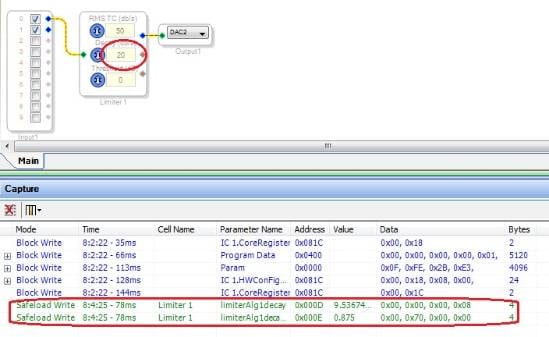
Load your project, then change the desired dynamics parameter in the SigmaStudio GUI. Note what appears in the Capture Window, as shown below:
This shows what addresses within the -1701's parameter RAM to write to, and the parameter values to write.
2. Have your microcontroller duplicate this write. The safeload method is required for any run-time change to avoid clicks and pops in the output sound. For info on safeloading, see
This question has been assumed as answered either offline via email or with a multi-part answer. This question has now been closed out. If you have an inquiry related to this topic please post a new question in the applicable product forum.
Thank you,
EZ Admin
Please log in to reply.