EVAL-ADAU1772 Selfboot problem
Hi,
I am working with the EVAL-ADAU1772 evaluation board. When programming from Sigma-studio it works fine. All settings are readily taken over and performance is as should be.
Unfortunately when want to start the same program from self-boot then the board does not work.
I followed all the steps:
Connect the board with Selfboot switch S_2 to off to PC by USB-i interface.
Connect EEprom in Sigmastudio
Clear contents of EEPROM
Do:"Link Compile download"
Write latest compilation to EEPROM
I checked the EEPROM memory both after clearing, where it contained only zeros and after writing,where it contained HEX info, as should be.
Then I disconnected the board from the USB, switched S2 to Selfboot_on, then powered the board up with an external 5V source. The LED shines but no signal (only some noise) at the output of board with the same input signal. This I repeated with different settings, Supply from USB_i and resetting by grounding PD.
What do I do wrong as all hardware seems to be OK. What do I need to check.
Thanks for helping me out.
adau1772
Integrated/Special Purpose A/D Converters
sigmastudio
evaluationboard
Audio CODECs
selfboot
Show More
Hi RMSacoustics,
It looks like you are following the correct steps for self-boot. Are you using the Push Button Volume functionality?
Make sure that the Converters Controlled by PushButton Volume setting in the Output/Serial Port tab is set to 'None'. If it isn't you may have the function turned on and the ADCs may be defaulting to full attenuation when self-booting.
Let me know if this helps.
Regards,
-BillJ
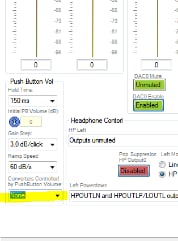
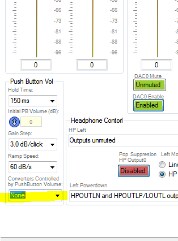
Hi Bill,
Yes that was it. Thanks, great help!
best regards, Rob
How to use Selfboot mode and push-button volume controls both?
Hello traxman,
I think the issue with the earlier post was that if the device selfboots it will do some housekeeping and automatically turn down the volume if selfboot is turned on and it is set to pushbutton control of the volume. You would want it to do that. I don't think the person was actually using pushbutton control. So when you do not selfboot then the part will not automatically turn down the volume where booting.
If you are using pushbutton volume then it will power up all the way down and you simply have to click the volume up button to hear it.
Dave T
Thanks.
Please log in to reply.